Snake is one of the simplest games ever made, and that’s exactly why it’s still everywhere. “Snake unblocked” usually means a version of the Snake game that runs directly in a web browser — no app, no installer, no account — which is why it turns up so often in searches from school and work computers where downloading new software isn’t an option.
This guide isn’t a game embed. It’s a straightforward explainer: what Snake unblocked actually refers to, how the classic gameplay works, which controls apply on desktop and mobile, and how the different versions of Snake — classic, Google Snake, and multiplayer “.io” style Snake games — actually differ from one another.
Table of Contents
What “Snake Unblocked” Actually Means
“Unblocked” doesn’t describe a special edition of the game. It describes how the game is delivered: as a browser-based version that runs on ordinary web hosting rather than through an app store or a downloaded executable. Because it loads like any other web page, it’s generally reachable on networks that only restrict specific software installs or specific blocklisted domains, rather than browsing itself.
That said, whether any individual “unblocked” site actually loads on a given school or office network depends entirely on that network’s own filtering rules — which vary widely and change without notice. No webpage, including this one, can guarantee that a specific site will load on a specific network, and this guide won’t tell you how to get around network security or content filters. If a site is blocked on your network, that’s a decision made by the network administrator, not something a Snake game changes.
What’s genuinely useful to know instead: the core Snake game is old, extremely lightweight, and has been rebuilt thousands of times by different developers, so if one version isn’t reachable, another functionally identical one usually is.
How to Play Snake: The Basics
Classic Snake plays out on a fixed grid. The rules haven’t really changed since the game’s arcade and early mobile-phone days:
- Your snake starts moving automatically in one direction as soon as the game begins.
- Food (often shown as a dot or an apple) appears somewhere on the grid.
- Steer the snake into the food to eat it.
- Each piece of food eaten makes the snake one segment longer and adds to your score.
- Avoid hitting the walls or your own tail. Either one ends the game immediately.
- The longer your snake gets, the less open space you have to maneuver in — which is the entire source of the game’s difficulty.
There’s no separate “win” condition. The objective is simply to survive as long as possible and post the highest score you can before a collision ends the run.
Related article:https://gamespuma.com/snake-io-unblocked/
Snake Controls
Controls are simple, but they differ depending on the device you’re playing on, and not every version supports every input method — always check what a specific game actually offers rather than assuming.
Desktop / Keyboard Controls
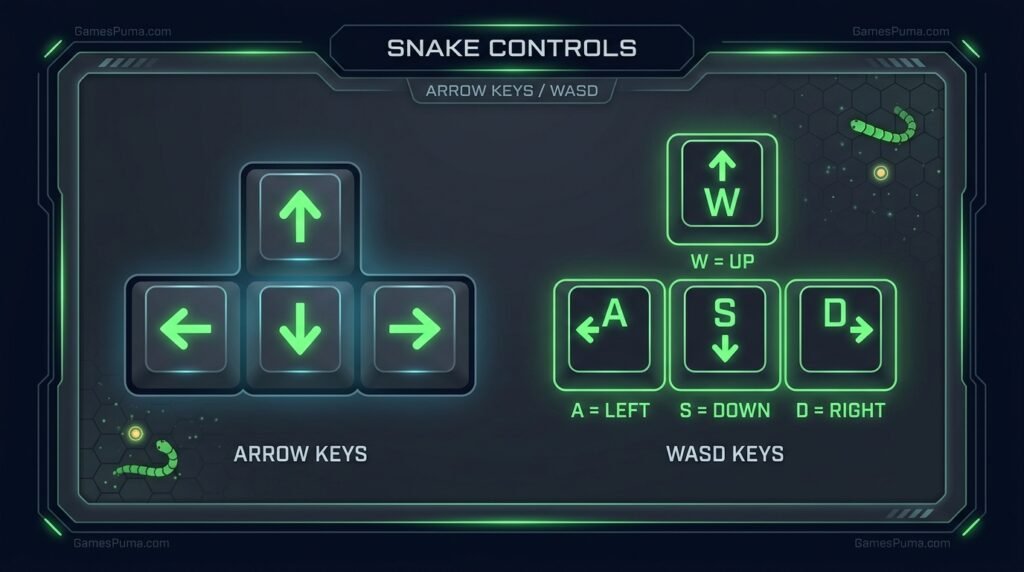
Most browser versions of Snake use one of these schemes:
- Arrow keys — Up, Down, Left, Right to change direction
- WASD — W (up), A (left), S (down), D (right), common on versions built with two-player mode in mind
- Speed boost — some versions let you hold Spacebar or another key to temporarily move faster; this isn’t universal, so don’t assume it’s available unless the game states it
You generally can’t reverse the snake directly into itself (pressing “down” while moving “up,” for example) — most versions simply ignore that input rather than ending the game.
Mobile / Touch Controls
Support for mobile play varies a lot by version. Where it’s supported, the common approaches are:
- On-screen directional buttons or a virtual joystick
- Swipe gestures, where swiping in a direction turns the snake that way
Not every browser-based Snake game is optimized for touchscreens — some are built keyboard-first and are difficult to control accurately on a phone. If mobile play matters to you, check that the specific version you’re using actually advertises touch support before relying on it.
Tips for Getting a Higher Score
Snake looks simple, but consistently posting a higher score comes down to spatial planning more than reaction speed. A few habits that genuinely help:
- Stay away from the edges early on, while your snake is still short and you have room to correct mistakes.
- Think two or three moves ahead, not just about the next piece of food — a good position now can trap you in three turns if you’re not careful.
- Leave yourself an escape route. Before turning into a smaller pocket of space, make sure you have a way back out.
- Use loose spirals instead of tight zig-zags as your snake grows, since spirals waste less open space than sharp repeated turns.
- Slow down mentally in tight spaces, even if the game itself is fast — most losses happen from a rushed turn, not from the game being “too fast” to react to.
- If speed boost is available, use it in open space, not when you’re navigating close to your own tail.
None of these guarantee a specific score — Snake has a large element of spatial luck as the board fills up — but they consistently reduce avoidable, careless collisions.
Snake Game Versions: Classic, Google Snake, and Multiplayer Variants
Not every game called “Snake” is the same experience. Three distinct types come up constantly in search results, and it’s worth knowing the difference before you pick one:
Classic Snake is the original single-player format: one snake, one grid, walls and your own tail as the only hazards. This is the version that shipped on Nokia phones starting with the Nokia 6110 in 1997, and it’s the template nearly every browser version is based on.
Google Snake refers to a specific implementation that appeared as a playable Easter egg tied to Google Search. It follows the same classic rules but has its own particular look, grid size, and menu options. Because the name is well known, plenty of unrelated Snake clones online are labeled “Google Snake” even though they aren’t the same build — it’s worth treating that label with some skepticism unless a site is clearly hosting the actual Google implementation.
Multiplayer “.io”-style Snake games (like Slither-style titles) are a different genre built on the same core idea. Instead of one snake on a fixed small grid, you control a snake in a large shared arena against other real players online, collecting orbs to grow and trying to avoid — or cause — collisions with opponents. These are real-time multiplayer games, not a mode of classic Snake, and they typically require an active internet connection to match you with other players.
Some browser Snake games also include a local two-player mode, which is different again from .io multiplayer — that’s two people sharing one keyboard on one screen, not playing over the internet against strangers.
Playing Snake on Mobile
Classic Snake’s simple grid-based movement generally makes it well-suited to mobile browsers, but actual support depends on how a specific version was built. Versions designed with mobile in mind typically offer on-screen touch controls or swipe input, and load in any modern mobile browser without an app install. Versions built only with keyboard controls in mind may still load on a phone but can be frustrating to play accurately with touch alone. If you’re playing on a phone, look for a version that explicitly mentions touch or mobile support rather than assuming every Snake page works well that way.
Two-Player Snake: What to Know
Local two-player Snake follows the same collision rules as single-player, just with two snakes on the same grid. Typically:
- Each player gets a separate set of keys (commonly WASD for one player, arrow keys for the other).
- Both snakes are trying to eat food and grow at the same time.
- If a player collides with a wall, their own tail, or the other snake, that round ends — usually in favor of whichever snake is still moving.
Not every browser Snake game includes a two-player mode, so if playing with a friend on one device matters to you, confirm the specific version actually supports it before you start.
Why Snake Is Still Popular
Snake has stayed relevant for decades for a fairly simple reason: the rules take seconds to learn, a full game rarely takes more than a few minutes, and the difficulty scales naturally as your own snake grows longer — you’re your own biggest obstacle. The concept dates back to a 1976 arcade game called Blockade, was reworked into countless clones through the late 1970s and 1980s, and became a global phenomenon after Nokia included it on the Nokia 6110 in 1997. That combination of low barrier to entry and rising self-generated difficulty is why the same basic loop keeps getting rebuilt for browsers, phones, and multiplayer arenas today.
Frequently Asked Questions
What is Snake Unblocked? It’s a browser-based version of the classic Snake game — one that loads directly on a web page rather than requiring an app download or installation.
How do you play Snake? Steer your snake into food to grow longer and increase your score, while avoiding the walls and your own tail. Hitting either ends the game.
Is Snake Unblocked free? Browser-based Snake games are generally free to play, since they don’t require a purchase to load in a browser. Specific ad support, extra features, or paid extensions vary by version, so check the individual game or extension you’re using.
Can I play Snake online without downloading anything? Yes — browser-based versions of Snake run directly in your web browser and don’t require an installer or app. (Some versions are also offered as optional Chrome extensions, which is a separate, install-based format.)
What are the controls for Snake? On desktop, arrow keys or WASD are the standard controls, with some versions adding a speed-boost key. On mobile, controls depend on the version — commonly on-screen buttons, a virtual joystick, or swipe gestures where supported.
Can I play Snake on mobile? Many browser versions of Snake work on mobile browsers, but touch support isn’t universal. Check that a specific version offers touch or swipe controls before relying on mobile play.
Can I play Snake with two players? Some versions include a local two-player mode, usually with one player on WASD and the other on arrow keys. This is different from multiplayer .io-style Snake games, which connect you with other players online. Not every Snake game supports either mode, so check the specific version.
How do you get a high score in Snake? Plan turns a few moves ahead, keep an escape route available before entering tight spaces, and use wide spirals rather than sharp zig-zags as your snake grows longer.
What happens when the snake hits itself? The game ends immediately. This is one of the two ways to lose in classic Snake — the other being hitting a wall or, in some versions, another player’s snake.
Is Google Snake the same as classic Snake? Google Snake follows the same classic rules but is a specific implementation tied to a Google Search Easter egg, with its own look and menu options. Many unrelated Snake clones online are labeled “Google Snake” without actually being that build, so it’s worth confirming what you’re actually playing.
Why is Snake called an “unblocked” game? The term describes how the game is delivered — as a lightweight web page rather than an installed app — which is why it tends to come up in searches from networks (like schools) that restrict software downloads more heavily than general browsing. It doesn’t mean any particular site is guaranteed to load on every network, since filtering rules differ by location.

Written by Daniel Carter
Daniel Carter is a dedicated gaming writer who enjoys turning complex gaming topics into clear, useful, and engaging content. He covers game guides, tips, reviews, features, and the latest developments across the gaming world. His approach focuses on research, accuracy, and practical value, helping readers discover new games, improve their gameplay, and stay informed about the industry. For Daniel, great gaming content is not just about information—it is about making every article genuinely worth reading.
1 thought on “Snake Unblocked: How to Play the Classic Snake Game Online”