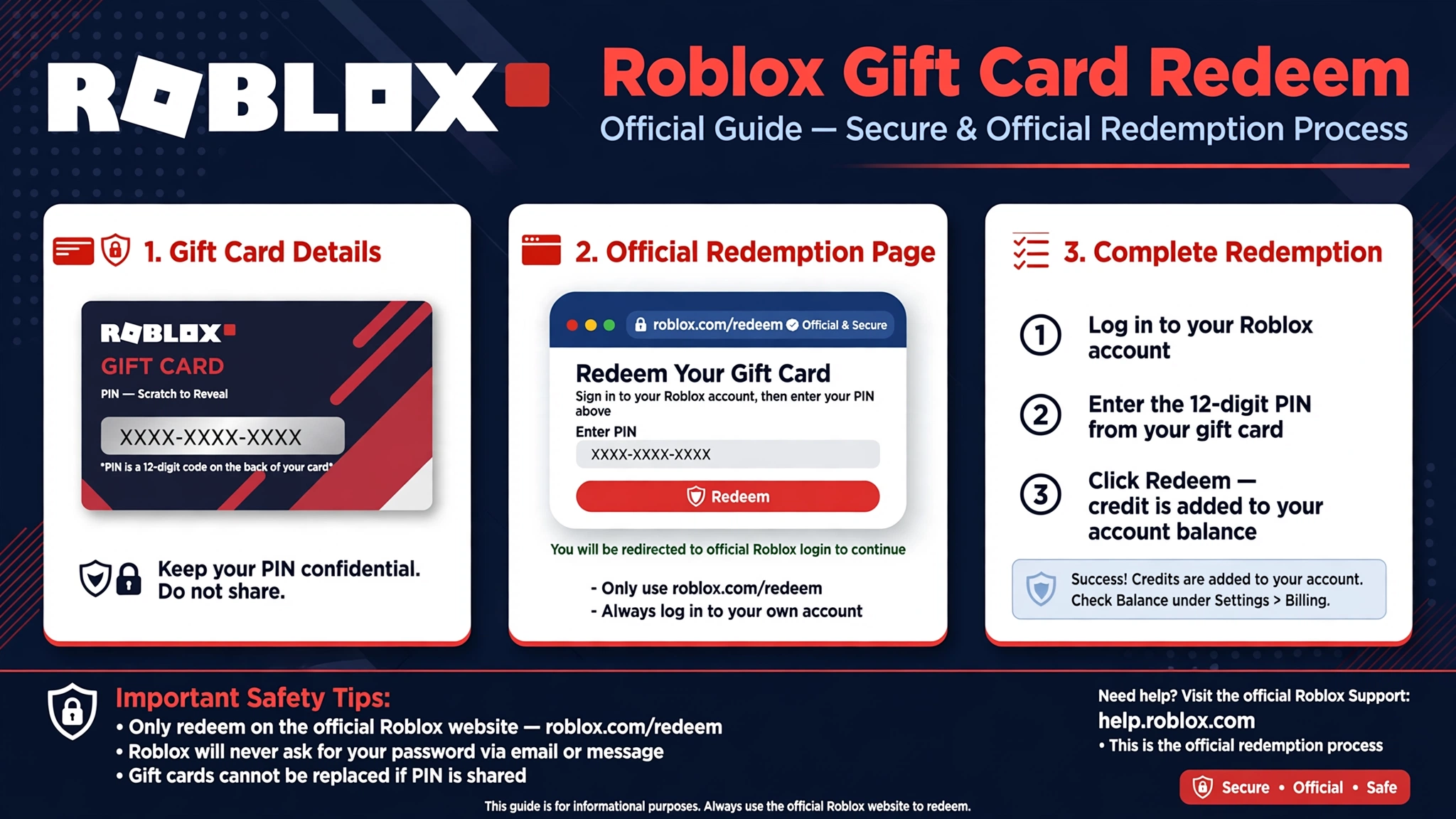
A Roblox Gift Card Redeem is the process of entering a gift card’s PIN or code at Roblox’s official redemption page so its value is added to your Roblox account. For most standard Roblox gift cards, that value becomes Roblox Credit, which you can later use to purchase Robux or eligible Roblox products; some retail products, such as Amazon Gift Cards and Party Packs, add Robux directly.help.roblox+1
This guide explains exactly where to enter a Roblox gift card code, how redemption differs on PC, mobile, and Samsung devices, how to turn Credit into Robux, and what to do when a code will not work. It also covers regional rules and the scams that often target players searching for free Robux.
Table of Contents
What Is Roblox Gift Card Redeem?
A Roblox Gift Card Redeem simply means claiming the value attached to a physical or digital Roblox gift card. Every valid card has a unique PIN or code. When you enter that code on the official Roblox redeem page while signed into your account, Roblox verifies it and adds the card’s value to that account.help.roblox
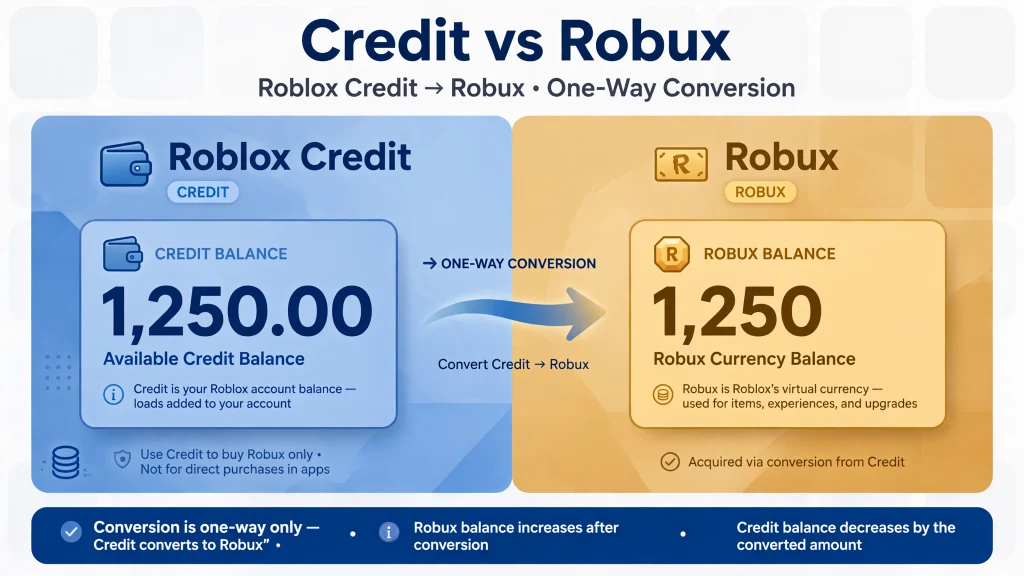
For a standard Roblox gift card, the redeemed value normally appears as Roblox Credit, not as an immediate Robux balance. Roblox Credit is account value that can be spent in a web browser on eligible purchases, including Robux packages. This distinction matters because many players expect Robux to appear instantly after a Roblox Gift Card Redeem, when the usual flow is Credit first and Robux second.help.roblox
A Roblox gift card code is single-use. Once it has been successfully redeemed, it cannot be entered again on another account. That is why Roblox advises players to confirm they are logged into the intended account before submitting the PIN.help.roblox+1
How to Redeem a Roblox Gift Card Step by Step
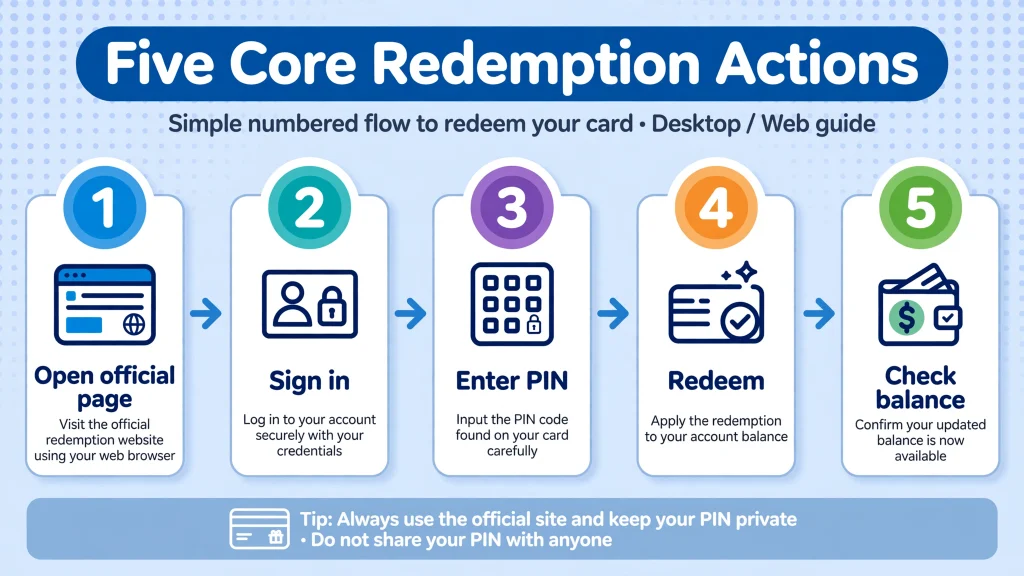
The official Roblox Gift Card Redeem process is short, but accuracy matters. Follow these steps in order:
- Open the official redemption page: https://www.roblox.com/redeem.
- Sign in to the Roblox account that should receive the value.
- Find the PIN or gift card code on the physical card, digital receipt, or retailer delivery email.
- Enter the code carefully into the text box.
- Select Redeem.
- Wait for the confirmation message confirming that Credit, Robux, or an eligible virtual item was added.
- Check your Roblox Credit balance or Robux balance, depending on the type of code you redeemed.help.roblox
If you are redeeming a standard gift card, expect a confirmation that Credit was added rather than a Robux notification. You can then use the same redemption page to choose Get Robux and convert the Credit into a Robux package.help.roblox
Before pressing Redeem, double-check the username shown at the top of the page. Roblox adds the value to whichever account is signed in at the moment of the Roblox Gift Card Redeem, and a code redeemed on the wrong account generally cannot simply be moved afterward.help.roblox
How to Redeem Roblox Gift Cards on PC
PC is the simplest place to complete a Roblox Gift Card Redeem because the full redemption and Credit-management tools are available in a browser.
- Open a desktop or laptop browser and go to Roblox.com/redeem.
- Log in with the correct Roblox username and password.
- Enter the gift card PIN exactly as printed or emailed.
- Click Redeem and review the confirmation.
- To use Credit for Robux, remain on the redemption page and select Get Robux, or visit the Buy Robux page to choose a specific package.help.roblox+1
Avoid third-party “redeem” websites. The only official Roblox redeem page used for gift cards and retail codes is roblox.com/redeem. If a site asks for your Roblox password, promises free Robux, or asks you to complete surveys before revealing a code, leave immediately.help.roblox+1
How to Redeem Roblox Gift Cards on Mobile
Mobile redemption works through a mobile web browser for most players. Open Chrome, Safari, Firefox, or another browser on your phone, visit Roblox.com/redeem, sign in, enter the PIN, and select Redeem. The process is the same browser-based Roblox Gift Card Redeem flow used on PC.help.roblox
The regular Roblox mobile app does not include a general gift-card redemption page. Roblox specifically states that redemption is unavailable in the standard mobile app and on consoles, so switching from the app to a browser is the correct solution if you cannot find a Redeem option.help.roblox
After redeeming on mobile, remember that Roblox Credit can only be viewed and spent in a web browser. It will not necessarily appear in the mobile app’s normal account screens, even though the Credit belongs to your account.help.roblox
How to Redeem Roblox Gift Cards on Samsung Devices
Samsung Galaxy users have an additional option: the Roblox mobile app on supported Samsung devices includes a Redeem tile.
- Open the Roblox app on your Samsung Galaxy device.
- Go to the More page.
- Tap the Redeem tile.
- Enter the gift card code directly in the app.
- Confirm the redemption message.help.roblox
This Samsung in-app method is an exception, not the default mobile method. If you use an iPhone, a non-Samsung Android phone, or a console, use a mobile browser and complete the standard Roblox Gift Card Redeem at Roblox.com/redeem instead.help.roblox
Roblox Credit vs. Robux
Understanding the difference between Roblox Credit and Robux prevents the most common post-redemption confusion.
| Feature | Roblox Credit | Robux |
|---|---|---|
| What it is | Account value created after redeeming most standard Roblox gift cards | Roblox’s virtual currency used in experiences and for avatar items |
| Where it appears | Browser-based redemption or Billing Settings pages | Your Robux balance |
| Main use | Buy Robux or eligible Roblox purchases in a browser | Buy avatar items, game passes, and other in-experience products |
| App visibility | Generally not visible or usable in Roblox apps | Visible in the Robux balance |
| Direct gift-card redemption | Standard gift cards normally create Credit | Amazon Gift Cards and Party Pack cards add Robux directly |
Roblox states that after a standard gift card is redeemed, the balance is stored as Roblox Credit. Credit can be used to purchase Robux when the balance is sufficient, but it cannot be used inside Roblox mobile apps.help.roblox
This is why a successful Roblox Gift Card Redeem may leave your Robux number unchanged at first. The value has not disappeared; it is sitting in your Roblox Credit balance until you choose a Robux package or convert a small remaining amount.help.roblox
How to Convert Roblox Credit into Robux
Once your Credit is available, converting it into Robux takes only a few taps in a browser.
- Sign in to the same Roblox account where you completed the Roblox Gift Card Redeem.
- Go to Roblox.com/redeem.
- Select Get Robux.
- Review the Robux package that Roblox pre-selects based on your available Credit.
- Click Buy and confirm the purchase.
- Refresh the page or navigate elsewhere if your Robux balance does not update immediately.help.roblox
If your Credit is not enough for a full Robux package, look for Convert Credit to Robux on the redemption page. Roblox explains that this option turns a small remaining Credit balance into Robux; if you have enough Credit for a full package, you will instead see Get Robux.help.roblox
You can also visit Roblox.com/upgrades/robux to choose a different Robux package after redeeming Credit. Roblox notes that Credit cannot be split between Credit and another payment method, so a purchase must be covered by enough Credit or paid for with an alternative payment method.help.roblox
How to Check Roblox Gift Card Balance
To check the balance produced by a Roblox Gift Card Redeem, use a web browser rather than the mobile app.
- Go to Roblox.com/redeem, sign in, and look for Available Credit beneath the Redeem button.
- Alternatively, open Billing Settings and check the Balance shown beside Roblox Credit.
- If neither location shows a balance, Roblox says the signed-in account currently has no Roblox Gift Card Credit redeemed onto it.help.roblox
If you redeemed an Amazon Gift Card or a Party Pack card, do not look for Credit. Those products redeem for Robux only, so the value should appear in your Robux balance instead.help.roblox+1
Roblox Gift Card Redeem Errors and Troubleshooting
A failed Roblox Gift Card Redeem is frustrating, but many issues have a straightforward cause. Work through the following checks before contacting support.
Invalid Code or Typing Errors
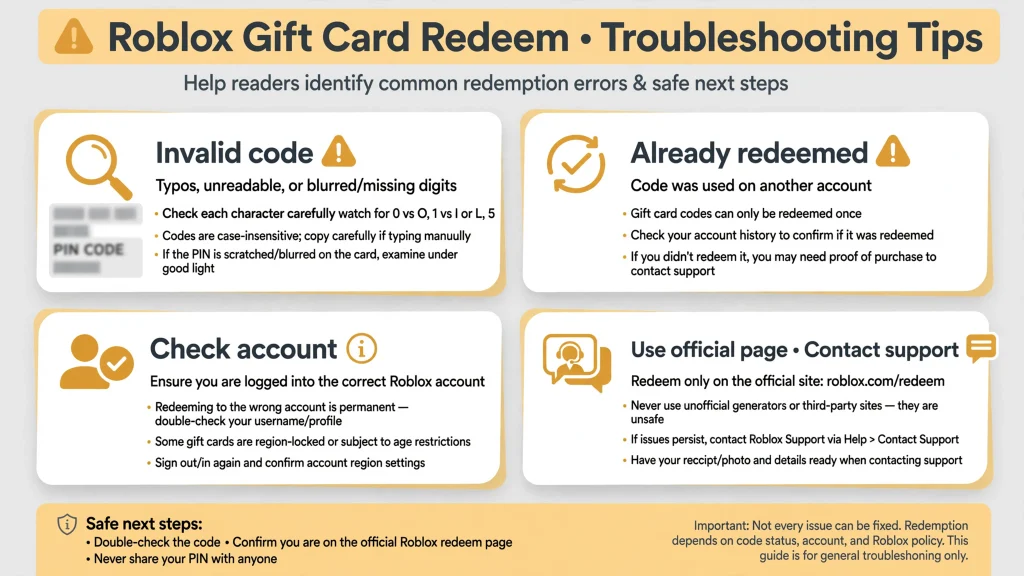
An “invalid code” message often means one character was entered incorrectly. Roblox notes that some letters and numbers look alike and recommends trying these substitutions:
- 0 may be O
- 1 may be capital I
- 2 may be Z
- 5 may be S
- 6 may be G or Q
- 8 may be Bhelp.roblox
Also confirm that you are using Roblox.com/redeem in a browser, not the standard mobile app or a console. Roblox specifically directs players to the browser redemption page when a retail code will not work.help.roblox+1
Code Already Redeemed
If Roblox says the code has already been redeemed, check whether another Roblox account you control may have claimed it. Roblox explains that the Robux or value may have been added to a different account.help.roblox
If the card was sealed, untampered, and newly purchased, keep the receipt and contact Roblox Support. Do not keep trying the same PIN repeatedly; a valid single-use code will not become usable again after it has been claimed.help.roblox+1
Damaged, Missing, or Delayed PIN
A scratched-off PIN, torn card, or incomplete digital email can prevent a Roblox Gift Card Redeem. For physical cards, check whether part of the code is obscured and avoid using sharp objects that could remove additional characters.
For promotional purchases, Roblox says it does not issue or reissue gift codes for external promotions; contact the retailer that ran the promotion. For digital gift cards bought through Roblox’s official gift-card shop, Roblox directs customers to its partner CashStar’s customer-support form.help.roblox
Missing Credit or Robux After Redemption
First, confirm that you redeemed the code while signed into the account you are checking. Roblox adds the value to the logged-in account at redemption time.help.roblox
Next, distinguish the code type. A standard gift card creates Roblox Credit, which is viewed in a browser on the redemption or Billing Settings page. Amazon Gift Cards and Party Pack cards create Robux directly. Checking the wrong balance type is one of the most common reasons players believe a redemption failed.help.roblox+1
When to Contact Roblox Support
If you have verified the PIN, used the official browser page, checked the correct account, and still cannot redeem the card, contact official Roblox Support. Roblox asks for details such as your username, purchase date and amount, purchase location, country, gift-card PIN, serial number, receipt images, and screenshots of any error message.help.roblox
Keep your receipt until the Roblox Gift Card Redeem is confirmed. Roblox states that gift cards are not refundable, so a receipt and clear images of the card can be important if support needs to investigate a faulty code.help.roblox+1
Roblox Gift Card Regional and Currency Rules
Roblox’s current guidance is more flexible than many older articles suggest. Roblox says that all Roblox codes can be redeemed worldwide, and that the value automatically converts to the account’s local currency when redeemed. For the detailed conversion terms, Roblox points users to its gift-card terms page.help.roblox
That does not mean every product behaves identically. Standard gift cards generally create Roblox Credit, while Amazon Gift Cards and Party Packs redeem for Robux only. Mini Packs contain individual Robux coins, each with its own PIN and a fixed 50-Robux value; Party Packs contain 25 cards, each worth 200 Robux.help.roblox+1
Because currency conversion and product rules can change, check the terms printed on your card and Roblox’s current gift-card terms before buying a card intended for use in another country. Do not assume that a card’s displayed face value will translate into the same numerical amount of local currency after conversion.help.roblox
Roblox Gift Card Scams and Safety
The biggest risk around a Roblox Gift Card Redeem is not the official redemption process—it is fake websites, fake codes, and social-media scams.
- Never use a “free Robux generator.” These sites cannot create legitimate Robux and often harvest passwords or push scams.
- Never share a gift-card PIN with a stranger, seller, “Roblox admin,” or someone offering to redeem it for you.
- Never enter your Roblox password on a site that is not Roblox.com.
- Do not trust YouTube comments, Discord messages, or social posts promising unused gift-card codes.
- Use only Roblox.com/redeem for gift cards and retail codes, and official Roblox Support channels for problems.help.roblox+1
A real Roblox Gift Card Redeem never requires you to watch videos indefinitely, complete surveys, download unknown software, or hand over your account credentials. If someone asks for your PIN before giving you a prize, they are attempting to take the card’s value.
For broader platform safety, read GamesPuma’s Roblox games guide to understand how experiences, creators, and in-game purchases fit together before spending Robux.
FAQs
How do I redeem a Roblox gift card?
Go to Roblox.com/redeem in a web browser, sign in to the correct account, enter the gift card PIN, and select Redeem. A standard card will normally add Roblox Credit, which you can later use to buy Robux.help.roblox+1
Where do I enter my Roblox gift card code?
Enter it in the code box on the official Roblox redeem page: https://www.roblox.com/redeem. Samsung Galaxy users may instead use the Redeem** tile in the Roblox app’s More page.help.roblox
Can I redeem a Roblox gift card on mobile?
Yes, through a mobile browser at Roblox.com/redeem. The standard Roblox mobile app does not offer general gift-card redemption, although supported Samsung Galaxy devices have an in-app Redeem option.help.roblox
Why is my Roblox gift card code not working?
Check for lookalike characters, confirm you are on the official browser redemption page, and make sure the code has not already been used. If the card is new, sealed, and still fails, contact Roblox Support with your receipt and card images.help.roblox+1
How do I check my Roblox gift card balance?
Sign in on a browser and view Available Credit under the Redeem button at Roblox.com/redeem, or check Roblox Credit in Billing Settings. Credit is not generally visible in Roblox mobile apps.help.roblox
Why did I receive Roblox Credit instead of Robux?
Most standard Roblox gift cards add Roblox Credit first. You can then use that Credit to purchase Robux through the redemption page or Buy Robux page.help.roblox
How do I convert Roblox Credit into Robux?
Go to Roblox.com/redeem, select Get Robux, choose the package you can afford with your Credit, and click Buy. For a small leftover balance, use Convert Credit to Robux if that option appears.help.roblox
Can I redeem multiple Roblox gift cards?
Yes. Roblox says you can redeem as many cards as you like, but each code must be entered one at a time at Roblox.com/redeem.help.roblox
Do Roblox gift cards expire?
Roblox’s current redemption support page does not list an expiration rule for gift cards, but terms can vary by product and region. Check the packaging, digital receipt, and Roblox’s current gift-card terms for the specific card you purchased.help.roblox
Can I redeem a gift card from another country?
Roblox says all Roblox codes can be redeemed worldwide and that the value converts to your account’s local currency. Review Roblox’s gift-card terms for conversion details before purchasing.help.roblox
Are free Roblox gift card codes real?
Legitimate free codes are rare and normally come from official Roblox promotions or verified partners. Websites or strangers offering unlimited free codes, generators, or Robux in exchange for your PIN are scams.help.roblox+1
Conclusion
A Roblox Gift Card Redeem is safe and simple when you use the official Roblox.com/redeem page, sign into the intended account, and enter the PIN carefully. Most standard cards create Roblox Credit, which you can convert into Robux in a browser; Amazon Gift Cards and Party Pack products instead add Robux directly.help.roblox+1
If your code fails, check for character confusion, confirm the account, use a browser rather than the standard app or console, and keep your receipt for Roblox Support. Avoid every site or person that promises free Robux or asks for your PIN—those are the clearest warning signs of a scam.help.roblox+1
Sources and References
- Roblox Support — How to redeem and spend your Gift Card
- Roblox Support — Managing and spending your Roblox Credit
- Roblox Support — Retail Codes
- Roblox — Roblox Gift Cards
- Roblox — Official redemption page

Written by Daniel Carter
Daniel Carter is a dedicated gaming writer who enjoys turning complex gaming topics into clear, useful, and engaging content. He covers game guides, tips, reviews, features, and the latest developments across the gaming world. His approach focuses on research, accuracy, and practical value, helping readers discover new games, improve their gameplay, and stay informed about the industry. For Daniel, great gaming content is not just about information—it is about making every article genuinely worth reading.