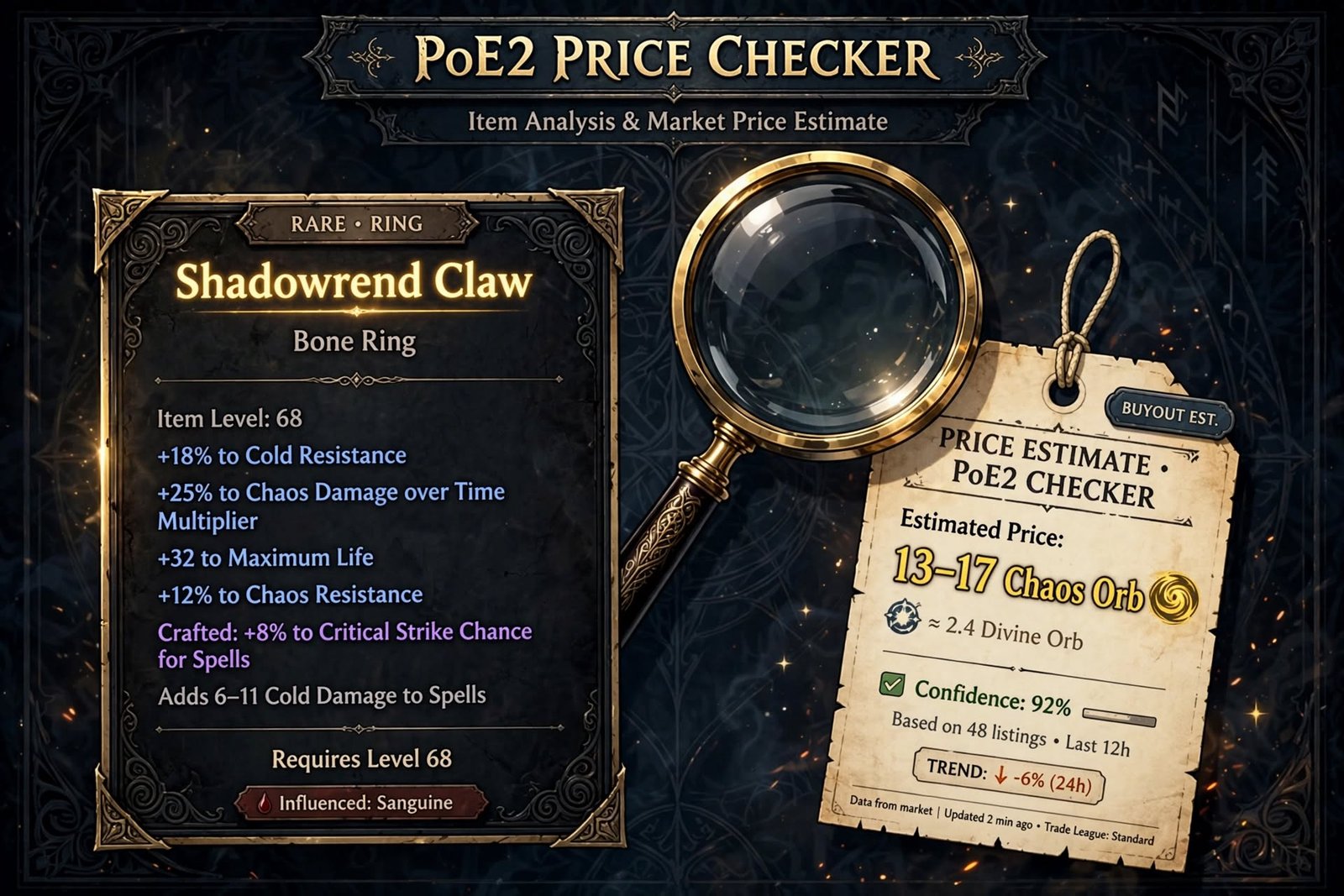
A PoE2 price checker is a tool or method that estimates what an item is worth in Path of Exile 2 by comparing it with current trade listings. Players use one to decide whether a drop is worth selling, what to list it for, and whether a trade offer is fair. A good PoE2 price checker can evaluate rares, uniques, gems and currency, but accuracy varies by item type.
As of October 7, 2026, you have three main options. The first is the game’s own Shift + Alt + click price check. The second is a third-party desktop tool such as Exiled Exchange 2 or PoE Overlay II. The third is a web economy tracker such as poe.ninja, mainly for currency.
This guide explains how each works, where each fails, and how to verify any number before you trust it.
Table of Contents
What Is a PoE2 Price Checker?
A PoE 2 price checker is software, or a built-in game feature, that reads an item’s properties and compares them with items listed on the market. It then shows you comparable listings or an estimated price range.
Think of it as a shortcut. Without one, you would copy the item, open the trade site, pick the right base, add each modifier by hand, and read the results. A PoE 2 price checker does most of that setup in one keypress.
The game’s built-in version works like this: the game opens the Market Panel with modifiers from your selected item already applied to the search, showing listed items with similar stats. gamerant
A PoE2 price checker cannot guarantee a sale price. It shows what others are asking, not what buyers pay. It can’t see demand that hasn’t shown up yet, and it can be fooled by thin markets, stale listings or odd item combinations.
Use it as a fast first read, then confirm the numbers that matter.
Where the PoE2 Economy Stands Right Now
Price checking only makes sense in context, so here is the current picture.
- Patch: 0.5.5, which released on September 4, 2026 alongside the Forbidden Rites league, resetting players into a new economy. fextralife
- Leagues running: Forbidden Rites and Runes of Aldur both continue. GGG confirmed the Runes of Aldur challenge league keeps running alongside the new event league. Standard, Hardcore and Solo Self-Found variants also exist. Hardcore Forbidden Rites is parented to its Standard Forbidden Rites equivalent. maxrollpathofexile
- Balance: Maxroll reports no balance changes in 0.5.5, with balancing slated for the 1.0 patch. That makes the build meta relatively stable inside the patch. maxroll
- End date: one secondary source says Forbidden Rites runs until the PoE 2 1.0 launch on December 11, 2026. Treat that date as reported, not official, and check GGG’s announcements. u4gm
This matters for pricing because a price from another league is not a price for your league. One guide describes a community thread that reported extreme exchange-rate movement, only for the poster to discover that a third-party overlay had been displaying Standard prices. Always confirm which league your PoE2 price checker is querying. boostroom
Read More: https://gamespuma.com/path-of-exile-2-patch-notes/
How PoE2 Item Pricing Works
Item value comes from supply, demand and usefulness. Not every factor applies equally to every item, so here are the ones that usually matter.
Item type and base. The base determines which builds can use the item. An armour base with the wrong defence type may be worthless to most buyers even with good modifiers.
Item level. Item level gates which modifier tiers can roll. A high item level opens the strongest tiers; a low one caps them.
Rarity. Normal and magic items are rarely valuable, apart from specific bases. Rares can be worth almost nothing or a great deal. Uniques are priced by demand for that exact item.
Modifiers and affix combinations. Which prefixes and suffixes are present matters more than how many. A rare with two sought-after modifiers can beat one with five mediocre ones.
Stat rolls. Within a modifier, a high roll is worth more than a low one. The premium for top rolls is sharpest on items many buyers want.
Build demand. An item is only worth what buyers will pay, and buyers follow builds. When a popular build needs a stat, items with that stat rise.
Supply. Rare combinations on a popular base can still be cheap if many players craft them.
League economy. A fresh league has volatile prices and little data. An older league has more stable prices.
Trade availability. An item nobody lists is hard to price. An item with hundreds of listings has a clear market.
The practical lesson: price comes from comparable sales, not from item quality in isolation. Every PoE 2 pricing tool is trying to find comparables.
How to Use a PoE2 Price Checker: Step by Step
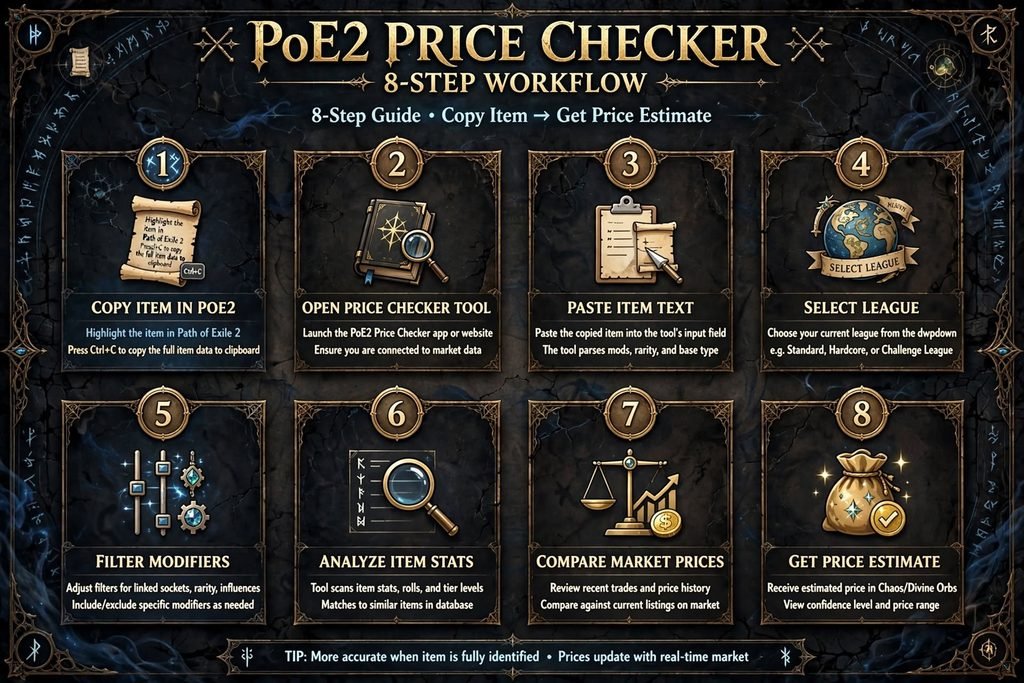
Here is a workflow that works with the built-in check or a third-party tool.
1. Identify the item. Note the rarity, the base, and whether it is corrupted or has other special states.
2. Open the price check. In-game, hold Shift + Alt and click the item; this opens the Trade Market with the item’s filters applied. It does not work while mapping; you need to be in town or your hideout. Third-party tools use their own hotkeys. For example, Exile Exchange 2 uses Ctrl + D while hovering an item. How to Price Check Items +2
3. Check the league. Make sure the search targets your league, not Standard or Runes of Aldur.
4. Review the filters. The check only looks for items with the exact same modifiers, so a rare with many modifiers may return nothing. game8
5. Remove modifiers that don’t matter. The patch’s search tool lets you disable individual modifiers to account for slight variations or to see how much specific affixes affect value. Keep the two or three that drive the price. pcgamesn
6. Compare several listings. Look at the cluster, not the cheapest or highest result.
7. Estimate a realistic price. Aim for the middle of the realistic range, then adjust for roll quality.
8. Decide. Sell, keep, or improve the item. If it is worth a lot, verify manually (see below).
PoE 2 Rare Item Price Checking
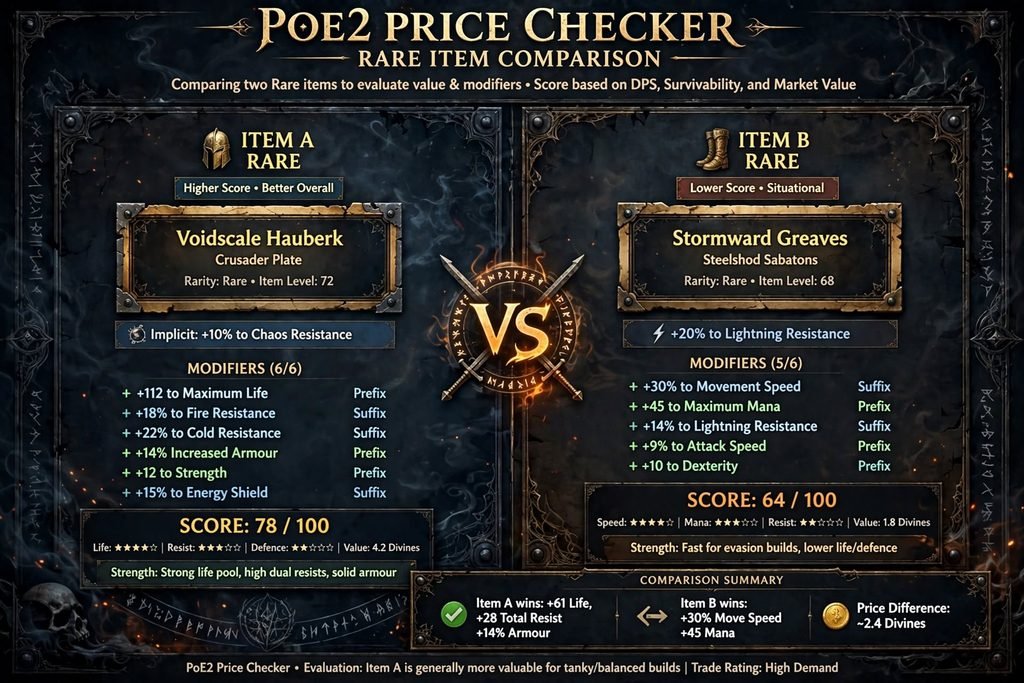
Rare items are the hardest to price. There are millions of possible combinations, and an automated tool can only match what it finds.
What to evaluate:
- Base type: is it one that builds actively want?
- Item level: high enough for the best tiers?
- Key affixes: which one or two modifiers drive demand?
- Number of useful modifiers: three good ones usually beat six average ones.
- Tiers and roll quality: a top-tier roll on a key stat adds a lot.
- Build relevance: would a popular build use this?
- Comparable listings: what do near-matches actually ask?
Why rares are harder than uniques. A unique is one named item with a defined set of rolls, so listings are directly comparable. A rare is a custom mix, so the tool has to guess which modifiers matter.
Practical approach. Start with all modifiers on, and if you get no results, remove the weakest one at a time. Stop when you have enough listings to see a pattern. If the result set is small, treat the price as a range, not a figure. Where possible, check that the listing prices are consistent and not a single outlier.
PoE 2 Unique Item Price Checking
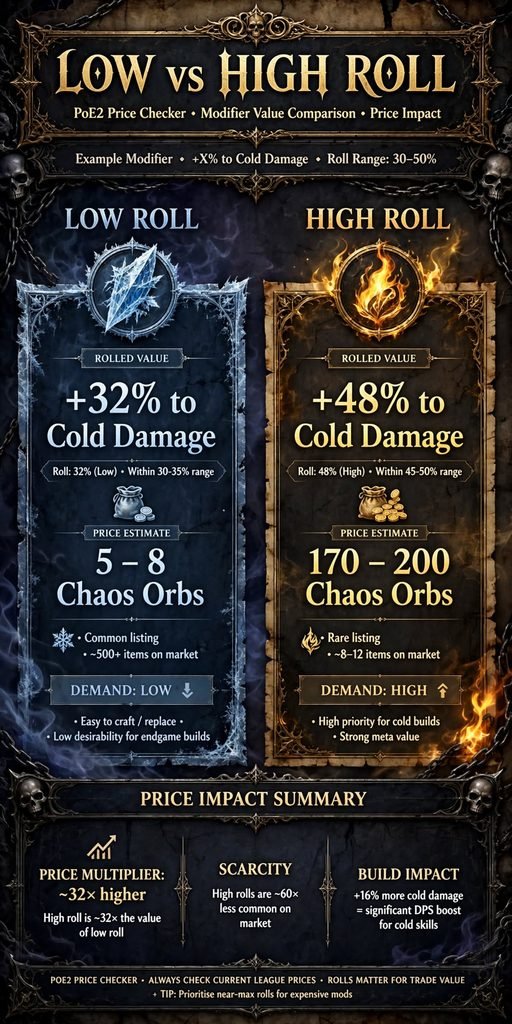
Unique items are easier to compare, but roll ranges and demand still matter.
What moves unique prices:
- Build popularity: a unique at the centre of a popular build rises with that build.
- Roll ranges: many uniques have variable stats. High rolls on the stat that matters sell for more.
- Low-roll versions: these usually sell for less, but only if there are enough of them to set a clear market.
- Supply: drop rate and league mechanics affect how many are around.
- League economy: in a fresh league, early prices swing widely.
In Forbidden Rites, the league mechanics can change which uniques are common. Rewards in the league include league-exclusive uniques, so supply for some items differs from older leagues. I’m not naming specific expensive uniques here because those prices change daily; check live listings. pathofexile
Tip: for uniques, filter on the roll that matters and leave the minor ones loose. Over-filtering a unique makes a normal item look scarce.
Currency Price Checking
Currency pricing works differently from item pricing, and it is the one area where PoE 2 clearly differs from PoE 1.
PoE 2’s Currency Exchange data is aggregated differently. poe.ninja says its PoE 2 economy overviews are based on the in-game Currency Exchange, unlike PoE 1 overviews, which are based on stash-tab trading, and the data comes in hourly chunks so prices may lag by up to an hour. poe
To check a currency rate:
- Use the in-game Currency Exchange. Add items to the “I Want” and “I Have” slots and check the Market Ratio tab for the rate. game8
- Or use poe.ninja’s PoE 2 economy page for your league.
Be careful with static numbers. Early-league rates move fast. One tracker’s guide gave about 65 Exalted per Divine on September 5, 2026, far below the previous league’s roughly 360. A different community-estimate page later showed a much higher ratio, and it labels itself as community estimates, not live trade data. The two sources use different methods and dates, which is exactly why you should never copy a rate from a page without checking its date and league. timesavertimesaver
Also note that early in a league, poe.ninja may price against Exalted rather than Divine because Divines are scarce. The anchor currency can change over time. exiledtools
How to Manually Verify a Price
Never trust a single automated estimate for a valuable item. Here is how to verify.
- Open the official trade site (pathofexile.com/trade2) or the in-game Market panel and select your league.
- Match the base or a base that serves the same builds.
- Match the important modifiers and set minimum values close to your item’s rolls.
- Leave unimportant modifiers off.
- Sort by price and read at least 10 listings if available.
- Ignore outliers. One listing at 50 times the others is not the market. Neither is one far below, which may be a mispricing that sells instantly.
- Look at patterns. Do several listings cluster? That cluster is your market.
- Check supply. Many listings at similar prices means you will compete. Few listings means a thin market, so prices are less certain.
- Re-check later. If an item doesn’t sell, the market may be lower than the listings suggest.
If the tool says 10 Divine and manual checking shows listings from 2 to 40 with no cluster, you don’t have a price. You have a guess.
Why PoE 2 Price Checkers Can Be Wrong
Even a good PoE2 price checker has limits.
- Thin markets. With only two or three listings, any estimate is shaky. The built-in check returns nothing if no other item on the market matches your item’s modifiers. gamerant
- Roll differences. A tool may treat a low and a high roll as the same.
- Rare combinations. Unusual combinations have no true comparables.
- New league launches. Early data is sparse and swings hard. In Forbidden Rites’ first days, rates moved fast.
- Patch changes. Balance or mechanic changes can alter demand overnight. With no balance changes in 0.5.5, this risk is lower now but returns at 1.0.
- Meta shifts. A build gaining popularity lifts prices before the data catches up.
- Incorrect item recognition. Parsers can mis-read new item types. For example, Exiled Exchange 2’s v0.16.3 notes mention fixing a parse error when bonded modifiers exist and an infinite loop when price checking Magebloods. Bugs like that are normal after content updates. github
- Fake or stale listings. Some listings are price-fixers or old offers that won’t sell.
- Extreme outliers. One bad listing can skew a median in a small sample.
- Wrong league. As noted above, a tool set to Standard gives Standard prices.
Best PoE 2 Price Checker Tools Compared
No single tool wins every case, so here is what each is best for.
| Tool | Type | Official? | Cost | Best for |
|---|---|---|---|---|
| In-game Shift + Alt + click | Built into PoE 2 | Yes (GGG) | Free | Fast checks in town |
| Official trade site (trade2) | Browser | Yes (GGG) | Free | Manual verification |
| Exiled Exchange 2 | Desktop overlay | Third-party | Free, open source | Frequent checks of rares, uniques, gems, currency |
| PoE Overlay II | Desktop companion | Third-party | Free, optional Premium | ML estimate, market history, trade tools |
| Poe2 Price Checker (CyanBalloon) | Standalone window | Third-party | Free | No-overlay preference |
| poe.ninja PoE 2 economy | Browser | Third-party | Free | Currency trends |
| Path of Price Check | iPhone app | Third-party | Free + in-app purchases | Phone-camera checks |
The built-in PoE 2 price check
GGG added it in 0.5.0. Game8 reports it arrived in the 0.5.0 Return of the Ancients update, removing the need for third-party tools for basic checks. It is free and needs no download. The limits: town or hideout only, and strict matching on every modifier unless you loosen it. game8
Exiled Exchange 2
Exiled Exchange 2 is a third-party tool for PoE 2 that focuses on price checking and trading. It is a fork of Awakened PoE Trade. That matters: Awakened PoE Trade is the PoE 1 tool, and EE2 is the PoE 2 version. Its GitHub page shows ongoing releases through early September, and one release added back an Item Editor so you can see the price with augments and catalyst quality before spending currency. It handles gems, rares, uniques and currency per its showcase. It is best for players who check many items each session. Exiled Exchange 2 – PoE2 Price Checker Information +2
PoE Overlay II
The PoE Overlay site describes a Windows companion that is available for PoE 1 and PoE 2, with a price checker that gives an instant ML price estimate that you can then refine, plus market history showing price and supply trends. The site says both apps are free to use, with one optional Premium plan covering PoE 1 and PoE 2. An older Overwolf listing also mentions ads. Plans and features can change, so check the current page before relying on this. poeoverlaypoeoverlay
Poe2 Price Checker (CyanBalloon)
This independent project describes itself as a standalone desktop trade macro and price checking tool with no overlay, triggered by Ctrl + D while hovering an item. Its claims about performance and compliance are the author’s own statements, not independently verified. It suits players who dislike overlays. github
poe.ninja and web trackers
For currency, poe.ninja’s PoE 2 economy page lists several leagues as active, including Forbidden Rites, Runes of Aldur, their Hardcore versions, and Standard. Several other websites use the name “PoE2 Price Checker.” One is a free browser tool that tracks Divine, Exalted and Chaos prices with 7-day trends and supply data, and tells you to treat it as a decision aid rather than a guaranteed sale price. That is sound advice for every tool here. poepoe2pricecheck
Path of Price Check (iPhone)
An iPhone app that targets console and PC players, letting you snap an item with your phone and view similar items with market prices. It is free with in-app purchases. Useful if you can’t run desktop software. apple
Which should you pick? Use the built-in check for casual play, add Exiled Exchange 2 or PoE Overlay II if you trade often, and use the trade site and poe.ninja to verify.
PoE2 Price Checker vs Trade Site
Why do I need a price checker if I can search the PoE 2 trade site? You don’t strictly need one. The trade site is the source of truth. A price checker saves time by building the search for you.
- Price checker: reads your item and builds a search or estimate in one step.
- Trade search engine: lets you search any listing with full control.
- Market database: tracks prices over time, such as poe.ninja.
- Currency exchange resource: shows bulk currency ratios.
Use a price checker for speed, the trade site for accuracy, a database for trends, and the exchange for bulk currency. The built-in feature blurs the first two, since it opens the market with filters set.
One more point: older guides describe whispering sellers. Community guides now describe the in-game Market, where you buy from a seller’s Merchant Tab through an NPC with no whisper required. If a guide mentions whispers, check its date. dadsofexile
Common Price-Checking Mistakes
| Mistake | Fix |
|---|---|
| Using one listing | Read at least ten and find the cluster |
| Comparing different bases | Match the base or an equivalent |
| Ignoring rolls | Set minimums near your item’s values |
| Ignoring item level | Check it gates the modifier tiers |
| Assuming rares are valuable | Check which modifiers buyers actually search |
| Copying the highest price | Use the cluster, not the top |
| Ignoring supply | Count listings; many means competition |
| Ignoring build demand | Check what popular builds need |
| Outdated pricing | Check the date and league |
| Mixing PoE 1 and PoE 2 | Use PoE 2 tools and data only |
| Trusting an estimate blindly | Verify valuable items manually |
The most expensive mistake is underpricing: selling a strong item quickly because the tool matched it to a weaker one. The second is overpricing: listing at the top of a range and waiting weeks.
PoE 1 vs PoE 2 Price Checking
Never carry a PoE 1 assumption over to PoE 2 without checking.
| Area | PoE 1 | PoE 2 |
|---|---|---|
| Overlay tool | Awakened PoE Trade | Exiled Exchange 2 (a fork) and others |
| Built-in check | No equivalent noted in my research | Shift + Alt + click (0.5.0+) |
| Economy data | Stash-tab based (poe.ninja) | Currency Exchange based (poe.ninja) |
| Trade site | Separate PoE 1 trade | pathofexile.com/trade2 |
| Currency | Different set and ratios | PoE 2 orbs, Divine/Exalted/Chaos |
Note that PoE Overlay supports both games, but you should confirm that the PoE 2 mode is active. An overlay pointed at the wrong game gives wrong prices.
Safety When Using Third-Party Tools
Third-party tools are not made by GGG. Follow these rules.
- Download only from official sources. Exiled Exchange 2’s project states that the only official download sites are its GitHub Pages download page and its GitHub releases page, and anywhere else may be malicious. Many forks exist, so make sure you are on the original. github
- Check the domain before you download.
- Avoid unknown “price checker” downloads from videos, Discord links or ads.
- Check permissions a desktop tool requests.
- Never enter account credentials into an unofficial page.
You may see forum posts making serious claims about specific overlays. One Steam thread warned about account theft, but replies noted that no connection had been proven. I can’t verify either side, so the safe approach is to use official sources, keep your system updated and use unique passwords. steamcommunity
Conclusion
A PoE2 price checker is a fast first estimate, not a final answer. For most players, the built-in Shift + Alt + click check is enough for everyday drops. Frequent traders benefit from Exiled Exchange 2 or PoE Overlay II, and everyone should use the trade site to verify anything valuable.
Pair any PoE 2 price checker with three habits: confirm the league, loosen over-strict filters, and read a cluster of listings instead of one. In a fresh economy like Forbidden Rites, that discipline matters more than which tool you choose.
F. FAQ
What is the best PoE 2 price checker?
There isn’t one universal best. The built-in check is best for convenience. Exiled Exchange 2 is a strong choice for frequent traders. The trade site is best for verification.
How do I check an item’s price in PoE 2?
Hold Shift + Alt and left-click the item while in town or your hideout. The Market panel opens with its modifiers pre-filled.
Is there a PoE 2 item price checker built into the game?
Yes. It was introduced in 0.5.0 Return of the Ancients.
How accurate are PoE 2 price checkers?
Accuracy depends on market depth. Common items are reliable; rare combinations in thin markets are not.
Can I price rare items with a PoE 2 price checker?
Yes, but remove minor modifiers. The built-in check filters on exact modifiers.
Can I check unique item prices?
Yes. Filter on the roll that matters and compare multiple listings.
How do I know if an item is valuable?
Check whether sought-after modifiers appear on a useful base with strong rolls, then confirm with several listings.
What is the difference between a price checker and the trade site?
A price checker builds the search for you; the trade site is the underlying market search.
Do PoE 1 price-checking tools work with PoE 2?
Not automatically. Awakened PoE Trade is a PoE 1 tool. Exiled Exchange 2 is its PoE 2 fork. PoE Overlay supports both games, according to its site.
Sources Used
All third-party except where noted. These are the pages my research returned:
- Path of Exile forum, 0.5.5 patch notes (official GGG) — pathofexile.com/forum/view-thread/4000864
- Maxroll 0.5.5 patch notes and launch article — maxroll.gg
- Path of Exile 2 Wiki (Fextralife), Forbidden Rites page
- GameRant, Game8, PCGamesN, Dads of Exile — in-game price check coverage
- Exiled Exchange 2 GitHub (Kvan7/Exiled-Exchange-2) and exiledexchange2.com
- PoE Overlay (poeoverlay.com); Overwolf listing
- CyanBalloon Poe2 Price Checker (GitHub and project site)
- poe.ninja, PoE 2 economy page
- poe2pricecheck.com; timesaver.gg (currency pages)
- Apple App Store listing for Path of Price Check
- Steam community discussion (user comments, unverified)

Written by Daniel Carter
Daniel Carter is a dedicated gaming writer who enjoys turning complex gaming topics into clear, useful, and engaging content. He covers game guides, tips, reviews, features, and the latest developments across the gaming world. His approach focuses on research, accuracy, and practical value, helping readers discover new games, improve their gameplay, and stay informed about the industry. For Daniel, great gaming content is not just about information—it is about making every article genuinely worth reading.
1 thought on “PoE2 Price Checker: How to Check Item Prices in Path of Exile 2 (2026 Guide)”