Diablo 2 Software is not a single download. Depending on who is asking, it can mean the original 2000 game and its Lord of Destruction expansion, installed from standalone Blizzard installers, or Diablo II: Resurrected, the remaster installed through the Battle.net Desktop App or Steam. Choosing the wrong one wastes time, and downloading from the wrong website can put your PC and your account at risk.
This guide explains what Diablo 2 Software actually refers to, how the classic game differs from the remaster, where the legitimate downloads live, how installation works for each version, what the system requirements look like, and where to get official help. Everything here points to Blizzard’s own pages wherever possible.
Table of Contents
What Is Diablo 2 Software?
In everyday use, Diablo 2 Software is a loose label for anything you need to install or run Diablo II. That can include several different things, and keeping them separate makes every later decision easier.
The game itself. This is the playable program: the original Diablo II, released in 2000, or the remastered Diablo II: Resurrected, released on September 23, 2021.
An official installer. For the classic game, this is a standalone setup file that Blizzard provides to people who own the original CD keys. For the remaster, installation happens inside Blizzard’s own application rather than through a separate setup file.
A launcher or account application. The remaster is installed and started through the Battle.net Desktop App, and it requires you to own the game on the account you are logged into. The classic game does not use that app for installation.
Updates and patches. These are separate for each version. The classic game has its own patch history, while the remaster is updated through its own platform.
Expansion content. Lord of Destruction is an expansion for the classic game. Reign of the Warlock is newer content that belongs to the remaster only.
Third-party tools and mods. Community projects exist, but they are not Blizzard software. If a website offers “Diablo 2 Software” that boosts stats or automates play, it is describing a different category of product from the game.
The key point is simple: Diablo 2 Software only means something specific once you know which version you are talking about. A random executable with Diablo 2 in its name is not automatically the real game, and nothing in this guide asks you to trust one.
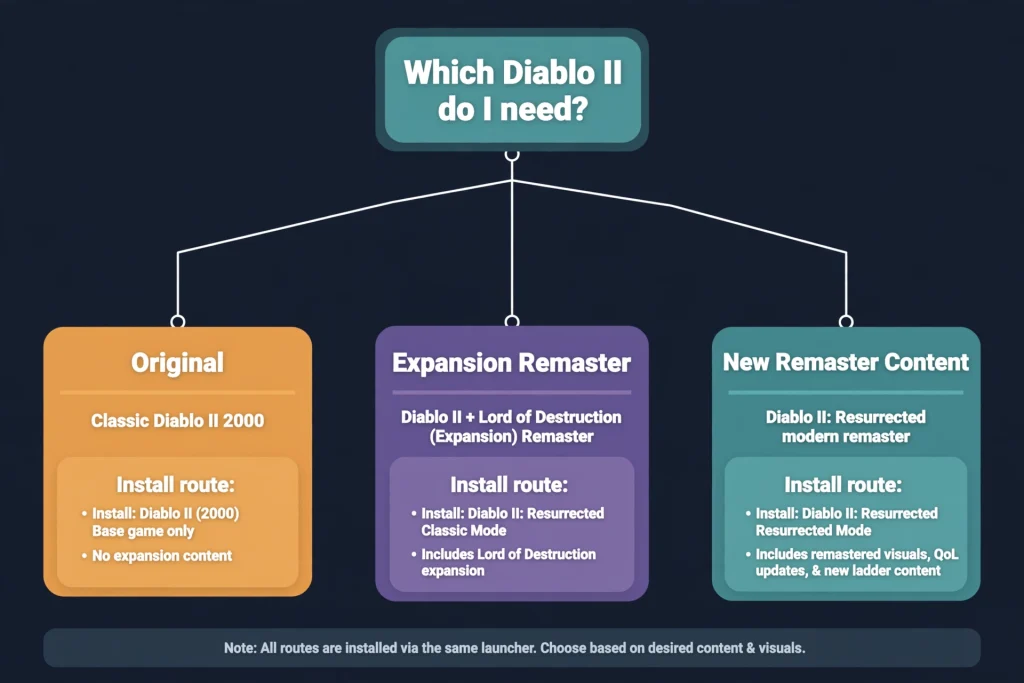
Which Diablo 2 Software Version Should You Download?
There are four official products to understand. The table summarizes them as of October 2026. Prices and availability can change, so confirm on the official pages linked in the last column.
| Product | Type | Visuals | Included content | Platforms | How it is installed | Compatibility notes | Official source |
|---|---|---|---|---|---|---|---|
| Diablo II (2000) | Original base game | Classic 2D presentation | Original campaign and five classes | PC (Blizzard’s classic install page covers PC) | Standalone installer, original CD key required | Provided “as is”; no guarantee on modern systems | Blizzard Support: install Diablo II and Lord of Destruction |
| Diablo II: Lord of Destruction (2001) | Expansion for the original | Classic 2D presentation | Act V, Assassin and Druid, new items | PC | Separate installer and key, used with the base game | Same “as is” limits as above | Same Blizzard Support article |
| Diablo II: Resurrected | Remaster | Upgraded 3D visuals with a legacy toggle | Remastered base game plus Lord of Destruction | Windows, Xbox, PlayStation, Nintendo Switch | Battle.net Desktop App (Steam listing also exists for the Infernal Edition) | Windows 10 is the operating system listed on Blizzard’s requirements page | Diablo II: Resurrected official site |
| Reign of the Warlock / Infernal Edition | New content for the remaster | Same as the remaster | Warlock class and added content; the Infernal Edition bundles the remaster, Lord of Destruction and the DLC | Windows and consoles | Same as the remaster | Requires the remaster to play | Blizzard shop page |
Choose the classic Diablo 2 Software if you own original CD keys, want the 2000-era look and feel, and are comfortable troubleshooting on your own. Blizzard states that it cannot assist with issues on those installers.
Choose Diablo II: Resurrected if you want the supported, currently maintained version of Diablo 2 Software, with modern graphics, a legacy visual toggle, and console options. New players who want the newest content generally look at the Infernal Edition, while existing owners can look at the DLC on its own.
One more distinction matters. Blizzard’s installation page says that owning Diablo II (2000) does not grant access to Diablo II: Resurrected. They are separate products, and a classic key will not unlock the remaster.
Where to Get Diablo 2 Software Safely
The safest source for any version of Diablo 2 Software is Blizzard itself. For the remaster, that means the official Diablo II: Resurrected website, the Blizzard shop, or an official store listing for your platform. For the classic game, it means the installer links on Blizzard Support.
Be wary of anything that offers the game outside those routes. Specifically, avoid:
- Pirated copies and cracked installers, which also strip away any support or account protection.
- Unauthorized repackaged downloads that bundle extra files.
- Suspicious executables with generic names.
- Fake download buttons, often placed beside real content on ad-heavy pages.
- Unverified mirrors that claim to host “the official installer.”
- Any download that tells you to turn off antivirus or other security protections.
- Websites promising paid Diablo 2 Software for free.
A practical safety check helps with any Diablo 2 Software download. Before you click, confirm that the address belongs to Blizzard or to a store you already trust, and that the page matches the version you intend to install. If a page asks you to disable security software, close it.
Third-party key resellers also appear in search results for the remaster. This guide does not recommend any of them, and it cannot verify their keys. Buying from Blizzard’s own shop or a platform store keeps the purchase tied to your account in a way Blizzard Support can see.
If you are new to the series and want context on where Diablo II sits in the larger story, our guide to the Diablo franchise explains the games in order.
How to Download Diablo 2 Software
The download route differs sharply between the two main versions, so treat them separately.
Downloading the original Diablo II and Lord of Destruction
According to Blizzard Support, if you possess the original CD keys, you can install Diablo II or Diablo II: Lord of Destruction separately from the Battle.net App using the installers on Blizzard’s own page. Blizzard also warns that these installers and patches are provided “as is” and that Customer Service cannot assist with problems.
To confirm the source is legitimate for classic Diablo 2 Software, start from Blizzard Support and follow its links rather than a search-engine result for an unknown site. The official article is titled “How to Install Diablo II and Diablo II: Lord of Destruction.”
Community moderators on Blizzard’s forums add practical context, which is useful but not official: players with older disc-based keys may need to convert them to the longer digital key format, and the classic game does not appear in the modern Battle.net app library. Treat those posts as hints, and confirm anything important with Blizzard Support.
Downloading Diablo II: Resurrected
For the remaster, ownership comes first. Blizzard’s installation article states that Diablo II: Resurrected is installed through the Battle.net Desktop App and that you must own the game on the account you are logged into.
Buyers have two main paths on PC. The Blizzard shop lists the Infernal Edition at US$39.99, and the Reign of the Warlock DLC at US$24.99 for people who already own the remaster. The Infernal Edition is also listed on Steam at US$39.99, released there on February 11, 2026, and Steam’s listing notes that a Battle.net account is part of the setup. Prices vary by region and change over time, so check the live store page before you buy.
For this version of Diablo 2 Software, the app, not a loose installer file, is the official route.
How to Install Diablo 2 Software on PC
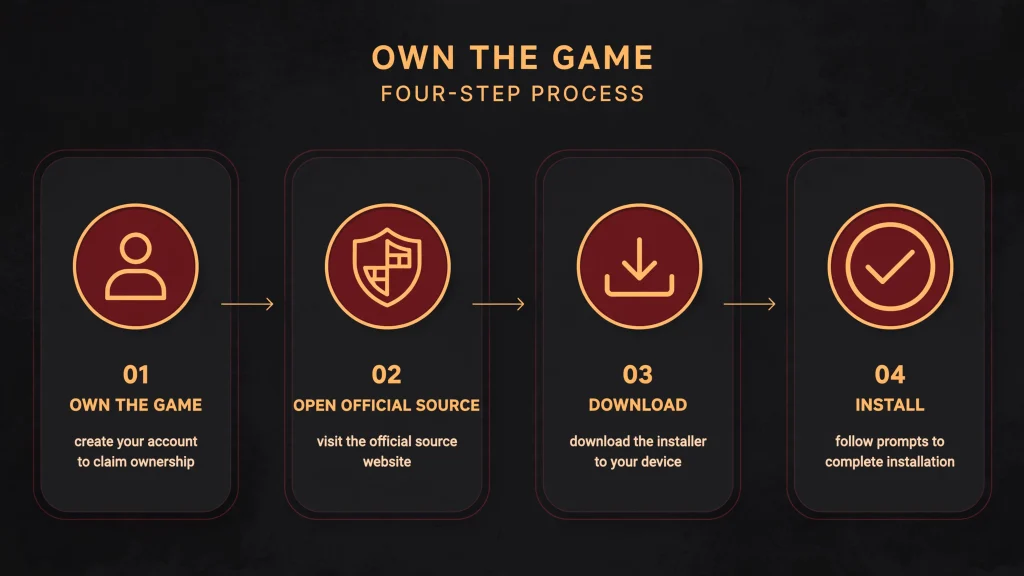
The steps for installing Diablo 2 Software below follow Blizzard’s current documentation. Where Blizzard does not publish a detail, this guide says so instead of guessing.
Installing Diablo II: Resurrected
Blizzard’s installation article describes this process:
- Log in to the Battle.net Desktop App with the account that owns the game.
- Click the Diablo II: Resurrected icon. If you cannot see it, click All Games, select the game from the list, and choose Add to Favorites.
- Above the Install button, select the correct game version.
- Click Install and let the app download the files.
If the Install button is grayed out, Blizzard suggests exiting the Battle.net app and trying again. If problems continue, Blizzard links to a separate installation troubleshooting article.
If you bought the Steam edition, Blizzard’s article does not cover the Steam client. Follow Steam’s own installation flow and keep your Battle.net account details ready, since the store listing indicates one is needed.
Installing the original Diablo II and Lord of Destruction
Blizzard’s page for the classic game is shorter. It states that the installer places version 1.14b on your PC, and that launching the game and logging in to Battle.net will prompt you to patch to the latest version, 1.14d.
In practical terms, the flow is:
- Prepare your original CD keys for the base game and, if you own it, the expansion.
- Download the installers from the official Blizzard Support article.
- Run the base game installer and follow the on-screen prompts.
- Run the expansion installer afterward if you own Lord of Destruction.
- Launch the game, log in to Battle.net, and accept the update prompt.
Blizzard does not document exact button names, folder paths or compatibility settings for modern versions of Windows in that article, so this guide does not invent them. If you want to understand what the expansion adds before installing it, our Diablo 2 LOD guide covers the new act, classes and systems.
Do not follow installation advice written for Windows 98 or Windows XP as if it applied to a current PC. That era’s instructions were written for different hardware and a different operating system.
Diablo 2 Software System Requirements and Compatibility
System requirements are where the two versions diverge the most, so do not copy one list onto the other.
Diablo II: Resurrected requirements
Blizzard’s requirements article lists the following for Windows:
| Minimum | Recommended | |
|---|---|---|
| Operating system | Windows 10 | Windows 10 |
| Processor | Intel Core i3-3250 or AMD FX-4350 | Intel Core i5-9600K or AMD Ryzen 5 2600 |
| Graphics | Nvidia GTX 660 or AMD Radeon HD 7850 | Nvidia GTX 1060 or AMD Radeon RX 5500 XT |
| Memory | 8 GB RAM | 16 GB RAM |
| Storage | 30 GB | Not separately listed |
| Network | Broadband Internet connection | Not separately listed |
| Resolution | 1280 x 720 | Not separately listed |
Blizzard adds that the minimum requirements may change over time because of compatibility changes. The page lists Windows 10; this guide could not confirm from that page how other Windows versions are treated, so check the live article if you run something newer. Because this Diablo 2 Software needs an online connection, treat an unstable network as part of your compatibility check as well.
Classic Diablo II requirements and modern compatibility
Blizzard’s classic install page does not publish a requirements list or a compatibility promise for modern operating systems. What can be said is historical. When the game launched in 2000, GameSpot reported that a minimum installation needed over 600 MB of hard disk space, with a larger installation recommended for Battle.net play. Those numbers describe the 2000 retail release, not what a current PC needs.
Because Blizzard calls the installers “as is,” nobody can honestly promise that this Diablo 2 Software will run perfectly on every modern machine. Some players use community tools to improve resolution or performance, but those are third-party projects, discussed below. If something fails, the sensible first step is to check Blizzard Support and the community forums instead of searching for random fixes.
Original Diablo II Software vs Diablo II: Resurrected
The two versions share a story and a core design, but they are separate products.
Graphics and presentation. The original uses classic 2D visuals. The remaster layers upgraded 3D models over the original structure, and Blizzard’s store page highlights a legacy toggle for real-time comparison with the original look, plus visuals up to 4K.
Audio and cinematics. Blizzard describes remastered, re-recorded 7.1 surround sound for the remaster. The original’s audio and cinematics are those of the 2000 release.
Included classic content. Diablo II: Resurrected includes the remastered base game and the Lord of Destruction expansion. On the classic side, the expansion is a separate install.
Expansion and new content. Lord of Destruction dates to 2001 and added the Assassin and Druid. Reign of the Warlock is a modern addition that only exists in Diablo II: Resurrected. It brings a new Warlock class and, according to Blizzard-linked store pages and press coverage, quality-of-life additions. Treat the Warlock as a remaster feature, never as an original Diablo II class.
Platforms. The classic game is documented for PC. The remaster is listed for Windows, Xbox Series X|S, Xbox One, PlayStation 5, PlayStation 4 and Nintendo Switch.
Installation and accounts. The remaster needs the Battle.net Desktop App and an owned license on your account. The classic installers work from your original CD keys.
In short, these two forms of Diablo 2 Software do not share installers, system requirements or platform support, and should never be treated as interchangeable. If you are curious how the series began before either, our Diablo 1 guide covers the 1997 original.
Common Diablo 2 Software Installation Problems
The list below sticks to documented, low-risk first steps for Diablo 2 Software installation trouble. None of them is a guaranteed fix.
The download does not begin or the Install button is grayed out. For the remaster, Blizzard’s advice is to exit the Battle.net app and try again, then follow its installation troubleshooting article if the problem continues.
The game shows only a purchase option. Blizzard Support’s article on this issue suggests confirming that you are logged into the correct account, checking that your order is marked as completed on the Transaction Page, and reinstalling the Battle.net app to clear any cache problems.
The game does not launch. For the “Launching” state with no game window, Blizzard asks you to check the system requirements first and then follow its article on lockups and crash errors.
A legacy key or the classic game is missing from your library. The original Diablo II does not appear in the Battle.net app the way the remaster does. Community moderators also warn that repeated invalid-key logins can lead to temporary restrictions, so avoid trying keys over and over. Check Blizzard Support before experimenting.
An installer fails on a newer operating system. Blizzard provides the classic installers without support, so expect to rely on community resources. Do not download random DLL files, modified executables or “cracks,” and do not edit the Windows registry unless a trustworthy source gives a specific reason. Those shortcuts create more risk than they remove.
An update fails. For the classic game, Blizzard’s page links the most recent patches directly. For the remaster, use the Battle.net app and Blizzard’s troubleshooting articles.
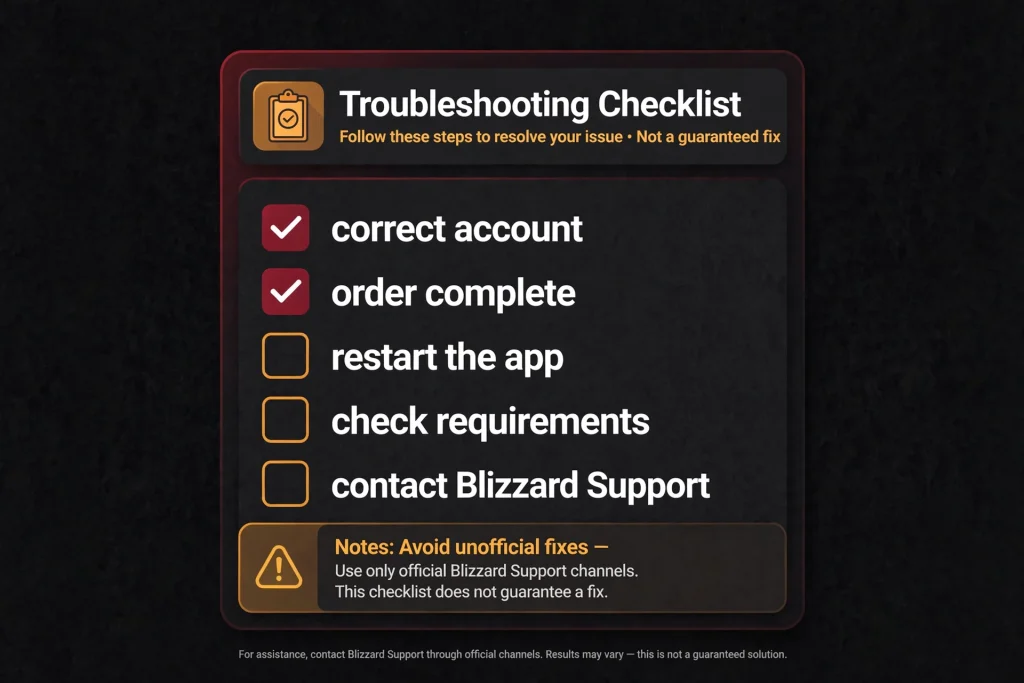
When your own steps run out, visit Blizzard Support and search for your exact error message. It is also reasonable to check the remaster’s official guidance first, since it covers the version Blizzard actively supports.
How to Update Diablo 2 Software
Updating Diablo 2 Software works differently for each product, so confirm which one you have before you look for a patch.
Classic Diablo II and Lord of Destruction. Blizzard’s page explains that the installer installs version 1.14b and that launching the game and logging in to Battle.net prompts an update to 1.14d. If that prompt does not work, the page also links the latest patches for download directly. Treat 1.14d as the latest version named on that page as of this writing, and re-check the page before publishing or acting on it, because patch information is time-sensitive.
Diablo II: Resurrected. Updates for the remaster run through the platform you bought it on. For Battle.net owners, that is the Battle.net Desktop App. Blizzard’s installation article does not describe Steam’s update flow, so Steam owners should rely on the Steam client and Blizzard Support for anything specific.
To identify what you have, look at the version shown by the game or by the app that launched it, and compare it with Blizzard’s current article. Never assume that both products share a patch number or a patch process.
Are Third-Party Diablo 2 Tools and Mods Safe?
Third-party tools, community launchers and mods are different from official Blizzard Diablo 2 Software. They are built by independent developers, and Blizzard does not endorse them unless its own documentation says so.
Some are well known. Project Diablo 2, for example, is a free fan-made modification for Lord of Destruction that adds ladder resets, reworked items and extra endgame content, and you can read more in our Project Diablo 2 guide. It is not an official Blizzard product, and it requires your own legitimate copies of the game.
Sensible precautions apply to any community project:
- Verify the developer and the source before you download.
- Read the documentation and look for a reputable community track record.
- Avoid unknown executable files.
- Scan downloads with appropriate security tools.
- Review the permissions an installer asks for.
- Understand whether the tool alters game files or online behavior.
- Check Blizzard’s terms and the project’s own rules before you use it online.
Any claim that a tool is “the real Diablo 2 Software” deserves skepticism. If a tool needs you to disable security software, or promises unlimited items or stats, that is a warning sign, not a feature.
Frequently Asked Questions About Diablo 2 Software
What is Diablo 2 Software?
Diablo 2 Software is a general term for the files needed to install or run Diablo II. It can mean the original 2000 game, the Lord of Destruction expansion, or Diablo II: Resurrected. Each has its own official source and installation process.
Where can I get Diablo 2 Software legally?
For the remaster, use the official Diablo II: Resurrected site, the Blizzard shop or an official platform store. For the classic game, use the installer links on Blizzard Support, which are intended for people who hold the original CD keys.
Is Diablo 2 available as a digital download?
Yes. Diablo 2 Software in its remastered form, Diablo II: Resurrected, is a digital release on PC and consoles, and the classic game’s installers are available through Blizzard Support to key owners. This guide could not confirm whether new classic keys are currently sold, so check Blizzard’s pages.
Is the original Diablo II the same as Diablo II: Resurrected?
No. They are separate products with different installers, platforms and requirements. Blizzard also states that owning Diablo II (2000) does not grant access to the remaster.
Do I need Lord of Destruction to play the original Diablo II?
No. The base game runs without the expansion. Lord of Destruction is a separate expansion with its own key and installer, and community reports say its installer expects the base game to be installed first. The remaster already includes the expansion.
How do I install Diablo 2 Software on Windows?
For the remaster, log in to the Battle.net Desktop App, open Diablo II: Resurrected, choose the game version and select Install. For the classic game, download the installers from Blizzard Support, run them with your keys, then launch the game and accept the update prompt.
What are the system requirements for Diablo II: Resurrected?
Blizzard’s minimum list is Windows 10, an Intel Core i3-3250 or AMD FX-4350, an Nvidia GTX 660 or AMD Radeon HD 7850, 8 GB of RAM, 30 GB of storage, broadband internet and a 1280 x 720 display. Blizzard’s recommended list asks for 16 GB of RAM and stronger components.
Why is my Diablo 2 Software installer not working?
Common causes include an incorrect account, an unfinished order, a Battle.net cache problem, or an older installer on a newer system. Try the documented first steps in this guide, then search Blizzard Support for your exact error. Do not download unofficial fixes.
How do I update Diablo 2 Software?
For the classic game, launching it and logging in to Battle.net prompts the update to 1.14d, and Blizzard links the patches directly. For the remaster, update through the Battle.net Desktop App or your platform’s client.
Is it safe to download Diablo 2 from third-party websites?
Generally no. Fake installers, pirated copies and repackaged downloads are common, and you cannot verify what they contain. Use Blizzard’s own pages or a trusted store.
Can I still install the classic Diablo II game?
Blizzard’s support article currently provides installers for people with the original CD keys, with the caveat that they are provided as is. Availability can change, so confirm on the live page.
Where can I get official Diablo II technical support?
Start at Blizzard Support and search for your product and error message. Blizzard supports the remaster’s installation and launch issues directly, while classic installers are offered without customer service help.
Final Verdict
The best way to handle Diablo 2 Software is to decide on the version before you download anything. The classic game and its expansion use standalone installers and original keys, with no support guarantee. The remaster installs through the Battle.net Desktop App, needs an owned license, and is the version Blizzard actively supports.
From there, the rest is routine: stay on official sources, follow the version-specific steps, check the current requirements, and use Blizzard Support when something breaks. If you are weighing where else to spend your Diablo time, our Diablo 4 builds guide is the better place to start for the newest game.
Practical next steps and official links:
- Confirm which version of Diablo 2 Software you need using the comparison table above.
- Visit the official Diablo II: Resurrected site for the remaster.
- Use Blizzard’s classic installation article for the original game and expansion.
- Review the Diablo II: Resurrected installation article before you install.
- Check the Diablo II: Resurrected system requirements against your PC.
- Search Blizzard Support if you hit an error.
Sources and Verification Notes
Sources actually consulted:
- Blizzard Support, “How to Install Diablo II and Diablo II: Lord of Destruction” (article 13867): https://support.blizzard.com/article/13867
- Blizzard Support, “Installing Diablo II: Resurrected” (article 286381): https://us.support.blizzard.com/en/article/286381
- Blizzard Support, “Diablo II: Resurrected System Requirements” (article 284798, EU mirror): https://eu.support.blizzard.com/en/article/284798
- Blizzard Support articles on the “purchase only” display problem (319759) and launch issues (298230): https://support.blizzard.com/en/article/319759 and https://support.blizzard.com/en/article/298230
- Official Diablo II: Resurrected site: https://diablo2.blizzard.com/
- Blizzard shop listings for Diablo II: Resurrected and Reign of the Warlock: https://us.shop.battle.net/en-us/product/diablo_ii_resurrected_reign_of_the_warlock
- Steam store page for the Infernal Edition: https://store.steampowered.com/app/2536520/Diablo_II_Resurrected__Infernal_Edition/
- GameSpot, 2000 coverage of the retail release (historical disk space)
- Blizzard community forum posts (used only as labeled community context)
- TBreak news coverage of the Steam launch and Reign of the Warlock (secondary source)
- GamesPuma homepage

Written by Daniel Carter
Daniel Carter is a dedicated gaming writer who enjoys turning complex gaming topics into clear, useful, and engaging content. He covers game guides, tips, reviews, features, and the latest developments across the gaming world. His approach focuses on research, accuracy, and practical value, helping readers discover new games, improve their gameplay, and stay informed about the industry. For Daniel, great gaming content is not just about information—it is about making every article genuinely worth reading.