Diablo 4 Forums are Blizzard’s community discussion boards for Diablo IV, where players ask for help, report bugs, share feedback and talk about classes, gear and updates. You can open the official Diablo IV forums at us.forums.blizzard.com/en/d4, then use the category list to find the section that matches your question.
This guide explains how the Diablo 4 Forums are organized, what each category is for, how to search before you post, how to write a useful topic, and how to tell official information from player opinion. It also covers bug reports, technical support, patch discussion, forum etiquette and a few common problems players run into.
Everything about the official forum below was checked against the live site on 17 October 2026. Forums change, so treat the category list as a snapshot and confirm it on the site before you rely on it.
Table of Contents
What Are Diablo 4 Forums?
The official Diablo IV forums are Blizzard’s own community platform for the game. Players use it to discuss gameplay, ask technical questions, report problems, find groups and give feedback. Searchers sometimes call it the Diablo 4 community forums, but the official Blizzard board is one specific site. The forum runs on Discourse software, and its footer links to the forum guidelines, terms of service and privacy policy.
When people search for Diablo 4 Forums, most want one of two things: the official Blizzard board, or a place where Diablo IV players talk. Those are related but not identical, and it helps to know the difference before you trust what you read.
Official forums versus other communities
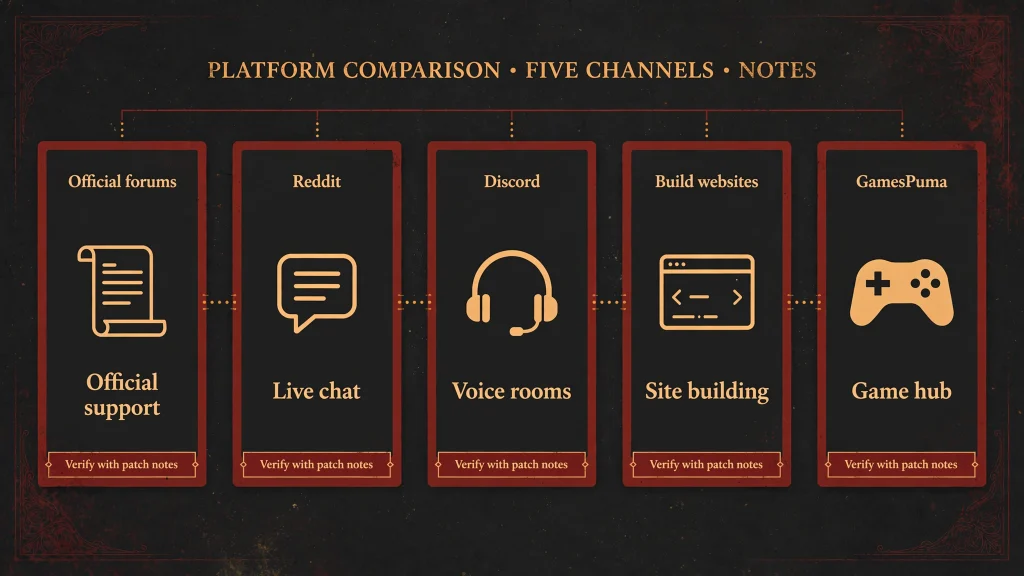
The Diablo 4 Forums on Blizzard’s site are one part of a wider community. Each platform has a different job:
- The official Blizzard forums: a Blizzard-hosted board organized by category, with official guidelines and terms.
- Reddit communities: independent discussion spaces run by volunteers, useful for shared experiences and quick reactions.
- Discord servers: real-time chat for groups, trading partners and clans, run by whoever owns each server.
- Build and database websites: structured reference material that is usually maintained by independent teams.
- GamesPuma: an independent editorial site that writes explainer guides, including this one.
None of these is a substitute for official patch notes or Blizzard announcements. A post on the Diablo 4 Forums can be a regular player’s opinion, a guess, or a genuine answer, and a post on any other platform carries the same uncertainty.
If you want the bigger picture of the series before diving into community spaces, our broader Diablo franchise guide covers the games, story and updates in one place.
Where to Find the Official Diablo 4 Forums
The official address is https://us.forums.blizzard.com/en/d4. Opening it takes you to the Diablo IV Forums home page, where the latest topics are listed. The full list of sections sits on the categories page at https://us.forums.blizzard.com/en/d4/categories.
The footer of the board also links to the guidelines, the terms of service and the privacy policy. It is worth reading the guidelines once before you post, because they explain what moderators expect.
To get started:
- Open the official Diablo IV forums link above.
- Choose Categories to see every section in one list.
- Pick the category closest to your topic, such as a class, a platform or technical support.
- Browse recent topics, or use the search tool to look for specific words.
This guide uses the US forum address because that is the address verified for this article. We did not verify regional or language versions of the Diablo 4 Forums, so if you play in another region, check Blizzard’s own pages for the version that applies to you rather than assuming a particular address.
Diablo 4 Forums Categories Explained
As of 17 October 2026, the official categories page lists the sections below. Categories can be added, renamed or retired over time, especially those tied to a test server or an expansion, so check the live list before you post.
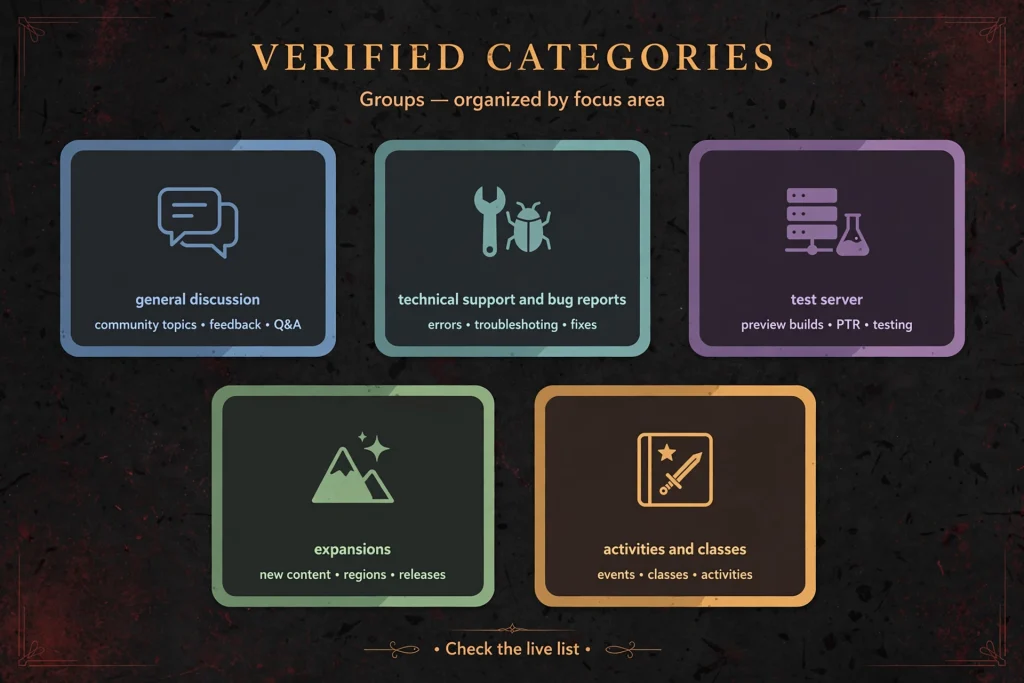
Platform and general discussion
- PC General Discussion: the main place for PC players to talk about anything in Diablo IV. A good fit for questions such as how a game system works or what players think of a change.
- Console Discussion: the same idea for console players, which is handy when your question depends on controller input or a console-specific menu.
- Hardcore: a section for discussing hardcore mode experiences, for example survival tactics or what went wrong in a lost character.
- Items and Crafting: a section about gear and the crafting systems, where you might ask how to improve an item or compare approaches.
- Looking for Group: for finding other players to team up with.
- Clans and Communities: for recruiting clan or fan community members and meeting other players.
- Share Your Creations: for fan art, fan fiction, video content and other media.
Technical support and bug reports
- Technical Support: described on the board as the place for issues that stop you from launching, installing or staying connected to the game.
- PC Bug Report: for in-game bugs on PC.
- Console Bug Report: for in-game bugs on console.
These Diablo 4 Forums sections are separate for a reason. A launch failure is a technical problem, while a quest that will not progress is a bug in the game itself. Choosing the right one helps readers and staff understand what you are describing.
Test server categories
- PTR Feedback: for feedback on content and the experience of playing the Public Test Realm.
- PTR Bug Report: for bugs found on the PTR.
These sections are tied to a test environment, so activity in them may rise and fall depending on whether a test is running. Treat them as temporary-purpose categories rather than permanent parts of the board.
Expansion and activity categories
- Vessel of Hatred Discussion: for talking about the Vessel of Hatred expansion.
- Lord of Hatred Discussion: for talking about the Lord of Hatred expansion.
- Tower and Leaderboard Discussion: for the Tower and leaderboards.
Expansion-specific categories are the most likely to change as the game moves forward. If you are asking about an older expansion, you may also find answers in the general discussion sections.
Class categories
The board has a category for each of these classes: Barbarian, Druid, Necromancer, Rogue, Sorcerer, Spiritborn, Paladin and Warlock. Each one is a space for players of that class to compare ideas. We cover how to use them in a later section.
The official descriptions of each class category are Blizzard’s own flavor text, so we have summarized rather than copied them. Visit the board to read them in full.
How to Search Diablo 4 Forums for Answers
Searching first saves time. Many questions have already been asked, and an existing thread may give you a faster answer than a new post. The forum guidelines themselves encourage browsing existing topics before replying or starting your own.
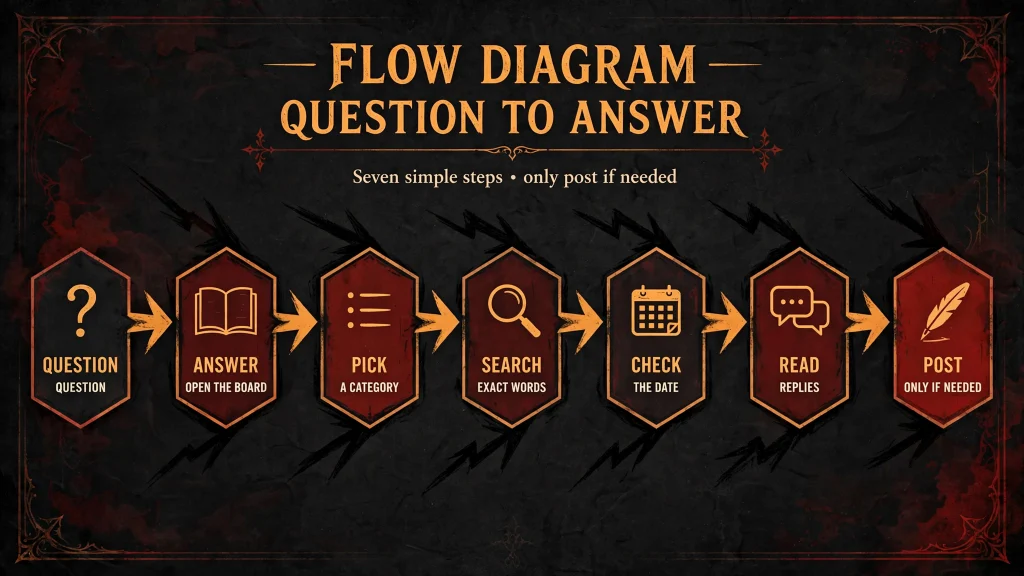
Here is a simple method for searching the Diablo 4 Forums:
- Open the official forum. Start at https://us.forums.blizzard.com/en/d4.
- Find the right category. Use the categories page to choose the section that matches your problem, such as Technical Support for a connection issue or a class category for a skill question.
- Search for exact terms. Use the search tool with the precise wording of an error message, a skill name, an item name, a quest title or a short description of the behavior.
- Check the date. A topic from before a major update may describe a game that no longer works that way.
- Read the replies. Later replies often correct, confirm or update the first post.
- Confirm important claims. If a post makes a claim about a change or a fix, compare it with the official patch notes or Blizzard’s support pages.
- Decide if you need a new topic. If you cannot find your exact situation, or the old discussion is clearly outdated, then start a new one.
Realistic example searches
These are illustrative search ideas, not real threads:
- An exact error code plus the word “PC”, to find technical support topics.
- A skill name plus a class name, to find how players are using it.
- An item name plus “crafting”, to find discussion about improving it.
- “Looking for group” plus a mode or activity, to find players with similar goals.
Using the Diablo 4 Forums search tool well is mostly about specific wording. Short, exact phrases usually work better than long descriptions.
Why old threads can mislead
An old discussion may no longer apply after patches, expansions or balance updates. Always look at the date, and when the topic involves game mechanics, check whether the advice still matches what Blizzard has published since.
How to Create a Post on Diablo 4 Forums
If searching did not solve your problem, you can start a topic. The general process is the same on most discussion boards: sign in, choose the right category, write a clear title, describe the situation and publish.
Check the access requirements first
Posting rules can differ by category and by account. The welcome posts for several official categories, including Technical Support, say that a valid Diablo IV key linked to your Battle.net account is required to post there. We found the same wording for the PC categories in a mirrored copy of the official post rather than on the official page itself, so read the notice at the top of the category you plan to use.
Community members have also reported trouble when an account link was not recognized, for example on a console account. That is an individual report, not a universal rule, so do not assume it will apply to you. Posting access is not guaranteed for every account, and it may not be immediate.
A step-by-step approach
- Sign in with the Battle.net account that is linked to your Diablo IV license.
- Open the category that fits your topic.
- Search once more for a similar topic.
- Select the option to create a new topic.
- Write a specific title.
- Explain the question or problem clearly.
- Add relevant screenshots only if they do not show private information.
- Review what you wrote, then publish.
Write a title people can understand
A strong title tells readers what and where. Here is an illustrative example, not a real forum thread:
“Crashing after the latest update on PC — troubleshooting steps already tried”
That title names the symptom, the platform and the effort already made. Compare it with a vague title such as “Game broken,” which gives readers nothing to work with.
Inside the post, describe what you expected, what actually happened, and what you have tried. Short paragraphs and a clear sequence make a post easier to answer. Clear reproduction steps are especially helpful in the Diablo 4 Forums bug sections.
Diablo 4 Forums for Classes, Builds and Gear Discussions
The class categories are a good place to see how players think about their characters. As of 17 October 2026, the board lists categories for Barbarian, Druid, Necromancer, Rogue, Sorcerer, Spiritborn, Paladin and Warlock. We checked this list against the live categories page rather than relying on an older roster.
Players use these sections to share ideas about:
- Skills and how they work together.
- Equipment choices and item priorities.
- Reactions to balance changes.
- Questions from newer players about how a class plays.
In the Diablo 4 Forums, a post titled something like “How do you handle survivability on this class?” can start a useful conversation. The strongest threads usually include details such as level range, gear situation and the activity the player wants to do.
Forum advice is not verified advice
Build suggestions on the Diablo 4 Forums are opinions and experiences. They are not automatically correct, and many are written for a specific moment in the game’s history. Before you commit to a plan, compare what you read with the in-game tooltips, the current patch notes and dated guides.
If you want structured advice instead of an open discussion, our Diablo 4 builds guide explains how builds fit together and how to choose one. Use the forums to ask follow-up questions and the guide to organize your thinking.
This section is not a tier list. Its purpose is to show how the class categories can support your own research.
Diablo 4 Forums for Bug Reports and Technical Support
Two kinds of posts are easy to mix up. A bug report describes something in the game that behaves wrongly, such as a broken interaction. A technical support request describes a problem that affects your ability to run or connect to the game.
On the official board, the Technical Support category is described as the place for launching, installing and connection problems, while separate bug report categories exist for PC and console. Choosing the right Diablo 4 Forums category helps the right readers find your post, whether you are using the Diablo 4 technical support forum section for a launch problem or the Diablo 4 bug report forum sections for an in-game fault.
What to include
A useful report contains:
- Platform and operating system: for example PC with a particular Windows version, or a specific console.
- Game version, where available: if you can see it, include it.
- The exact error message: copy it word for word.
- Steps that reproduce the problem: a short list of what you did.
- How often it happens: every time, or only sometimes.
- What you have already tried: restarts, updates and other steps.
- Evidence: a screenshot or similar, when appropriate.
Protect your private information
Never publish passwords, authentication codes, payment details or other sensitive information in a forum post. The guidelines also warn against exposing anyone’s private information. Crop or hide personal details in screenshots before you upload them.
What replies mean
Other players may suggest a workaround that helps, but a community reply is not an official solution. Treat it as a lead. The Technical Support welcome post also points readers to Blizzard’s Knowledge Center for common fixes. We did not verify a stable direct link for this article, so look for Blizzard Support’s Diablo IV pages from Blizzard’s own site.
Posting a report does not guarantee a response, a fix or any particular timeline. The Diablo 4 Forums are a place to document and discuss problems, and no one can promise how quickly they will be addressed.
Diablo 4 Forums for Patch Notes and Player Feedback
The forums are a useful place to see how players react to changes. After an update, you can often find discussion about balance adjustments, seasonal mechanics and new content. The board also has test-related categories and expansion discussion sections where feedback may appear.
It helps to keep several kinds of information apart:
- Official patch notes: Blizzard’s published list of changes, found on its news site.
- Developer announcements: statements from the team about plans or fixes.
- Player feedback: what players think about a change.
- Community theories: explanations players propose without confirmation.
- Unverified rumors: claims with no source.
- Individual opinions: one person’s view.
Official notes tell you what changed. The Diablo 4 Forums tell you how players feel and what they are noticing. Both are valuable, but they answer different questions.
Check dates and versions
Before relying on an older discussion, check the date it was posted, the game version it refers to, and whether an official announcement confirms the claim. This guide does not state a current patch number, season or release date, because those details change and should be confirmed on Blizzard’s patch notes page right before you act on them.
Diablo 4 Forums vs Reddit, Discord and Other Communities
Different platforms suit different needs. The table below is a general comparison, not a ranking. Moderation, quality and participation rules differ between communities, so no row applies identically to every community or website.
| Platform | Main purpose | Strengths | Limitations |
|---|---|---|---|
| Official Diablo IV Forums | Official game discussion, feedback and support categories | Directly organized around Diablo IV and its official community | Participation and access policies may apply; answers can vary in quality |
| Community discussion and shared player experiences | Broad community perspectives and discussion discovery | Claims require verification; threads may become outdated | |
| Discord | Real-time community chat and coordination | Quick conversations and group coordination | Information can be difficult to find later; quality varies by server |
| Build websites | Structured build guides and reference material | Organized guides and dedicated explanations | May become outdated after patches |
| GamesPuma | Editorial guides and gaming explainers | Structured, searchable articles | Not an official Blizzard support channel |
Which one should you use? If you want to report a bug or ask a technical question in an official setting, the Diablo 4 Forums are the natural starting point. If you want a quick opinion from many players, Reddit may be faster. If you want to find a group right now, Discord can work well. If you want a structured explanation, a guide is easier to follow than a long thread.
Many players use several of these together. The key is to remember what each is good at and what it cannot promise.
Common Problems When Using Diablo 4 Forums
Some problems come up often. Here are sensible next steps for each, without promising a fix.
You cannot sign in or create a post
Check the notice at the top of the category. Several official categories say a valid Diablo IV key linked to your Battle.net account is required to post. Make sure you are using the right account, and if you believe your license is not being recognized, contact Blizzard Support through its official channels. We cannot say whether an account issue can be resolved in your case, and Blizzard Support may not be able to guarantee forum access.
A discussion is hard to find
Try other words. Search the exact error text, the skill name or the item name, and narrow by category. Sort through recent topics if the search results seem old.
A category looks unavailable
Some categories, such as test server and expansion sections, may be added or removed. Check the current categories page and choose the closest alternative.
You are unsure where to report a bug
If the problem stops the game from launching or connecting, start with Technical Support. If the problem happens inside the game, use the bug report category for your platform. If you are still unsure, read the category descriptions on the Diablo 4 Forums categories page.
An old thread has outdated advice
Look at the date and later replies, then compare with current patch notes. If the topic is outdated, start a new topic and link back to the old one for context.
Your post gets no reply
Replies are not guaranteed. Improve your title, add missing details and check that you are in the correct category. Do not repost the same question in several places. The guidelines ask users not to cross-post the same thing in multiple topics, and the Technical Support welcome post warns that repeated reposting can lead to suspended posting privileges.
Access may differ by account or region
Access can vary by account and region. We could not verify a full list of regional rules, so rely on the notices shown in the forum itself.
Forum Etiquette and How to Get Helpful Replies
Good etiquette improves the replies you receive. The official guidelines describe the forum as a place for civil public discussion and ask users to add something positive to the conversation. Here is how to put that into practice on the Diablo 4 Forums:
- Search first. Browse existing topics before you start a new one.
- Choose the correct category. The guidelines ask users not to start topics in the wrong category.
- Use a clear title. Specific titles attract the right readers.
- Keep your post concise. Explain the issue without long tangents.
- Share evidence safely. Include screenshots or details, but not private information.
- Stay on topic. Do not divert a topic midstream.
- Disagree respectfully. The guidelines say to criticize ideas, not people.
- Avoid spam and duplicates. Do not cross-post or bump threads.
- Use likes instead of empty replies. The guidelines suggest the Like button rather than posting “+1” or “Agreed.”
- Flag problems. If you see bad behavior, the guidelines recommend flagging rather than replying.
The guidelines also note that the forum is public and indexed by search engines, so keep language, links and images appropriate. They say users should only post their own content or content they have permission to share.
Read the full guidelines at https://us.forums.blizzard.com/en/d4/guidelines before you take part. Moderators can remove content and accounts, so it is worth knowing the expectations.
How to Verify Information Found on Diablo 4 Forums
A forum post is a starting point, not a final answer. The Diablo 4 Forums are valuable because many players share what they see, but any one post can be mistaken, outdated or based on a different setup.
When you read a post, ask these questions:
- Who posted it? Is it a regular player, or an official announcement?
- Is it official? Official statements should be clearly identifiable, and a normal reply is not one.
- When was it written? Check the date and the game version.
- Do others report the same thing? Multiple matching reports are more convincing than a single claim.
- Does a patch note confirm it? Compare with Blizzard’s published notes.
- Does it apply to me? Platform, expansion ownership and game mode can change the answer.
Use the Diablo 4 Forums for discovery and discussion, then verify anything important through official documentation or what you can see in the game. This habit protects you from acting on stale or incorrect advice.
Frequently Asked Questions About Diablo 4 Forums
1. What are Diablo 4 Forums?
Diablo 4 Forums are the community discussion boards for Diablo IV. The official version is hosted by Blizzard and organized into categories for general discussion, classes, items, group finding, bug reports, technical support, test content and expansions.
2. Where is the official Diablo IV forum?
The official forum is at https://us.forums.blizzard.com/en/d4. The categories page is at https://us.forums.blizzard.com/en/d4/categories. We verified the US address and did not verify other regional addresses.
3. Are Diablo 4 Forums run by Blizzard?
The official Diablo 4 Forums at the address above are Blizzard’s own board. Reddit communities, Discord servers, build sites and GamesPuma are independent of it, so what they publish is not an official Blizzard statement.
4. How do I search the Diablo 4 Forums?
Open the forum, choose a relevant category, and search for the exact error message, skill, item or quest name. Check the date of each result and read the replies for updates before you trust the answer.
5. How can I post a question on Diablo 4 Forums?
Sign in, open the category that fits your question, write a specific title, describe the issue and publish. Read the notice at the top of the category first, because posting requirements may apply.
6. Where should I report a Diablo IV bug?
Use the PC Bug Report or Console Bug Report category for in-game bugs, depending on your platform. For problems with launching, installing or staying connected, the Technical Support category is described as the right place.
7. Can I use the forums to discuss builds and classes?
Yes. The board has a category for each class listed on the categories page, plus an Items and Crafting category. Treat the advice as community opinion and compare it with current game information. Our Diablo 4 builds guide can help with structure.
8. Are Diablo 4 Forums better than Reddit?
Neither is better in every case. The official forums are organized around Diablo IV and its official categories, while Reddit offers broad community perspectives. Many players use both and verify important details against official sources.
9. Why might I be unable to post on the official forums?
Several official categories state that a valid Diablo IV key linked to your Battle.net account is required to post. Account linking, category rules or moderation may also play a part. Contact Blizzard Support through official channels if you think your account should have access.
10. Are forum answers always official or accurate?
No. Most replies come from other players. Unless a post is clearly an official announcement, treat it as community input and check it against patch notes or official support pages.
11. Where can I find current Diablo IV patch information?
Blizzard publishes Diablo IV patch notes on its news site. Check the date and version there, because this guide does not list a current patch number.
12. Can I use GamesPuma guides alongside forum discussions?
Yes. Use the Diablo 4 Forums for questions and community reactions, and use guides such as our Diablo franchise guide for background. GamesPuma is not an official Blizzard support channel.
Final Verdict
The official Diablo 4 Forums are the best starting point when you want a Blizzard-hosted place to ask questions, report problems and see what other Diablo IV players are discussing. They are especially useful for bug reports, technical support and class-specific conversations, as long as you search first and pick the right category.
Remember that the board mixes official notices with player opinion. Check dates, compare claims with Blizzard’s patch notes, and keep private information out of your posts. If you do that, the Diablo 4 Forums can save you time and help you find answers faster.
Ready to start? Open the official Diablo IV forums, pick a category, and search before you post.
Sources and Verification Notes
Consulted:
- https://gamespuma.com/ (homepage, internal-link candidates)
- https://us.forums.blizzard.com/en/d4/categories (live category list, 17 October 2026)
- https://us.forums.blizzard.com/en/d4/guidelines (official forum guidelines)
- https://us.forums.blizzard.com/en/d4/t/welcome-to-technical-support/22 (Technical Support welcome post, key requirement)
- https://devtrackers.gg/diablo4/p/f5ca602b-discuss-all-things-diablo-iv-with-fellow-pc-based-wanderers and https://devtrackers.gg/diablo4/p/6cdf0d50-welcome-to-pc-technical-support (third-party mirrors of PC category welcome posts)
- https://us.forums.blizzard.com/en/d4/t/account-linking-invalid-for-forums/23314 (one player’s account-linking report, used only as anecdote)

Written by Daniel Carter
Daniel Carter is a dedicated gaming writer who enjoys turning complex gaming topics into clear, useful, and engaging content. He covers game guides, tips, reviews, features, and the latest developments across the gaming world. His approach focuses on research, accuracy, and practical value, helping readers discover new games, improve their gameplay, and stay informed about the industry. For Daniel, great gaming content is not just about information—it is about making every article genuinely worth reading.