How to Install Exiled Exchange 2 is a short job once you know which download is the real one. Get the app from the official project download page or the official GitHub Releases page, run the Windows installer, start Exiled Exchange 2, then launch Path of Exile 2 and wait for the banner that confirms the overlay has loaded. That is the whole process in one sentence.
This guide explains How to Install Exiled Exchange 2 in plain language, from finding the legitimate download to your first price check. It follows the project’s current documentation, which we reviewed on 15 October 2026. GamesPuma is publishing an independent tutorial. We are not the developer and we do not distribute the software.
[INSERT IMAGE 1 HERE — FEATURED IMAGE]
Table of Contents
What Is Exiled Exchange 2 Before You Learn How to Install Exiled Exchange 2?
Exiled Exchange 2 is a Path of Exile 2 overlay program for price checking items. The project describes itself as an app for price-checking items in Path of Exile 2, and its repository calls it a fork of Awakened PoE Trade. In practice, that means a small window appears on top of the game and shows pricing information for the item under your cursor. For a broader look at the tool’s features, read our Exile Exchange 2 guide.
The mechanism is simple. According to the project’s Quick Start page, Path of Exile 2 copies the item’s text to the clipboard when you press Ctrl + C, and Exiled Exchange 2 parses that text and displays it in the overlay. That clipboard dependency explains many of the problems covered later in this guide.
Two cautions belong here. First, the app does not magically price your item. The project says you tick the relevant filters yourself, and that knowing which stats matter comes from understanding different builds. Second, prices shown in the overlay are listings and estimates, not guaranteed selling prices. Treat them as a starting point.
Learning How to Install Exiled Exchange 2 is only the first step. The tool is most useful once you understand what it is reading and why.
Is Exiled Exchange 2 Safe to Download? Check This Before You Follow How to Install Exiled Exchange 2 Steps
Before learning How to Install Exiled Exchange 2, learn how to spot the real project. The maintainer states that the only official website is the project’s GitHub Pages site and that the only official repository is the Kvan7/Exiled-Exchange-2 repository on GitHub. The FAQ adds that any other mirrors are not known to the developer, and that downloading from them may be unsafe or malicious.
The FAQ also answers a common question directly: exiledexchange2.com is not an official website. Several guides, including some search results we reviewed, point readers to that domain. Do not use it as your download source.
Here is a quick identity check you can do in under a minute:
- The repository owner is Kvan7 and the repository name is Exiled-Exchange-2.
- The repository page describes itself as a Path of Exile 2 price-checking app.
- The repository lists itself as a fork of SnosMe/awakened-poe-trade, which matches the project history.
- The download links on the official site point to the official GitHub Releases page.
Be careful with look-alikes. Search results also show other forks of the project, such as personal builds with their own release pages. A fork is a separate project. We did not use any fork as evidence for how the official app works, and you should not treat a fork’s instructions as official.
GamesPuma cannot tell you that any file is free of malware, and a project page alone does not prove that. What you can do is download only from the sources the maintainer names and read the current release notes first. Knowing How to Install Exiled Exchange 2 safely starts with that discipline.
Exiled Exchange 2 System Requirements Before How to Install Exiled Exchange 2
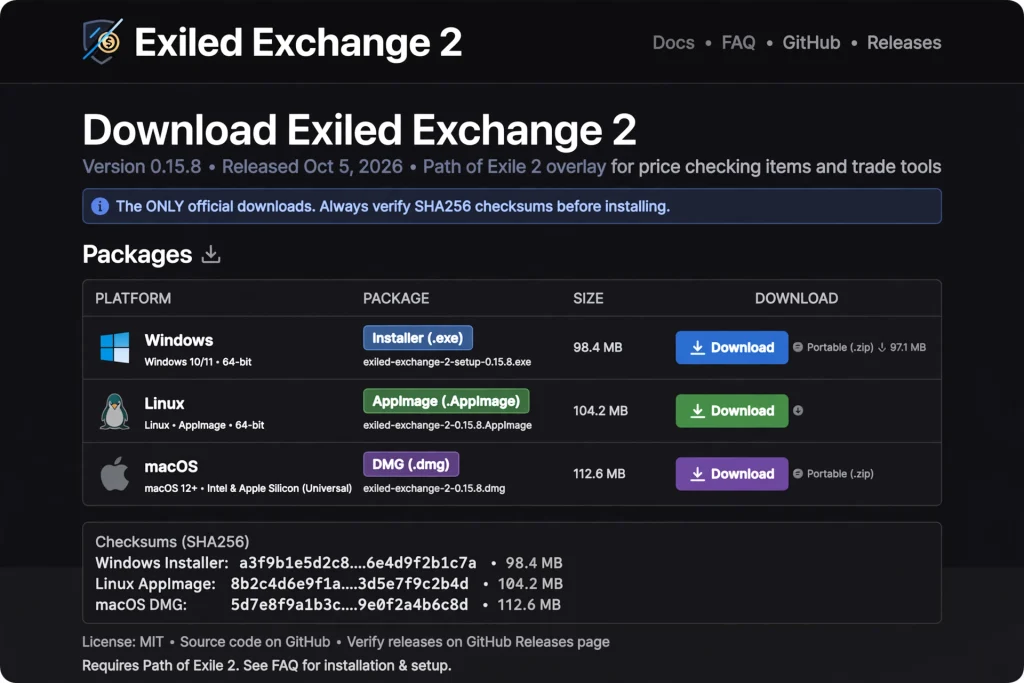
The official download page lists builds for Windows, Linux, and macOS, plus a short list of game requirements. The table below summarizes what the page showed on 15 October 2026. Check the live page before you download, because requirements can change.
| Operating system | Package listed | Automatic updates | Startup | Notes |
|---|---|---|---|---|
| Windows 10 or newer | Installer | Yes | Fast | Main route in this guide |
| Windows 10 or newer | Portable | No | Slower | Runs without the installer |
| Linux | AppImage | Yes | Not listed | Separate known issues exist |
| macOS | dmg | No | Not listed | Unsigned; Apple security prompts apply |
Source: the official Exiled Exchange 2 download page.
The game requirements on the same page are just as important when you follow How to Install Exiled Exchange 2:
- Display mode: Windowed Fullscreen and Windowed are supported. Fullscreen is not.
- Game language: English, Russian, Portuguese, French, German, Spanish, Korean, Traditional Chinese, and Japanese are supported. Thai is not.
- Permissions: Administrator rights are not required, with one exception covered below.
- Cloud gaming: The page says the app is not compatible with GeForce Now or any cloud gaming service that does not forward clipboard data.
This tutorial focuses on Windows. We did not test Linux or macOS, so this article does not give step-by-step instructions for them. If you are on those platforms, read the official download page and the Common issues page, which lists Linux-specific reports.
How to Download Exiled Exchange 2
This section covers the Exiled Exchange 2 download, the first stage of How to Install Exiled Exchange 2, step by step. The wording of buttons and filenames can change between releases, so use the names you see on the live page.
- Open an official source. Go to the official download page at kvan7.github.io/Exiled-Exchange-2/download, or open the Releases page of the Kvan7/Exiled-Exchange-2 repository on GitHub.
- Confirm the project identity. Check the owner and repository name as described above.
- Read the latest release notes. Release notes tell you what changed and whether the maintainer has flagged any known problems.
- Choose the correct package. For most Windows readers, that is the Windows installer. The download page labels it “Windows 10+ (installer)”.
- Save the file. Keep it somewhere easy to find, such as your Downloads folder.
- Check what you downloaded. On the day we reviewed the page, the installer link pointed to a file named exiled-exchange-2-Setup-0.16.3.exe. The version number will change over time, but the name should follow the same pattern. If you received a zip of source files with no executable inside, the FAQ says you downloaded the source code, not the app.
- Continue to the installation steps below.
One discrepancy deserves mention. The download page said the latest version was 0.16.3, while the GitHub Releases page snapshot we could load listed v0.15.8 as the latest entry. We could not confirm the cause. Always use the version shown on the live official pages when you follow How to Install Exiled Exchange 2.
How to Install Exiled Exchange 2 on Windows
This is the main section for the Exiled Exchange 2 Windows installation. We describe the process the maintainer documents. We did not run the installer ourselves, so we do not describe individual installer screens.
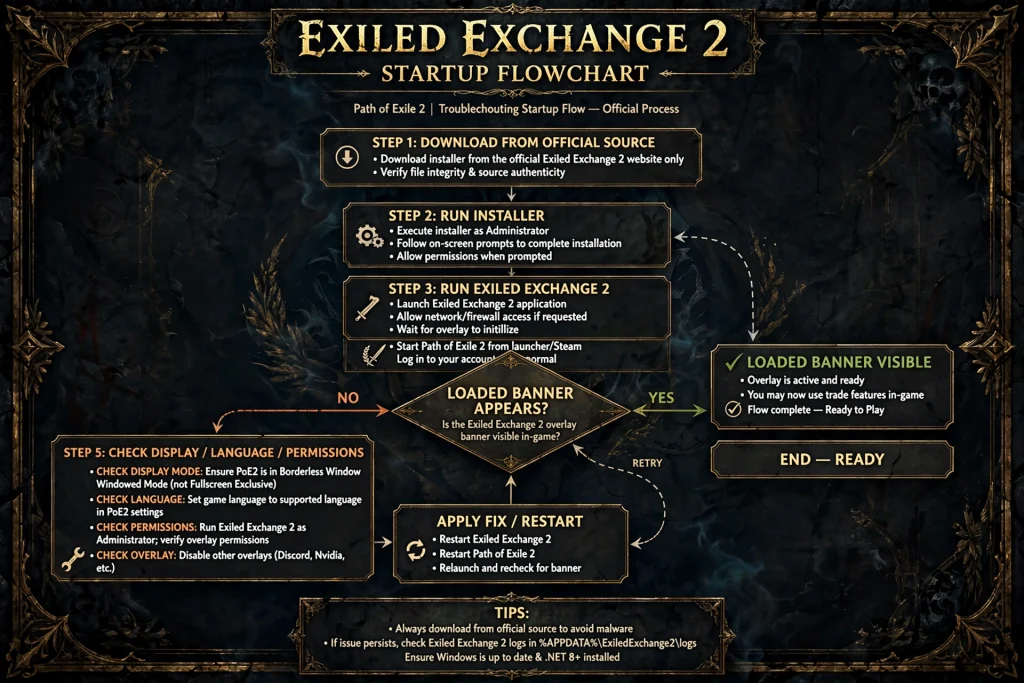
Required steps for How to Install Exiled Exchange 2:
- Download the installer from an official source, as covered above.
- Run the installer. The official instructions list running the installer as the second step.
- Run Exiled Exchange 2. Start the application after installation finishes.
- Launch Path of Exile 2. The maintainer says launching the game generates the correct files.
- Watch for the loaded banner. The official steps refer to a banner popup showing that Exiled Exchange 2 loaded. That banner is your confirmation that the overlay found the game.
Optional steps after How to Install Exiled Exchange 2:
- Open the overlay with Shift + Space and click the cog icon to explore settings.
- Change hotkeys that conflict with other software.
- Install the portable build instead, if you prefer not to use the installer (see the comparison below).
Notice what is not on the list: you do not need to edit any files for a fresh installation. The file-editing steps in the official documentation apply to players moving from Awakened PoE Trade, which we cover later.
That is How to Install Exiled Exchange 2 on a standard Windows PC. If the banner does not appear, jump to the troubleshooting section.
Installer or Windows Security Warning
The download page includes a clear note: the app is unsigned, so you will have to bypass security warnings on Windows and macOS to open it. This is the single most confusing part of How to Install Exiled Exchange 2 for beginners, so it deserves care.
An unsigned-app warning means the operating system cannot match the file to a verified publisher. It does not prove the file is malicious, and it does not prove the file is safe. It simply tells you the system has no publisher information to show.
Use this decision process whenever How to Install Exiled Exchange 2 triggers a warning:
- Confirm that you downloaded the file from the official download page or the official Kvan7 GitHub Releases page.
- Confirm that the repository name and owner match.
- Read the current instructions on the download page.
- If the file came from anywhere else, stop. Delete it and start again from an official source.
- If you are satisfied with the source, follow the Windows prompts. In general, Windows SmartScreen hides the run option behind a “More info” link, but the exact wording depends on your Windows version, and this is general Windows behavior rather than project documentation.
Do not turn off your antivirus or other Windows protections to get past the warning. Nothing in the official documentation asks you to do that, and a global shutdown of security features is never a safe fix. If your security software blocks the file and you are unsure why, ask on the official issue tracker before taking further action.
How to Set Up Exiled Exchange 2 With Path of Exile 2
Once the installer finishes, the Exiled Exchange 2 setup is mostly about getting the game and the overlay talking to each other. Here is the verified order that completes How to Install Exiled Exchange 2.
- Start Exiled Exchange 2. Open it from your Start menu or the shortcut the installer created.
- Launch Path of Exile 2. The maintainer says to launch the game to generate the correct files.
- Look for the banner. When the loaded banner appears, the app has detected the game.
- Check your display mode. Use Windowed or Windowed Fullscreen. Fullscreen is not supported.
- Check your game language. Make sure it is on the supported list above.
- Open the overlay. Press Shift + Space in the game, then click the cog icon to reach settings.
Two details trip people up. The first is permissions. The official page says administrator rights are not required, but if you run the Path of Exile client as Administrator, operating system security boundaries apply, and Exiled Exchange 2 must also be started with Administrator rights to reach the game window. The simplest approach is to run both at the same permission level.
The second is league selection. The FAQ says you change the league in the same settings screen you open with Shift + Space. If you play in a private league, the FAQ says you will need to sign in through the built-in browser, and it links to a dedicated page.
If this section went smoothly, you now know How to Install Exiled Exchange 2 and confirm it works. The next step is using it.
How to Use Exiled Exchange 2 to Price-Check Items
Now for your first price check. The Quick Start page lists these default hotkeys:
| Action | Default hotkey |
|---|---|
| Price check an item | Ctrl + D |
| Price check, window stays open | Ctrl + Alt + D |
| Open item on the wiki | Alt + W |
| Open overlay with widgets | Shift + Space |
| Go to hideout (chat command) | F5 |
| Exit to character selection (chat command) | F9 |
The page also says some functions have no hotkey by default to avoid conflicts, and that you can assign or change hotkeys in Settings. So if a shortcut does not match this table on your machine, check your settings first.
To run a price check once How to Install Exiled Exchange 2 is finished:
- Hover your cursor over an item in the game.
- Press the price-check hotkey. Hold Ctrl if you do not want the window to close while you move the mouse; the page says you can release it once the cursor is inside the window.
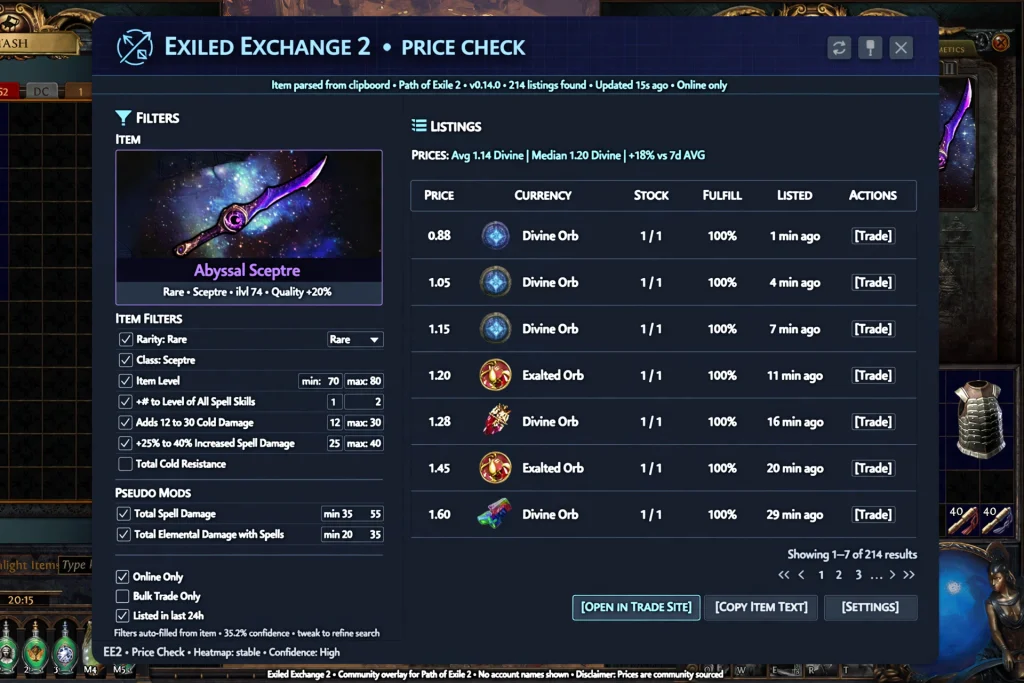
- Read the window. The Quick Start explains that some stats are grouped into “pseudo” stats, such as combining several resistance mods into one total.
- Adjust the filters. The numbers beside each filter show the min-max range used for the trade search, and they are pre-filled slightly below your item’s actual roll so that similar items can be found. You can change them manually.
- Compare the listings and make your own judgment.
Remember that listings are asking prices. The FAQ notes that a question mark beside a price means the item was priced by its stash tab name rather than individually, so the price is likely not real. It also notes an orange or red circle beside the listed time marks a player as AFK or offline.
The FAQ lists a few places where price checks cannot work because the game copies nothing to the clipboard: the Divination Card stash tab, Curio Display rewards in Heist Blueprints, and maps offered by Kirac.
Exiled Exchange 2 Display Mode and Language Settings After How to Install Exiled Exchange 2
Most “overlay not showing” reports trace back to the display mode, so this section is worth a close look when you are learning How to Install Exiled Exchange 2.
The download page supports Windowed Fullscreen and Windowed and lists Fullscreen as unsupported. These modes do not behave identically, so do not assume that a setting that works for another game will work here. The Common issues page also warns that updating GeForce Experience can reset game video settings to an optimized profile and silently enable Fullscreen mode. If the overlay stopped working after a driver or GeForce Experience update, check the game’s display mode first.
For language, the app supports the nine languages listed in the requirements. The project’s FAQ says other languages might be supported if the translation file is completed. A release note for version 0.15.5 mentions added detection for an incorrect language selection, which suggests the app can flag a mismatch, though we did not test that behavior.
To change display mode or language, use the Path of Exile 2 options menu. We did not capture the exact menu labels, so look for the display and language settings in the game’s own options.
Exiled Exchange 2 Portable Version vs. Installer
The official table offers two Windows packages, and the difference matters if you are deciding How to Install Exiled Exchange 2 for the first time.
| Installer | Portable | |
|---|---|---|
| Automatic updates | Yes | No |
| Startup time | Fast | Slower |
Based on the official table, the installer is the easier long-term choice because it updates automatically and starts faster. The portable build suits readers who want to run the app without installing it, but they must update it by hand. The FAQ mentions that auto-updates can be disabled with a command line flag, and it links to a separate page about command line flags. Beginners should not need that.
We did not find official guidance telling beginners which to choose, so the recommendation above is an editorial reading of the table, not a maintainer instruction.
How to Update Exiled Exchange 2 After How to Install Exiled Exchange 2
The installer build and the Linux AppImage list automatic updates as supported, while the portable build and the macOS dmg do not. This is the official table, and it determines your update routine.
For installer users, updating is usually hands-off, so How to Install Exiled Exchange 2 is a one-time job. For portable and macOS users, follow this routine:
- Open the official Releases page.
- Read the release notes for anything that affects your setup.
- Compare the latest version with the one you run.
- Download the latest package from the official download page.
- Quit Exiled Exchange 2 completely before replacing or launching the new version. The Common issues page warns that launching a second instance while the first is still running will do nothing.
- Start the app and launch Path of Exile 2 to confirm the loaded banner appears.
We did not find an official step-by-step update procedure for the portable build, so the steps above combine the official table, the release notes, and the quit-first warning. Treat them as editorial guidance. Knowing How to Install Exiled Exchange 2 includes knowing how to keep it current, because release notes show the maintainer regularly updates trade data and fixes parsing problems.
How to Preserve Settings During an Upgrade
If you used Awakened PoE Trade for Path of Exile 1, the official site publishes a migration procedure. It says all steps are required and that most problems come from skipping step 7. In short, the steps are:
- Download the latest release.
- Run the installer.
- Run Exiled Exchange 2.
- Launch Path of Exile 2 to generate the correct files.
- Quit both the game and Exiled Exchange 2 after the loaded banner appears.
- Copy the apt-data folder from the awakened-poe-trade folder in your %APPDATA% directory into the exiled-exchange-2 folder in %APPDATA%.
- Edit config.json and change the “windowTitle” value from “Path of Exile” to “Path of Exile 2”. Otherwise the app opens only for Path of Exile 1.
- Start Exiled Exchange 2 and Path of Exile 2.
Do not copy old settings blindly. The project warns that skipping the window title edit is the most common failure, and old settings may behave differently in the new app. If something looks wrong, the Common issues page suggests backing up the apt-data folder inside %appdata%\exiled-exchange-2, deleting the folder, and starting fresh.
Even if you are not migrating, that backup advice is useful before any major change. This is part of understanding How to Install Exiled Exchange 2 without losing your configuration.
How to Uninstall Exiled Exchange 2 (the Reverse of How to Install Exiled Exchange 2)
We did not find an official uninstall guide, so the following is general Windows advice rather than project documentation. If you used the installer from How to Install Exiled Exchange 2, remove the app through the Windows list of installed apps. If you used the portable build, you can delete the file you downloaded.
Your configuration lives in the exiled-exchange-2 folder under %APPDATA%, according to the Common issues page. If you want to keep your settings for a later reinstall, copy the apt-data folder somewhere safe first. We do not recommend deleting any system folders; stay within the app’s own folder.
Common Problems After You Learn How to Install Exiled Exchange 2
This section covers Exiled Exchange 2 troubleshooting for anyone who followed How to Install Exiled Exchange 2 and hit a wall, based on the official Common issues page, the FAQ, and a dedicated page about price checks that do nothing. The maintainer’s first advice is to read the requirements again, check the logs, and change one variable at a time.
Nothing happens after How to Install Exiled Exchange 2 and a price check
Open the logs first. The FAQ says they are under the Debug tab in settings. The official page about this problem singles out one log line, “No item text found”, as the case without a quick fix. It means the game did not copy the item to the clipboard.
According to the same page, the app relies on the game’s Advanced Descriptions copy action, and that shortcut is frequently intercepted by other software. Programs players reported include ASUS GPU Tweak II, Radeon Software, Display Pilot, AutoHotkey scripts, and Discord clips. The goal is to make Path of Exile copy the full item text to the clipboard when you press the copy shortcut.
The overlay does not appear after How to Install Exiled Exchange 2
Check, in this order, whether How to Install Exiled Exchange 2 left you in an unsupported setup: the display mode is not Fullscreen, the game language is supported, and the permission levels match. The Common issues page also recommends updating GPU drivers if you use the Vulkan renderer, saying that if the app works under DirectX 11 or 12, old Vulkan drivers are the cause.
The wrong game is detected
If you migrated from Awakened PoE Trade and the app only works for Path of Exile 1, the official step 7 tells you to correct the window title in config.json.
Another program causes a conflict
The Common issues page recommends closing every application you can in the tray and task manager, then launching them one at a time to identify the conflict.
A sound plays when I price check
The FAQ explains that Discord’s clip-saving shortcut is Alt + C by default, and Exiled Exchange 2 presses it on every price check. Change the Discord key to stop the sound.
Cloud gaming does not work
Services that do not forward clipboard data are not compatible, according to the download page. There is no fix to attempt on our side.
The installer does not open or the file is wrong
We found no official page about an installer that will not launch. Our unverified hypothesis is that an incomplete download or a blocked file is responsible, so download again from an official source and re-read the security warning section above. If it still fails, search the official issue tracker for a matching report.
The Common issues page also links dedicated pages for “There are no stats to select from when price checking”, “Failed to load leagues”, “Query is too complex”, and “Unexpected token is not valid JSON”. We did not review the contents of those pages, so check them if you see those messages. If your problem is not covered, the issue tracker is the right place to report it. The final item on the official checklist is the project’s Discord, but the maintainer warns that vague reports are redirected to the Common issues page.
Is Exiled Exchange 2 Compatible With Path of Exile 2 After How to Install Exiled Exchange 2?
Yes. Exiled Exchange 2 is built for Path of Exile 2. The official site’s description is “App for price-checking items in Path of Exile 2”. The Awakened PoE Trade tool is its Path of Exile 1 ancestor, and the migration steps exist precisely because the two games need different window titles.
Compatibility is not permanent. Game updates can change item text or trade data, which is why the release notes show frequent updates. Check the Releases page after major Path of Exile 2 patches rather than assuming the version you installed will keep working.
The FAQ also addresses safety with the game’s rules: there are no approved community apps, and an app that follows the game’s terms of service, performs one server action per button press, and does not interact with the game client itself can be considered safe. If you get banned, the FAQ says to contact support first. This is the maintainer’s position, not a guarantee from Grinding Gear Games.
For more on the economy side of the game, see our comparison of every PoE2 pricing tool and our Path of Exile trade guide.
Frequently Asked Questions
How to Install Exiled Exchange 2: What Is the Short Answer?
Download the installer from the official download page or the official GitHub Releases page, run it, start Exiled Exchange 2, and launch Path of Exile 2. Wait for the loaded banner. That is How to Install Exiled Exchange 2 in its shortest form.
Where can I download Exiled Exchange 2 officially?
The official sources are the project’s GitHub Pages download page and the Kvan7/Exiled-Exchange-2 GitHub Releases page. The maintainer says other mirrors are unknown and may be unsafe, and that exiledexchange2.com is not official.
Is Exiled Exchange 2 free?
The official pages we reviewed list no price and show downloads directly from GitHub. We did not find a licensing statement on those pages, so check the repository’s license information if that matters to you.
Does Exiled Exchange 2 work with Path of Exile 2?
Yes. It is a Path of Exile 2 price-checking overlay. Compatibility after future game patches depends on the maintainer’s updates, so check the release notes.
Why is the Exiled Exchange 2 overlay not showing?
The most common documented causes are Fullscreen mode, an unsupported game language, mismatched Administrator permissions, old Vulkan drivers, or conflicts with other software. Work through the checks in the troubleshooting section.
Which operating systems does Exiled Exchange 2 support?
The download page lists Windows 10 or newer (installer and portable), Linux (AppImage), and macOS (dmg). This tutorial covers only Windows.
Does Exiled Exchange 2 update automatically?
It depends on the package. The Windows installer and the Linux AppImage list automatic updates; the Windows portable build and the macOS dmg do not.
What should I do if How to Install Exiled Exchange 2 triggers a Windows warning?
The app is unsigned, so a warning is expected according to the download page. Verify that the file came from an official source before you proceed, and do not disable your antivirus. This is the safest answer to How to Install Exiled Exchange 2 when Windows objects.
Final Verdict
Learning How to Install Exiled Exchange 2 is straightforward when you stick to the official sources. Download from the project download page or the Kvan7 GitHub Releases page, run the Windows installer, launch the app, then start Path of Exile 2 in Windowed or Windowed Fullscreen mode and wait for the loaded banner.
Remember the main requirements: a supported game language, matching permission levels, and no cloud gaming service that blocks the clipboard. If a price check does nothing, read the logs first and look for conflicting software.
If you are still stuck, consult the official Common issues page or the issue tracker rather than relying on outdated instructions or unofficial downloads. We hope this guide on How to Install Exiled Exchange 2 saves you time, and we will update it as the project changes.
Sources and Official Links
This tutorial is based on the project’s own documentation, reviewed on 15 October 2026. Check these pages again before you install, because versions and requirements can change.
Official Exiled Exchange 2 resources
- Official download page: packages, automatic-update column, display mode, language and administrator requirements, migration steps.
- Official GitHub repository: the project’s source and README.
- Official GitHub Releases: release notes and downloadable assets.
- Quick Start: how the app works, default hotkeys, the price check window.
- FAQ: settings, logs, official website warning, private leagues, safety question.
- Common issues: the maintainer’s troubleshooting checklist.
- Nothing happens when I try to price check: clipboard and conflicting-software guidance.
- Path of Exile terms of use: linked from the project FAQ.
Related GamesPuma guides

Written by Daniel Carter
Daniel Carter is a dedicated gaming writer who enjoys turning complex gaming topics into clear, useful, and engaging content. He covers game guides, tips, reviews, features, and the latest developments across the gaming world. His approach focuses on research, accuracy, and practical value, helping readers discover new games, improve their gameplay, and stay informed about the industry. For Daniel, great gaming content is not just about information—it is about making every article genuinely worth reading.