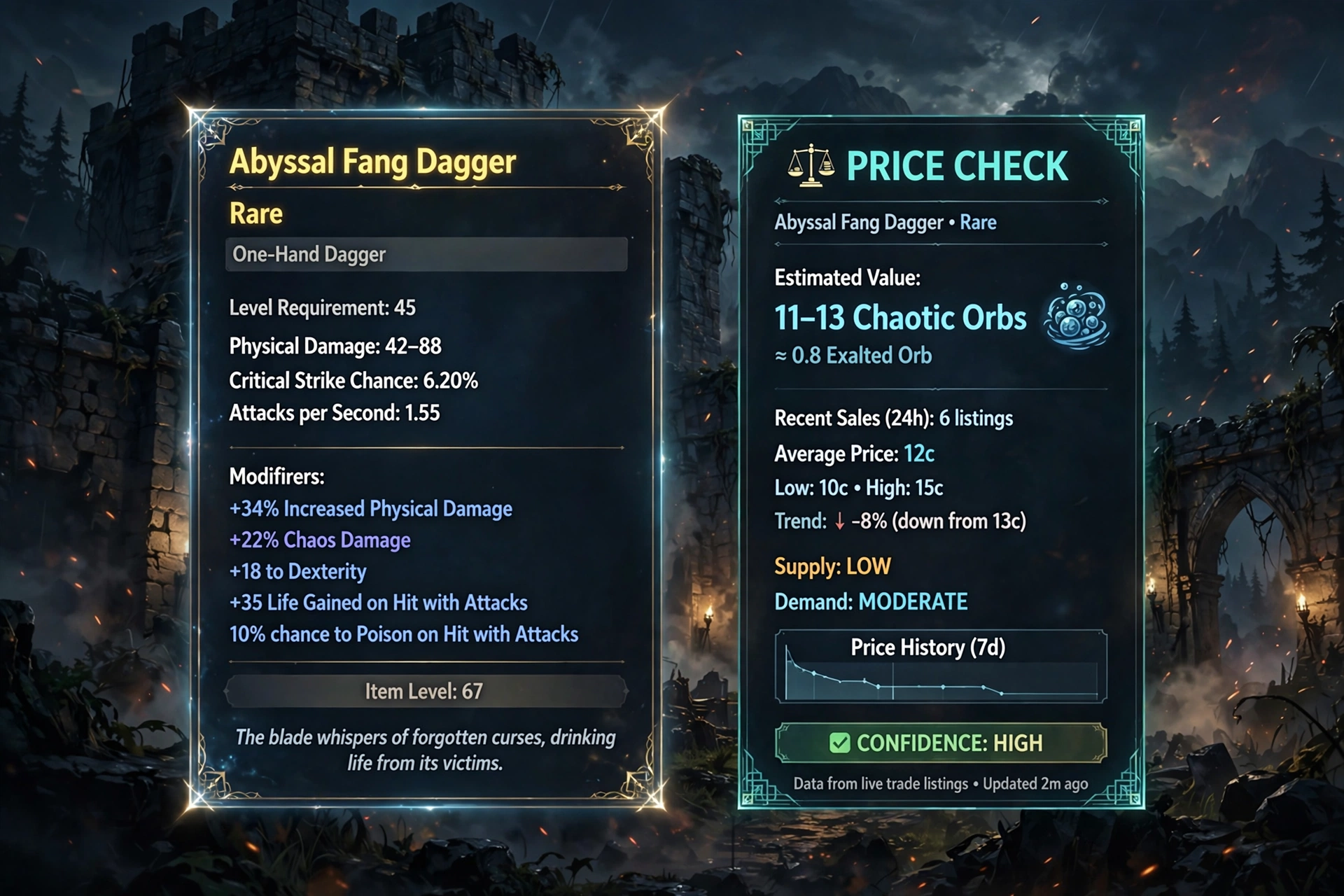
Exile Exchange 2 is the phrase most players type when they want a price-checking overlay for Path of Exile 2, and the tool they are looking for is officially named Exiled Exchange 2. It is a free-to-download, community-developed app that reads the item under your cursor, lets you choose which modifiers matter, and then shows comparable listings from the official trade site without forcing you to alt-tab. The official download page is kvan7.github.io/Exiled-Exchange-2/download, and the official source repository is github.com/Kvan7/Exiled-Exchange-2.
Table of Contents
Introduction
If you have ever hovered over a rare ring in Path of Exile 2 and wondered whether it is worth a few currency items or worth nothing at all, Exile Exchange 2 is built for exactly that moment. Instead of copying item text into the trade website by hand, you press a hotkey and the overlay does the parsing for you.
This guide explains what Exile Exchange 2 is, why the spelling confuses people, how to download it from the right place, how to install and configure it, and how to price-check items without being misled by a single cheap or inflated listing. It also covers hotkeys, troubleshooting, safety, and how Exile Exchange 2 compares with other tools. Beginners will get a clear setup path, and experienced traders will find a checklist of common mistakes.
A quick note on naming: throughout this article, “Exile Exchange 2” is the search phrase readers use, while “Exiled Exchange 2” is the official project name and is used whenever a factual reference to the software requires it. They refer to the same tool.
What Is Exiled Exchange 2?
Exiled Exchange 2 is an app for price-checking items in Path of Exile 2. The official project site describes it with that single sentence, and the GitHub repository calls it a Path of Exile 2 trading app for price checking. It is a fork of Awakened PoE Trade, a well-known price-check overlay for the first Path of Exile game, and it carries many of the same ideas into the sequel.
The official quick-start guide explains the mechanism in plain terms. When you press Ctrl + C in Path of Exile 2, the game copies the text of the item under your cursor to the clipboard. The app then parses that text and presents it in a readable window. In other words, Exile Exchange 2 works from the text the game itself provides, not from guesses about what is on screen.
It is important to be precise about what the tool is not. It is not an automatic trading bot, and it does not decide what your item is worth. The quick-start guide is blunt about this: the app does not magically check the price of your item. You tick the checkboxes and filters yourself. Exile Exchange 2 saves time by assembling a search and showing listings, but the judgment about which modifiers matter still belongs to the player.
Market data adds another layer of uncertainty. Listings can be outdated, mispriced, or placed in dump tabs, so what you see is a snapshot of what sellers are asking, not a guaranteed sale price.
Is Exile Exchange 2 the Same as Exiled Exchange 2?
Yes. There is only one tool here, and the spelling difference is simply how people remember it. “Exile Exchange 2” is the version many players search for, and even third-party guides use it. The project’s own name is Exiled Exchange 2, with a “d” on the end of “Exiled.”
Why does this matter? Because the wrong spelling can lead you to the wrong website. The official FAQ explicitly warns that a site named exiledexchange2.com is not official, and that the only official website is the project page hosted on GitHub Pages. If you search for Exile Exchange 2 and land on a polished domain with a big download button, stop and check it against the official links above.
A simple rule keeps you safe: use “Exile Exchange 2” when you search, but trust only the official Exiled Exchange 2 project page and its GitHub repository when you download. You are not choosing between two tools. You are choosing between the real project and imitators.
Main Features of Exile Exchange 2
The following features are described in the official quick-start guide, FAQ, download page, and release notes. Exile Exchange 2 does not necessarily offer every feature on every operating system, so check the notes beside each item.
Item price checking. This is the core function. Hover over an item, press the price-check hotkey, and a window shows listings that match the filters you select.
Pseudo stats. The quick-start guide explains that some stats are grouped into “pseudo” stats. For example, elemental resistances from several modifiers on one ring can be combined into a single total elemental resistance filter. This makes searches broader and more useful than matching each modifier individually.
Automatic filter ranges. The numbers beside each filter show the minimum and maximum used on the trade site. They are filled in with a slight decrease from the actual roll so you can find similar items, and you can adjust them manually if you hold a perfect roll.
Listing tooltips. Recent release notes describe detailed hover tooltips for listings, which you can view by holding Shift while hovering, or by changing the setting to hover-only.
Item search. A newer feature lets you search for gems, uniques, or base items by name from the overlay, with prices shown above the search, drawing on poe.ninja data for some item types.
Input shortcuts. The release notes mention that you can right-click numeric input boxes to clear them and use the scroll wheel on a selected box to adjust values.
Chat commands and widgets. The default hotkeys include shortcuts for going to your hideout and exiting to the character selection screen, plus an overlay with widgets.
Language support. The download page lists several supported game languages, including English, German, French, Spanish, Portuguese, Russian, Korean, Traditional Chinese, and Japanese. Thai is listed as unsupported.
Operating systems. The official download page offers builds for Windows 10 and later, Linux (AppImage), and macOS (dmg). Their update behavior differs, which is covered in the next section.
Exile Exchange 2 is a fast way to surface relevant listings. Seeing them is not the same as knowing what an item will actually sell for.
Official Download: How to Get Exiled Exchange 2 Safely
The safest way to get Exile Exchange 2 is to follow the project’s own links. The official download page states plainly that any other mirrors are not known to the developer and may be unsafe or malicious. Here is a short, reliable path.
- Open the official project page. Go to kvan7.github.io/Exiled-Exchange-2. This is the project website named in the official FAQ.
- Go to the Download page. Use the Download link in the site navigation, or open the official download page directly.
- Pick your package. The page lists four options: a Windows 10+ installer, a Windows 10+ portable build, a Linux AppImage, and a macOS dmg.
- Know the trade-offs. According to the page, the Windows installer supports automatic updates and starts fast. The Windows portable build does not update automatically and starts more slowly. The Linux AppImage lists automatic updates, and the macOS dmg does not.
- Use the releases page as a cross-check. The GitHub releases page shows version notes and attached files, and is useful if you want to read what changed.
- Do not confuse source code with a program. The official FAQ addresses a common error: if you downloaded a zip containing many files and no .exe, you downloaded the source code. Return to the download page and choose an installer or portable build instead.
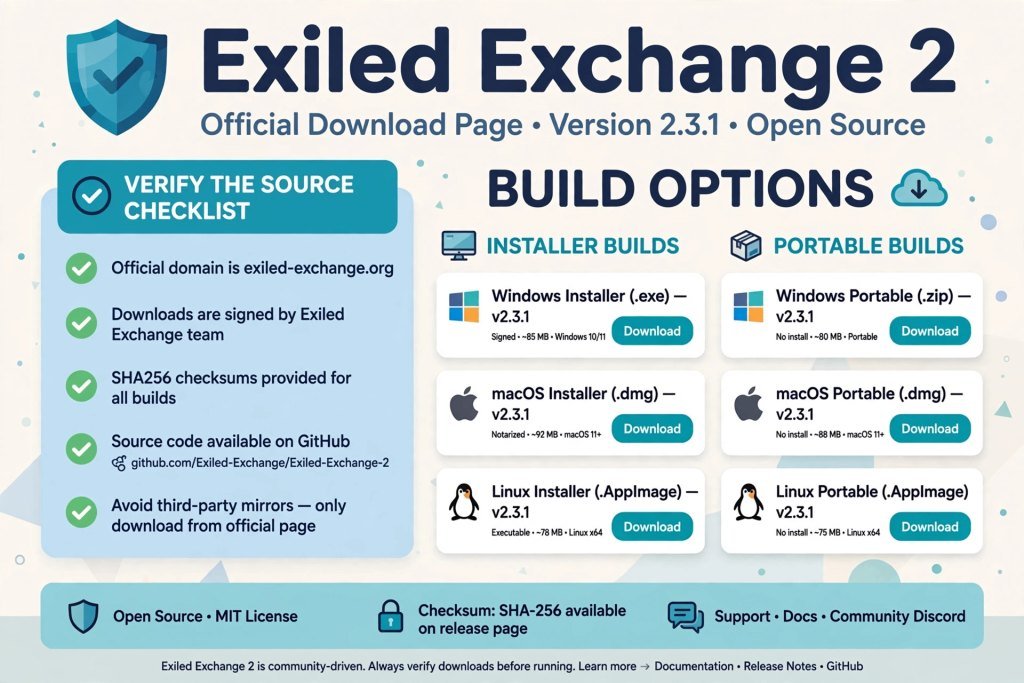
Two warnings from the official page deserve attention. First, the app is unsigned, so Windows and macOS may show security warnings that you need to bypass to open it. That is the developer’s documented behavior, but it is also exactly the kind of prompt malicious files exploit, which is why downloading only from the official source matters so much. Second, version numbers change often. Rather than trusting a number quoted in an article, read the version shown on the official download page on the day you download.
If an installation fails, the project’s Common issues page is the first place to look, and its FAQ answers the most frequent questions.
Installation and First-Time Setup for Exile Exchange 2
This section follows the official documentation. Setup is short, but a few requirements trip people up.
Check the requirements first
The official download page lists these requirements for Exile Exchange 2:
- Display mode: Path of Exile 2 must run in Windowed Fullscreen or Windowed mode. Fullscreen is not supported.
- Game language: Supported languages include English, Russian, Portuguese, French, German, Spanish, Korean, Traditional Chinese, and Japanese. Thai is not supported.
- Permissions: Administrator rights are not required. However, if you run the Path of Exile client as an administrator, Exiled Exchange 2 must also be started with administrator rights so it can access the game window.
- Cloud gaming: The tool is not compatible with GeForce Now or other cloud services that do not forward clipboard data.
Basic setup steps
- Download the installer (or portable build) from the official page.
- Run the installer and open Exiled Exchange 2.
- Start Path of Exile 2.
- Look for the small banner that appears when the app has loaded. The official migration instructions refer to this banner popup as confirmation that the overlay loaded, and a Prima Games guide describes a small window near the bottom center of the screen.
- Open settings by pressing
Shift + Spacein the game to show the overlay, then click the cog icon. The official FAQ confirms this is where you change settings and your league.
Choosing the right league in settings matters, because price checks pull listings for the league you select. Checking the wrong league produces results that look plausible but do not apply to you.
Moving from Path of Exile 1 or Awakened PoE Trade
If you used Awakened PoE Trade, the official download page includes migration steps, and it warns that all of them are required. In short: install and run Exile Exchange 2, launch Path of Exile 2 so the correct files are generated, quit both, copy the apt-data folder from %APPDATA%\awakened-poe-trade to %APPDATA%\exiled-exchange-2, and then edit config.json so that "windowTitle" reads “Path of Exile 2” instead of “Path of Exile.” The page notes that most problems come from skipping that last edit, because otherwise the overlay only attaches to the first game. This is a migration step for returning users, not a requirement for a fresh install.
Private leagues
The FAQ states that private leagues work, but you must sign in through the built-in browser. The project has a dedicated page for this, so follow it if you play private leagues.
How to Price-Check Items With Exile Exchange 2
Once the overlay is running, the workflow takes only a few seconds. The steps below follow the official quick-start guide.
- Hover over the item in your inventory, stash, or a trade window.
- Press
Ctrl + D. This is the default hotkey to check the price. The guide notes that you can holdCtrlif you do not want the window to close, and release it once your cursor is inside the window. - Use
Ctrl + Alt + Dif you want the window to stay. This opens the window without automatically hiding it when you move the mouse. - Review the modifiers. The window lists the item’s stats with checkboxes and min-max values.
- Select what matters. Tick the stats that actually drive the item’s value for the kind of build it would suit.
- Compare the listings. Read the results as a spread, not as one number.
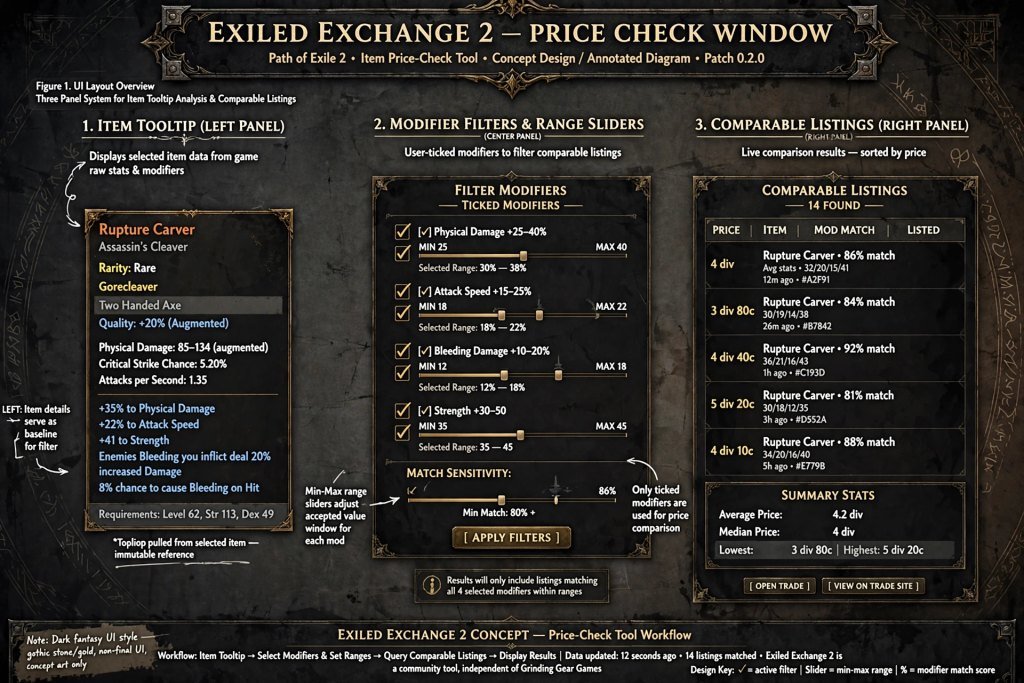
The official guide stresses that choosing stats that “synergize well” comes from experience with different build archetypes. Exile Exchange 2 does not know your build, and it cannot tell you which modifier a buyer will pay extra for. If you want background on what players actually buy, our Path of Exile 2 builds guide is a useful starting point for understanding which stats matter.
A hypothetical example
The numbers below are invented for illustration only. Imagine a rare ring with high life, two elemental resistances, and one low-value utility modifier. If you leave every box ticked, the search may return almost nothing, because few rings match all of those rolls exactly. You might conclude the ring is priceless or worthless.
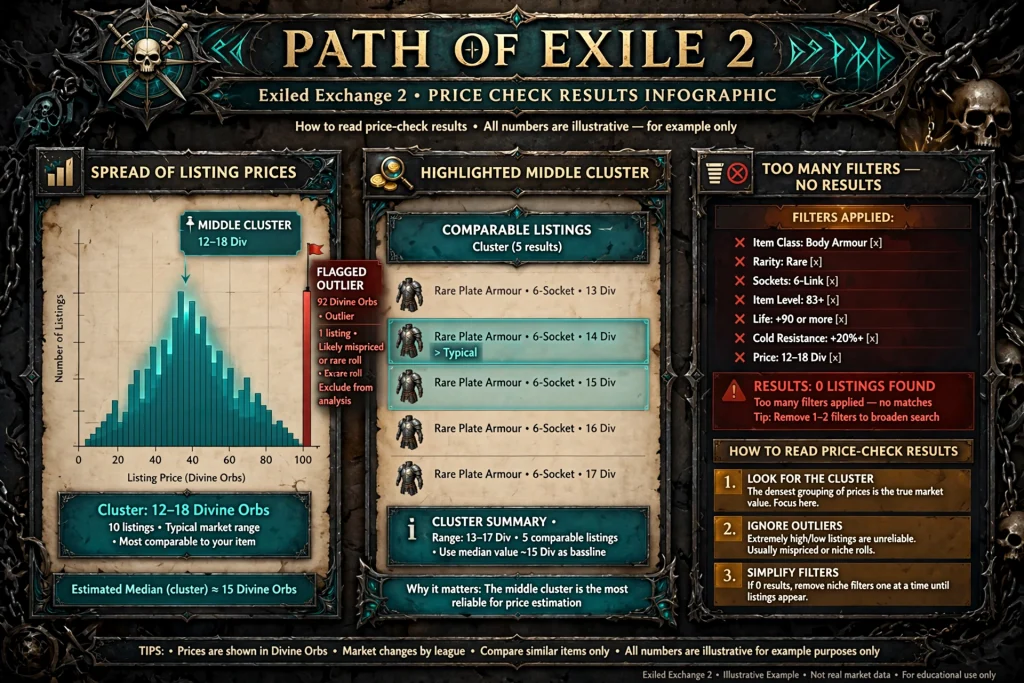
Now tick only life and the combined elemental resistance pseudo stat, and loosen the minimums slightly. The search returns a spread of listings. A few are very cheap, a few are very expensive, and most cluster in the middle. That cluster is more informative than any single listing. Searching by relevant modifiers rather than by the item’s name alone is what separates a useful price check from a lucky guess.
Items that cannot be price-checked
The official FAQ lists situations where the tool cannot work. You cannot price-check items in the Divination Card stash tab, rewards in the Curio Display room of Heist blueprints, or modifiers of the maps proposed by Kirac, because the game does not copy item text to the clipboard in those places. The FAQ points to other third-party tools for stash-tab pricing of divination cards. If Exile Exchange 2 fails on one specific item, check whether it falls into one of these categories before assuming something is broken.
Understanding Price-Check Results From Exile Exchange 2
A price check is an estimate, not a receipt. Learning to read the results is the most valuable skill you can build alongside the tool.
Tool-assisted estimate versus confirmed sale price. Listings show what sellers want, not what buyers paid. A listing can sit unsold for days because it is overpriced.
Item rolls and modifiers. Two items with the same modifiers can have very different values depending on the rolls. The automatic ranges in Exile Exchange 2 are set slightly below your roll so you find comparable items, but a near-perfect roll might justify raising the minimum.
Comparable listings. Look at several results. If the first listing is dramatically cheaper than the next five, it may be a mistake or a bait price. If the first is dramatically higher, it may be an unrealistic ask.
Market context. League stage, patch changes, and build popularity all shift prices. Our Path of Exile 2 trade guide explains how the official trade site, Market Panel, and Currency Exchange fit together, and our PoE Currency guide helps you understand the currencies listings are priced in.
Seller status and stash pricing. The FAQ explains two small indicators. An orange or red circle next to the listed time shows that a player is AFK or offline. A question mark next to a price means the item is priced using a stash tab name instead of individually, so the price is likely not real and may be high only because the item sits in a dump tab.
Unrealistic prices. An apparently high price may not be a real transaction price. If only one listing shows a very high number and nothing else supports it, treat it as noise.
For a deeper look at the general process, our PoE2 price checker guide covers the wider set of ways to check item value, and Exile Exchange 2 is one of the quickest of them.
Exile Exchange 2 Hotkeys and Customization
The official quick-start guide documents these default hotkeys. Only the shortcuts below are confirmed from current documentation.
| Hotkey | What it does |
|---|---|
Ctrl + D | Price check the item. Hold Ctrl to keep the window open. |
Ctrl + Alt + D | Price check and keep the window open without auto-hiding. |
Alt + W | Open the item on the wiki. |
Shift + Space | Open the overlay with widgets. |
F5 | Go to hideout. |
F9 | Exit to the character selection screen. |
Ctrl + MouseWheel | Scroll through stash tabs. |
The guide also says some functions have no default hotkey, to avoid conflicts on your system. You can set your own and change defaults in the settings, which you reach by pressing Shift + Space in the game and clicking the cog icon.
If scrolling stash tabs with Ctrl + MouseWheel also zooms your character, the FAQ suggests disabling “Mousewheel Zoom” in the Path of Exile 2 interface options. Zoom keys remain available.
One small quirk: the FAQ says a sound may play on every price check if Discord’s clip-saving shortcut uses Alt + C, because the app presses that combination. Changing the Discord key resolves it.
Exile Exchange 2 Troubleshooting
Most problems fall into a few categories. The advice below is based on the project’s own troubleshooting pages unless labeled otherwise. No universal fix exists, so work through the steps in order.
The overlay does not appear or nothing happens
- Re-read the requirements. The official page notes that updating GPU software can silently reset your video settings to Fullscreen, which the tool does not support.
- Check the logs. They are in the settings under the Debug tab.
- If you use the Vulkan renderer, update your GPU drivers. The project says that if the tool works with DirectX 11 or 12, old Vulkan drivers are the cause.
- If you run Path of Exile 2 as administrator, run Exiled Exchange 2 as administrator too.
The hotkey does not work or no item text is found
The project’s “nothing happens” page says the key question is whether the game actually copies the item to the clipboard. A log warning reading “No item text found” points to this. Other programs often interfere with global shortcuts. Programs reported by players on that page included GPU utilities, AutoHotkey scripts, and Discord clips. Closing other applications and relaunching them one at a time helps you identify the conflict.
The application does not recognize the game
Confirm that the game runs in Windowed or Windowed Fullscreen mode, that the game language is supported, and, if you migrated settings, that windowTitle in config.json says “Path of Exile 2.” The official page says the missing edit is the most common cause for returning users.
Results are missing or the wrong values appear
First, make sure the right league is selected in settings. Second, loosen your filters, because too many ticked modifiers produce empty results. The project also lists dedicated pages for errors such as “There are no stats to select from,” “Failed to load leagues,” “Query is too complex,” and an invalid JSON error. If you see one of those messages, search for that exact title on the Common issues page.
A downloaded file has no installer
You most likely downloaded the source code. Go back to the official download page and choose an installer or portable build.
The application fails to start
Try the project’s reset sequence: quit Exiled Exchange 2 fully, back up the apt-data folder if you want to keep your settings, delete %appdata%\exiled-exchange-2, and start again. Remember to quit before relaunching, because starting a second instance does nothing.
The game or tool may be outdated
Game patches can change item text and trade data. The release notes show regular updates for trade data and parsing fixes after patches. If the installer build is in use, automatic updates apply. If you use the portable build, you must update manually, so check the official page.
If none of this helps, the project directs users to its Discord, but notes that vague reports are usually sent back to the troubleshooting page. Describe your problem specifically.
Is Exile Exchange 2 Safe?
There are two separate questions here: is the download safe, and is the tool allowed by the game.
The download. The project says its GitHub repository and project website are the only official sources. The official FAQ warns that other domains and mirrors are unknown to the developer and may be unsafe. The app is unsigned, so security warnings will appear. That is a documented trade-off, and it is another reason to avoid files from forums, video descriptions, or unknown mirrors.
The tool and the game rules. The official FAQ states that there are no community-created apps approved by Grinding Gear Games. It says that an app which complies with the game’s terms of service, does one server action per button press, and does not interact with the game client itself (for example by injecting into the process or changing process memory) can be considered safe. If you are ever banned, the FAQ’s first recommended step is to contact support. Read the current Path of Exile terms of use yourself, because rules can change, and no article can guarantee that a tool is risk-free.
A practical safety checklist:
- Download only from the official project sources.
- Avoid unknown executables and unverified mirrors.
- Read the release notes before updating.
- Be cautious with any third-party tool you cannot verify, including those that ask for your account details.
Safe habits matter more than reassurance. Exile Exchange 2 is community software, so you accept the same trade-offs as with any unofficial tool.
Exile Exchange 2 vs. Other Price-Checking Tools
Several tools help with Path of Exile 2 item pricing, and none is universally best. The differences below are based on what each project says about itself. Verify current details before choosing.
| Tool | Game support | Main purpose | Notes |
|---|---|---|---|
| Exile Exchange 2 (Exiled Exchange 2) | Path of Exile 2 | Overlay price checking via hotkey | Free download from official project; Windows, Linux, macOS builds |
| Official trade site | Path of Exile 2 (trade2 section) | Manual searching and buying | No install, but you enter filters by hand |
| Sidekick | Path of Exile and Path of Exile 2 | Companion tool: price checks, map mod warnings and more | Its repository describes support for both games |
| PoE2K | Path of Exile 2 | Overwolf overlay for price checking and trade notifications | Runs through Overwolf, per its listing |
| Path of Price Check | Path of Exile 2 | Mobile app using camera scanning | iPhone app, per its App Store listing |
The official trade site is the foundation. Exile Exchange 2 and similar overlays are shortcuts that build searches for you. If you want to understand what the overlay is searching, our Path of Exile 2 trading guide explains how trading works from the ground up.
Be careful not to mix up games. Some tools were made for Path of Exile 1, and a few support both. Exile Exchange 2 is described by its own project as a Path of Exile 2 app. If you play the first game, see our PoE 1 trade guide for the right tools. When you need item data rather than prices, the community database covered in our PoE 2 DB guide pairs well with any price checker.
Common Mistakes to Avoid With Exile Exchange 2
Downloading from an unofficial mirror. Prevention tip: start from the official project page and never from a search ad or video link.
Confusing source code with a ready-to-run release. Prevention tip: if you see a zip full of folders and no .exe, go back and pick the installer or portable build.
Following outdated setup instructions. Prevention tip: compare any guide, including this one, with the official Quick Start and Download pages, which are the sources that change first.
Leaving filters too restrictive. Prevention tip: untick marginal modifiers and use pseudo stats such as total resistance to widen the search.
Treating one listing as the true value. Prevention tip: read at least several listings and look for a cluster rather than the lowest number.
Assuming all modifiers matter equally. Prevention tip: ask which modifiers a buyer for that kind of build would actually want.
Using shortcuts that conflict with other software. Prevention tip: if the hotkey does nothing, close GPU utilities, scripts, and Discord clip shortcuts and relaunch them one by one.
Confusing Path of Exile 1 tools with Path of Exile 2 tools. Prevention tip: confirm the tool’s own description names the game you are playing, and select the right league in settings.
Running the game in true Fullscreen. Prevention tip: switch to Windowed or Windowed Fullscreen before launching the overlay.
Frequently Asked Questions About Exile Exchange 2
What is Exile Exchange 2?
Exile Exchange 2 is a common search spelling for Exiled Exchange 2, a community-developed overlay for price-checking items in Path of Exile 2. It reads item text copied by the game and shows comparable trade listings.
What is the official name of Exile Exchange 2?
The official name is Exiled Exchange 2. The project site and GitHub repository both use that spelling.
Where can I download Exiled Exchange 2?
Download it from the official page at kvan7.github.io/Exiled-Exchange-2/download or through the official GitHub repository. The project warns that other mirrors may be unsafe.
Is Exile Exchange 2 free?
The official download page offers direct downloads with no payment step, and the project is published as a public repository. I found no pricing on the official pages. Always confirm on the official site.
How do I use Exile Exchange 2 to price-check items?
Run the app, launch Path of Exile 2 in Windowed or Windowed Fullscreen, hover over an item, and press Ctrl + D. Then tick the modifiers that matter and review the listings.
Why is Exile Exchange 2 not working?
Common causes listed by the project include Fullscreen display mode, an unsupported language, a mismatch in administrator rights, outdated Vulkan drivers, and other software blocking the hotkey. Check the logs under the Debug tab in settings.
Does Exile Exchange 2 guarantee accurate item prices?
No. The official guide says the app does not magically check the price, and listings are only asking prices.
Is Exile Exchange 2 compatible with Path of Exile 1?
Exile Exchange 2 is described as a Path of Exile 2 trading app. It is a fork of a tool made for the first game, but you should use tools made for the game you play.
Is Exile Exchange 2 safe to download?
It is safe only if you download from the official sources. The app is unsigned, so security warnings are expected, and no tool can be guaranteed risk-free under the game’s rules.
Summary: Key Takeaways About Exile Exchange 2
- The official name is Exiled Exchange 2, though many players search for Exile Exchange 2.
- Download only from the official project page or GitHub repository.
- The basic workflow is to hover over an item and press
Ctrl + D. - Select relevant modifiers and compare several listings instead of trusting one price.
- Run Path of Exile 2 in Windowed or Windowed Fullscreen.
- Use the official Quick Start, FAQ, and Common issues pages for setup help.
Conclusion
Exile Exchange 2 earns its popularity by removing friction from a task every Path of Exile 2 trader repeats constantly. A single hotkey turns a hovered item into a structured search, and pseudo stats and adjustable ranges make comparisons faster than manual entry. Its limits are just as clear: it assists your judgment instead of replacing it, and it is only as reliable as the listings behind it.
Your next step is simple. Open the official Exiled Exchange 2 project page, download the build for your system, and run through the quick-start guide once before your next session. After that, price your next drop by comparing several listings instead of trusting a single number.
Research and source-verification notes
Consulted:
- Official Quick Start: https://kvan7.github.io/Exiled-Exchange-2/quick-start (hotkeys,
Ctrl + Cmechanism, pseudo stats, filter ranges) - Official Download page: https://kvan7.github.io/Exiled-Exchange-2/download (builds, requirements, migration steps, official-source warning)
- Official FAQ: https://kvan7.github.io/Exiled-Exchange-2/faq (settings, logs, ToS statement, private leagues, unsupported stash tabs, fake website warning)
- Official Common issues: https://kvan7.github.io/Exiled-Exchange-2/issues and “Nothing happens”: https://kvan7.github.io/Exiled-Exchange-2/nothing-happens.html (note: this page contains older Awakened PoE Trade wording, so I only used its general conflict advice)
- GitHub releases: https://github.com/Kvan7/Exiled-Exchange-2/releases (release-note features)
- Prima Games guide: https://primagames.com/tips/how-to-get-the-price-checker-tool-in-poe-2 (third-party use of the “Exile Exchange 2” spelling, startup window)
- Tool listings: Sidekick GitHub repository, PoE2K on Overwolf, Path of Price Check on the App Store
- GamesPuma homepage and page 2 for internal links

Written by Daniel Carter
Daniel Carter is a dedicated gaming writer who enjoys turning complex gaming topics into clear, useful, and engaging content. He covers game guides, tips, reviews, features, and the latest developments across the gaming world. His approach focuses on research, accuracy, and practical value, helping readers discover new games, improve their gameplay, and stay informed about the industry. For Daniel, great gaming content is not just about information—it is about making every article genuinely worth reading.