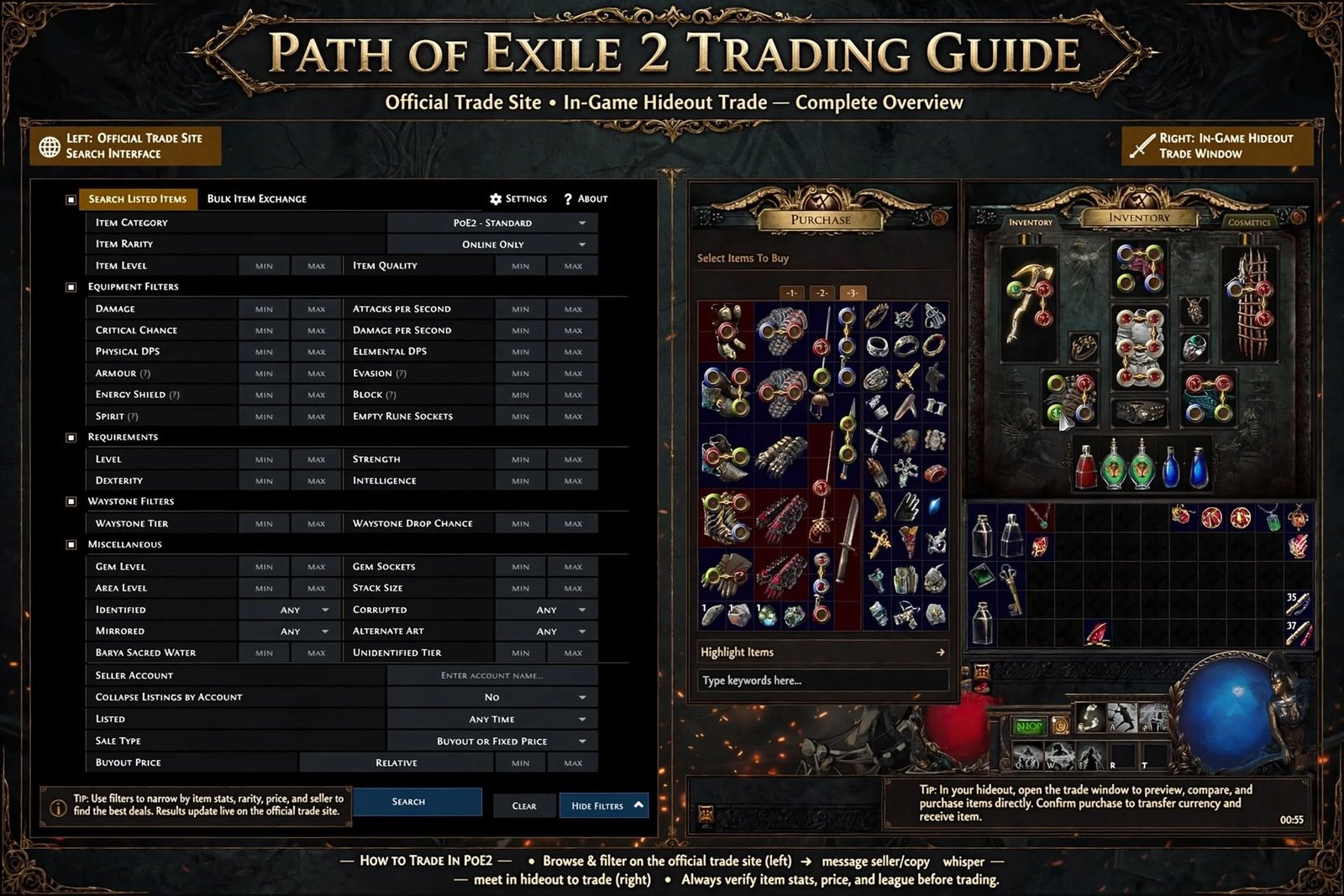
PoE2 trading is how Path of Exile 2 players exchange gear and currency with each other instead of relying purely on what drops for their own character. If you’ve searched “poe2 trading,” you’re probably trying to find the official trade site, figure out how to actually buy or sell something, or understand how currency exchange works — this guide covers all three, plus pricing, common mistakes, and how to avoid getting scammed.
Path of Exile 2 doesn’t have a traditional auction house. There’s no “buy now” button sitting on top of a global marketplace. Instead, PoE2 trading runs on a mix of a browser-based trade site, an in-game asynchronous shop, and direct player-to-player deals. That split is exactly why so many new players get confused — you need to know which system to use for which situation.
Table of Contents
What Is PoE2 Trading?
Trading in Path of Exile 2 means exchanging items, equipment, or currency with other players rather than only using what your own character finds. Almost everything in the game is tradeable — weapons, armour, unique items, rare items, crafting materials, runes, essences, and every stackable currency — with one notable exception: Gold cannot be traded. Gold is tied to your account and is spent only on Ange’s random-item vendor rolls and a few other NPC services.
Players trade for a simple reason: drop rates are random, and the item your build actually needs might drop for someone else in a completely different part of the game. PoE2 trading lets you convert currency or spare gear you don’t need into the specific upgrades you’re chasing, which is dramatically faster than farming for a single item yourself.
One important exception: characters on Solo Self-Found (SSF) cannot trade at all. No Currency Exchange, no Merchant’s Tab, no direct player trades. If you’re on SSF and can’t find the trade site options in-game, that’s expected — you’d need to move the character to a standard (trade-enabled) league to trade, which is a one-way switch.
The Official PoE2 Trade Site
The official PoE2 trade destination is pathofexile.com/trade2, hosted directly by Grinding Gear Games as part of the main Path of Exile website — it is not a separate app and not a third-party marketplace. You’ll need a Path of Exile account (the same account you use to log into the game) to search and to send whispers from the site.
The trade site itself is mainly a search and listing browser. It shows you what other players have publicly listed, lets you filter by item type, modifiers, and price, and gives you a one-click way to message a seller in-game. The trade site does not complete transactions by itself — the actual exchange of items and currency still happens through the Merchant’s Tab system or a direct in-game trade.
Because “PoE2 trade site” and “poe2 trading” scams are common search terms, it’s worth repeating: the only legitimate PoE2 trade destination is the pathofexile.com domain. Third-party sites promising a “PoE2 trading website” with lower prices or instant currency delivery are outside GGG’s official system and carry real risk to your account.
Read More: https://gamespuma.com/path-of-exile-help/
The Three Ways to Trade in PoE2
Understanding PoE2 trading gets much easier once you separate it into its three actual systems:
- The Currency Exchange — an automated, asynchronous market for stackable currency (Chaos Orbs, Exalted Orbs, Divine Orbs, Essences, Runes, Soul Cores, and similar materials). You don’t negotiate with a person; you set what you have and what you want, and the system matches you against live market ratios.
- The Merchant’s Tab (asynchronous trading) — how most gear, uniques, and rares are actually bought and sold. You price an item and list it in a special stash tab; buyers can purchase it any time, even while you’re offline, through Ange or the trade site.
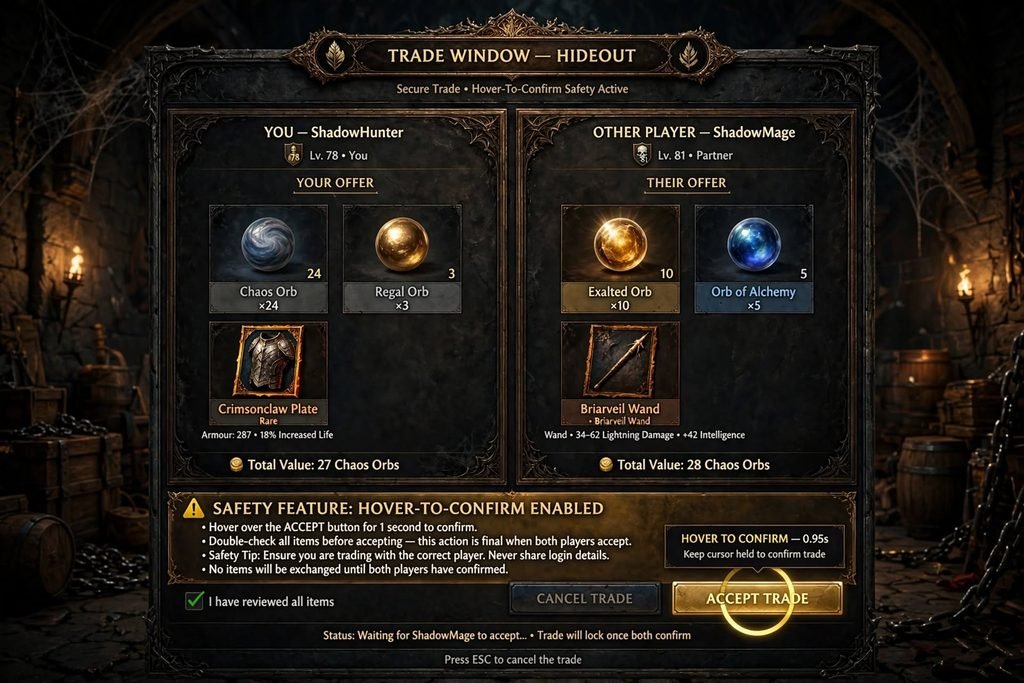
- Direct player-to-player trade — the traditional method: you invite a player to your party, they travel to your hideout (or vice versa), and you trade items and currency face-to-face in a trade window.
Both the Currency Exchange and the Merchant’s Tab are unlocked through Ange, the Merchant, an NPC you meet in Kingsmarch during Act 4. However, the Currency Exchange is also available much earlier — every town from Act 1 onward has its own currency NPC (Finn is the first, in Clearfell) offering the same Currency Exchange window, so you don’t need to reach Act 4 just to swap orbs.
How to Search for Items on the Trade Site
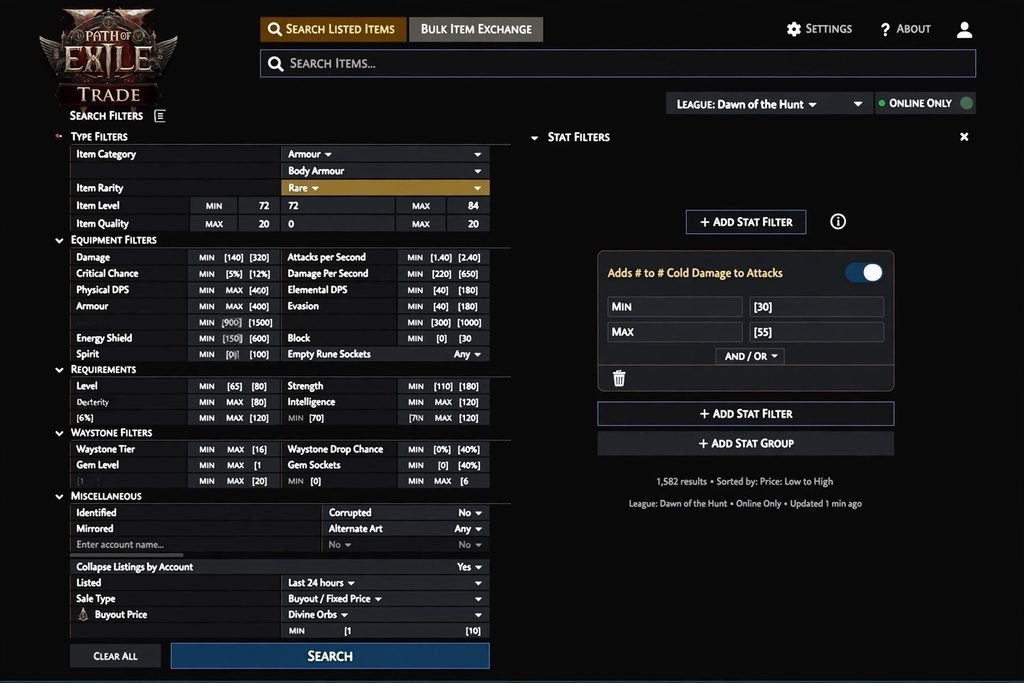
The trade site’s search interface lets you narrow results by:
- Item type or base (e.g., a specific weapon or armour base)
- Item name (for uniques)
- Rarity (normal, magic, rare, unique)
- Level requirement and item level
- Modifiers/affixes, with minimum and maximum value ranges
- Sockets, runes, or linked properties where applicable
- Price range, in your chosen currency
A practical tip: start broad, then narrow. If you filter too aggressively — stacking five or six minimum modifier values at once — you’ll often get zero results, even though a “close enough” item exists that would still upgrade your character. Loosen one filter at a time until listings appear, then compare.
How to Buy Items in PoE2
Buying gear through the Merchant’s Tab system (via the trade site or in-game) generally works like this:
- Go to pathofexile.com/trade2 and log in with your account.
- Select the correct league/game mode (make sure you’re searching the league you’re actually playing).
- Search for the item you need and apply filters.
- Compare listings — don’t automatically buy the cheapest one without checking the actual modifiers.
- For items listed through a Merchant’s Tab, you can often complete the purchase directly by traveling to the seller’s hideout via the trade site listing, without needing them to be online.
- For items being sold through direct trade, use the trade site’s whisper feature to contact the seller in-game.
- If a direct trade is needed, invite the seller to your party (or accept their invite) and travel to their hideout.
- In the trade window, hover over the item the other player has placed — this is a built-in anti-scam step, and the Accept button won’t become clickable until you do.
- Double-check the item and the currency amount shown before accepting.
- Click Accept to complete the trade.
How to Sell Items in PoE2
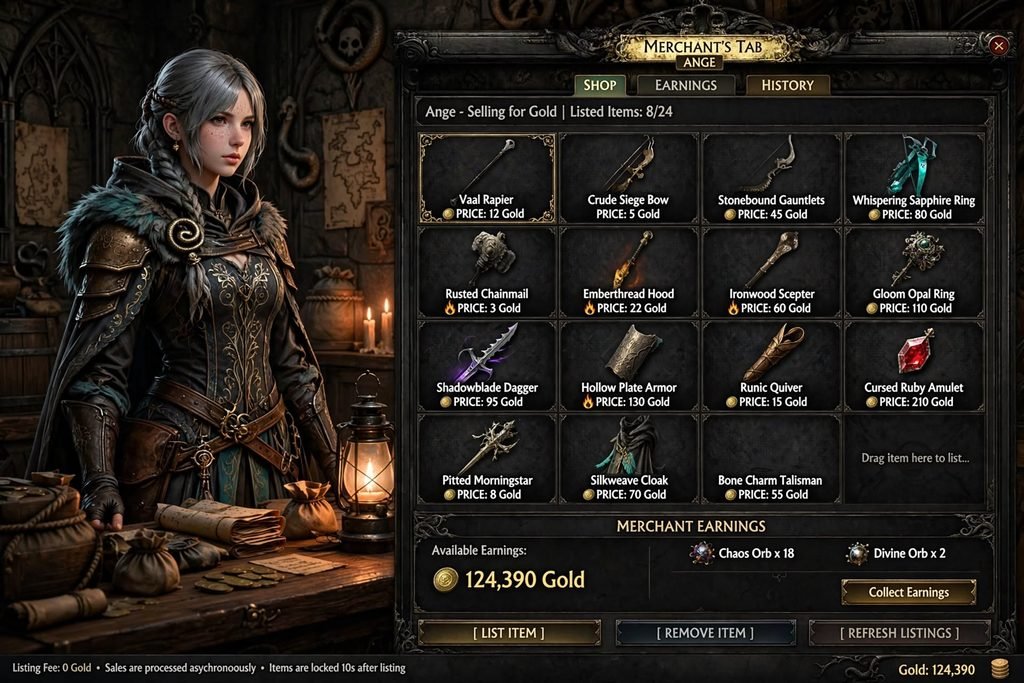
Selling gear in PoE2 mainly runs through the Merchant’s Tab, which enables offline, asynchronous sales:
- Unlock Ange in Act 4 (this requires completing the Hostile Takeover quest and having a hideout).
- Get a Merchant’s Tab — either bought directly from the in-game shop, or converted from an existing Premium Stash Tab you already own.
- Speak to Ange and select “Manage Shop” (or open the Merchant’s Tab UI directly in your hideout).
- Place the item you want to sell into the tab.
- Set an individual asking price in a currency of your choice for each item (there’s no single bulk price for a whole tab).
- Leave the game — the listing stays live even while you’re offline.
- When it sells, you’ll get a notification, and the currency lands in a remove-only Earnings tab for you to collect whenever you’re ready.
- To adjust or cancel a listing, reopen the Merchant’s Tab and change the price or pull the item back out.
If you’d rather not deal with the Merchant’s Tab setup, you can still sell the traditional way: list the item’s stats in a public forum/community channel or respond to whispers from buyers browsing the trade site’s direct-trade listings, then complete the exchange in your hideout.
PoE2 Currency Trading
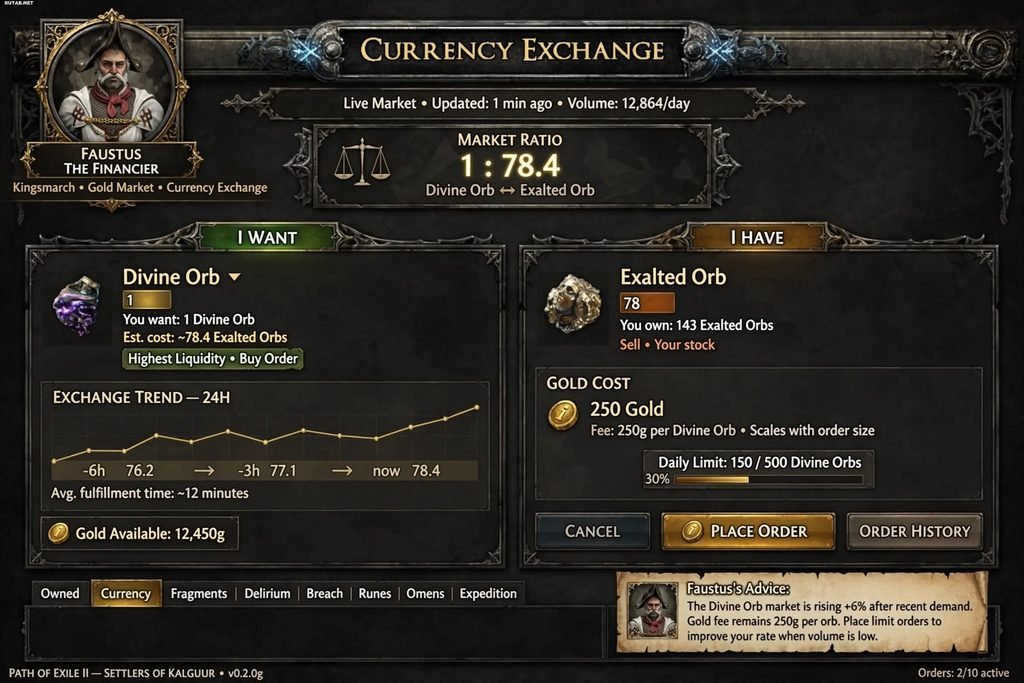
The Currency Exchange is the fastest way to convert one stackable currency into another without hunting for a human trading partner. It works like a live order book rather than a chat negotiation:
- Open the Currency Exchange through any town currency NPC (from Act 1) or through Ange (Act 4+).
- Choose the currency you want under “I Want.”
- Choose the currency you’re offering under “I Have.”
- The system shows the current market ratio and fills your order against existing offers automatically.
Commonly exchanged currencies include Chaos Orbs, Exalted Orbs, and Divine Orbs, along with Essences, Runes, Soul Cores, and various endgame crafting materials. Because ratios move with supply and demand throughout a league, treat any specific exchange rate as a snapshot in time rather than a fixed number — check the live rate in-game before committing to a large trade.
How to Price PoE2 Items
Pricing is where most new traders get stuck, because two visually similar items can be worth wildly different amounts. When pricing (or evaluating) an item, weigh:
- The strength and combination of its modifiers, not just the number of them
- Item level, which caps which modifiers can roll
- Rarity and whether it’s build-defining (a unique in high demand for a popular build can spike in price)
- Current league economy — prices shift as a league matures and currency becomes more available
- Supply of similar listings — search the trade site for comparable items and see where most listings cluster, rather than anchoring to the single cheapest one, which may be mispriced or already sold
A good habit is to check several current listings for a near-identical item before setting your own price, and to re-check every so often — the “right” price for anything in PoE2 trading changes as the league goes on.
Common PoE2 Trading Mistakes
- Buying the first listing without comparing modifiers against similar items
- Stacking too many search filters and getting zero results
- Forgetting to select the correct league before searching
- Not double-checking the currency amount or item in the trade window before clicking Accept
- Assuming a listed price is still valid — popular items sell fast, and stale listings are common
- Trying to sell without a Merchant’s Tab and then wondering why nothing shows up publicly
- Ignoring item level when comparing two items with the same base
PoE2 Trading Safety Tips
- Only use the official trade site (pathofexile.com/trade2) and in-game systems — never a third-party “PoE2 trading site.”
- In direct trades, always hover over the other player’s item before clicking Accept, and re-check the currency stack size — a classic scam swaps a valuable item or currency stack for something cheaper right before confirmation.
- Never share your account password or login codes with anyone claiming to help with a trade.
- Treat unsolicited “cheap currency” offers outside the game with suspicion; real-money trading outside official channels risks your account.
- If something feels rushed or pressured, slow down — legitimate trades don’t require urgency.
- Report suspicious behavior through the game’s built-in reporting tools.
Troubleshooting Common Trade Problems
Seller isn’t responding to my whisper. Popular items often sell within minutes of being listed; the listing may be stale. Try a few sellers rather than waiting on one.
My search returns no results. Loosen your filters one at a time, starting with the most specific modifier ranges, and confirm you’re searching the correct league.
A listing disappeared or the item is unavailable. It’s most likely already sold — trade site listings for Merchant’s Tab items aren’t always removed instantly.
I can’t find the option to trade currency or list items. Confirm you’re not on a Solo Self-Found character — SSF blocks all trading, including the Currency Exchange.
I can’t convert my stash tab into a Merchant’s Tab. Not every Premium Stash Tab qualifies for conversion; check your account’s stash tab purchase history, or buy a Merchant’s Tab directly from the in-game shop instead.
PoE vs PoE2 Trading
| Feature | Path of Exile (PoE1) | Path of Exile 2 (PoE2) |
|---|---|---|
| Trade website | pathofexile.com/trade | pathofexile.com/trade2 |
| Economies | Separate | Separate — no crossover with PoE1 |
| Currency exchange system | In-game currency exchange | In-game Currency Exchange, available from Act 1 |
| Async/offline selling | Public stash tab listings | Merchant’s Tab via Ange |
| Direct trade | Whisper + hideout trade window | Whisper + hideout trade window, with hover-to-confirm |
| Solo Self-Found | No trading | No trading |
The two games share the same underlying philosophy — a trade-site-plus-whisper system with no built-in auction house — but PoE2 layers in the asynchronous Merchant’s Tab and an earlier-unlocked Currency Exchange, making offline selling and bulk currency swaps noticeably smoother than PoE1’s original public-stash-tab approach.
Frequently Asked Questions
What is PoE2 trading? It’s the overall system Path of Exile 2 players use to exchange items and currency, made up of the official trade site, the Currency Exchange, the Merchant’s Tab, and direct player trades.
What is the official PoE2 trade site? pathofexile.com/trade2, run directly by Grinding Gear Games.
How do I buy items in PoE2? Search the trade site, compare listings, then either buy directly through a Merchant’s Tab listing or whisper the seller for a direct trade.
How do I sell items in PoE2? Get a Merchant’s Tab (purchased or converted from a Premium Stash Tab), price your items through Ange’s Manage Shop interface, and collect currency from the Earnings tab as items sell.
How does PoE2 currency trading work? Through the Currency Exchange, available from Act 1 via town NPCs and later through Ange — you select what you want and what you’re offering, and the system matches you at the live market ratio.
Why is my PoE2 trade search returning nothing? Your filters are probably too strict, or you’re searching the wrong league. Loosen filters one at a time.
Is PoE2 trading safe? Yes, when you stick to the official trade site and in-game trade windows, hover over items before accepting, and avoid third-party currency sellers.
Can I trade on Solo Self-Found? No — SSF disables the Currency Exchange, the Merchant’s Tab, and direct trading entirely.
Is PoE2 trading different from PoE1 trading? The core structure is similar, but PoE2 adds the Merchant’s Tab for asynchronous gear sales and unlocks the Currency Exchange much earlier in the campaign.
Conclusion
PoE2 trading looks complicated at first glance because it’s really three systems wearing one name — the trade site for searching, the Currency Exchange for stackable currency, and the Merchant’s Tab (or direct trade) for gear. Once you know which one applies to your situation, buying and selling in Path of Exile 2 becomes a quick, routine part of building your character rather than a confusing detour. Stick to the official pathofexile.com/trade2 site, double-check every trade window before confirming, and you’ll get far more value out of PoE2 trading than grinding drops alone ever provides.
Sources Used
- Grinding Gear Games official trade site — pathofexile.com/trade2
- Maxroll.gg — “Trade in Path of Exile 2”
- Fextralife PoE2 Wiki — “How to Trade in Path of Exile 2” and “Ange” NPC page
- pathofexile.gg — “Path of Exile 2: Currency Exchange Explained”
- conquestcapped.com — “PoE 2 Trade & Currency Exchange Guide”

Written by Daniel Carter
Daniel Carter is a dedicated gaming writer who enjoys turning complex gaming topics into clear, useful, and engaging content. He covers game guides, tips, reviews, features, and the latest developments across the gaming world. His approach focuses on research, accuracy, and practical value, helping readers discover new games, improve their gameplay, and stay informed about the industry. For Daniel, great gaming content is not just about information—it is about making every article genuinely worth reading.
1 thought on “PoE2 Trading: The Complete, Practical Guide to Trading in Path of Exile 2”