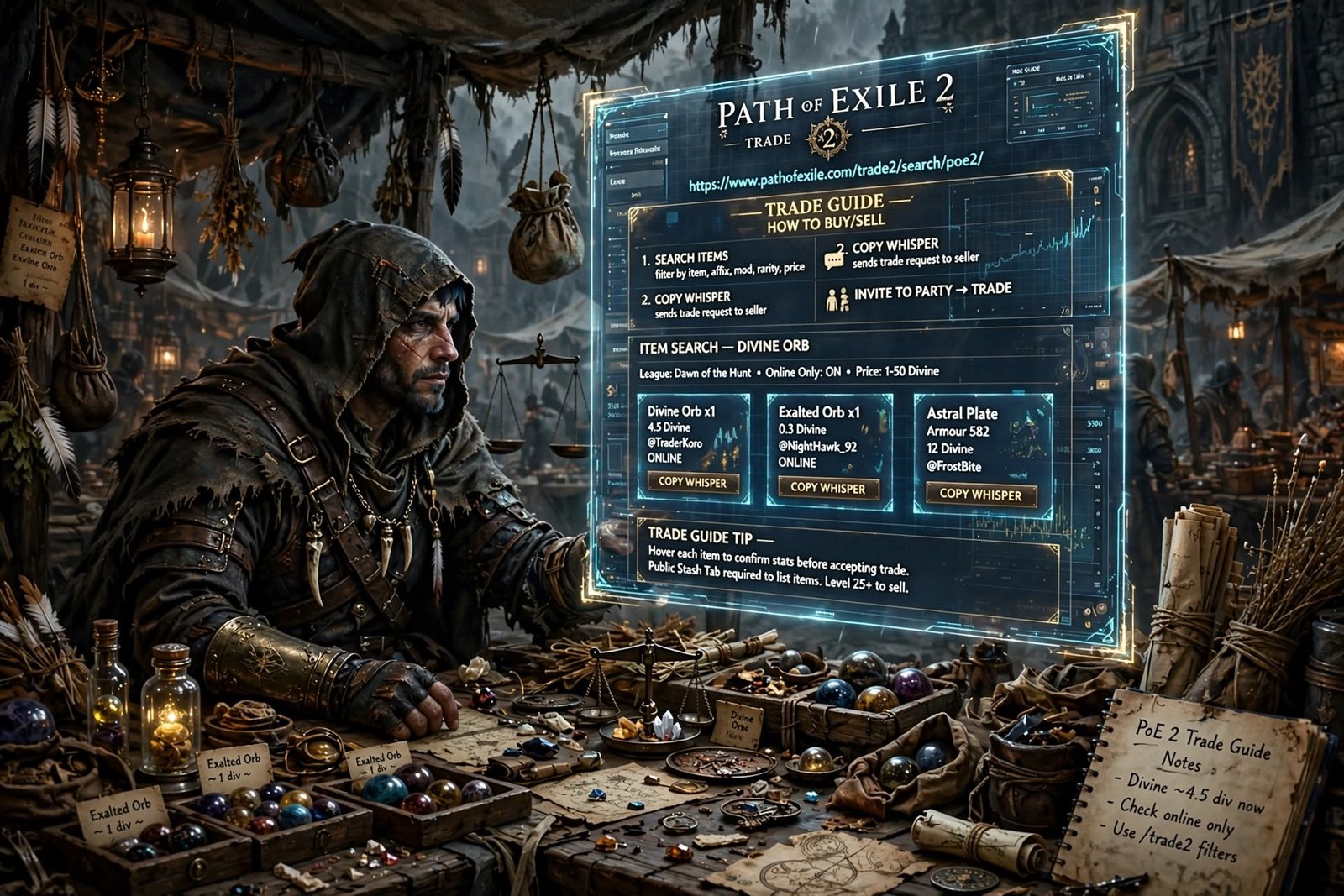
PoE 2 trade is the player-driven market where Path of Exile 2 gear, uniques and currency change hands. It runs through GGG’s official trade site, an in-game Market Panel, and a bulk Currency Exchange. If you are new to Path of Exile 2, learning PoE 2 trade early saves hours of farming.
There is no traditional auction house in the game. Instead, there are three separate systems, each built for a different kind of item.
This guide covers the current 2026 setup, with patch 0.5.5 and the Forbidden Rites event league in mind. You will learn where the official site is, how to buy and sell, and how to stay safe.
Table of Contents
What Is PoE 2 Trade?
Short answer: PoE 2 trade is the set of tools Path of Exile 2 players use to buy and sell items and currency with each other.
poe 2 trade: Path of Exile 2, developed by Grinding Gear Games (GGG), is built around a player economy. Most items are tradable, including gear, runes, crafting currency and many endgame materials. Gold is the notable exception because it cannot be traded between players.
Instead of a universal money, the game uses barter. Players agree on which orbs to use as currency, and the market values shift with each league.
Today, PoE 2 trade covers three main systems:
- The official trade site and in-game Market Panel, used to search listings.
- Asynchronous trading through Ange and Merchant’s Tabs, used to buy and sell gear while the seller is offline.
- The Currency Exchange, used for bulk stackable items.
A fourth option, direct player-to-player trading, still exists as the classic fallback.
Solo Self-Found (SSF) characters cannot use these systems. SSF blocks the Currency Exchange, Merchant’s Tabs and direct trades by design.
What Is the Official PoE 2 Trade Website?
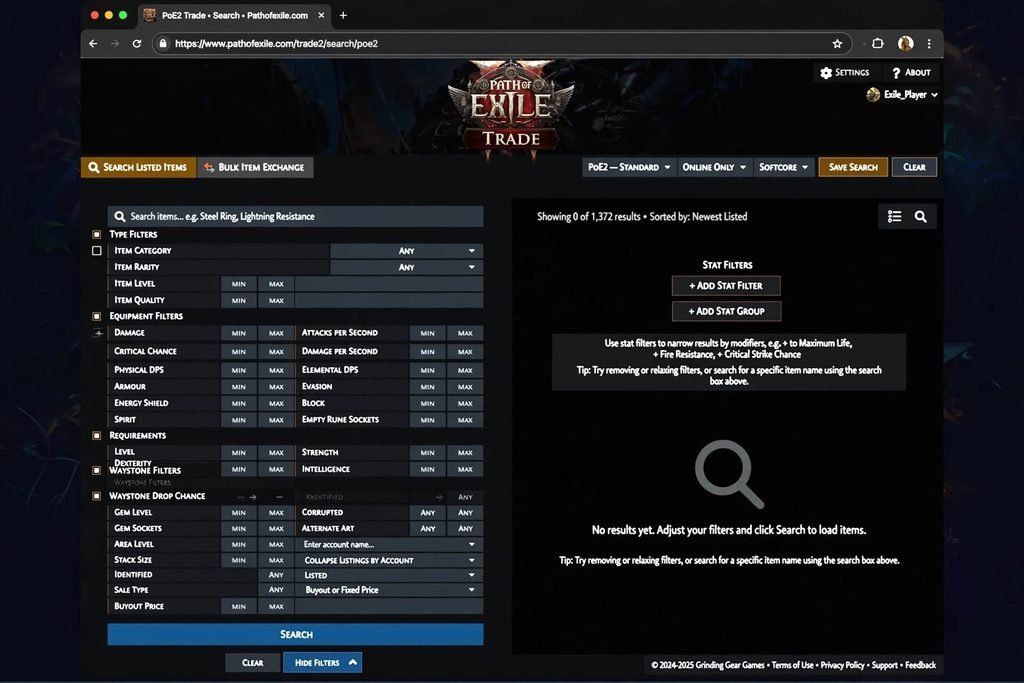
Short answer: The official PoE2 trade website is pathofexile.com/trade2, run by Grinding Gear Games as a section of the main Path of Exile website.
It is not a separate “poe2.com” domain. It lives on the same site as the original game’s trade page, in a dedicated section. Community-shared links follow the pattern /trade2/search/poe2/ followed by a league name.
Using the right address matters. Players who land on the original game’s trade page often find they can only select Path of Exile 1 characters. If your site shows PoE1 options only, check that trade2 appears in the address.
The official site is an indexer. It lists items that players have put up for sale and lets you filter them. It does not hold items or currency itself.
Here is what it does:
- Searches listings by item type, rarity and modifiers.
- Filters by price and seller status.
- Sorts results so you can compare similar items.
- Starts the buying process, either with a whisper or a Secure Item button.
You can also open an equivalent search panel inside the game. Press the forward-slash key or use the menu icon in the lower-left corner. Guides report the functionality matches the website, and patch notes confirm the in-game market exists, since GGG fixed a bug where it missed pseudo modifiers.
For any PoE 2 trade session, use whichever version is more convenient.
Read More: https://gamespuma.com/poe-trade/
How PoE 2 Trading Works: The Three Methods
Understanding which method fits which item is half the skill. Here is a comparison.
| Method | Best for | Seller must be online? | Notes |
|---|---|---|---|
| Asynchronous trade (Merchant’s Tab) | Gear, uniques, non-stackables | No | Needs a hideout, Ange, and a Merchant’s Tab to sell |
| Currency Exchange | Stackable currency, runes, fragments, crafting materials | No | Gold fee applies |
| Direct player trade | Almost everything except gold | Yes | Free, both players present |
Asynchronous Trading
The Third Edict update (patch 0.3, August 2025) introduced asynchronous trade. Sellers list items in a Merchant’s Tab, and buyers purchase them through Ange, an NPC found in your hideout.
A buyer clicks Secure Item on a listing. The game then teleports them to the seller’s hideout to complete the purchase, even if the seller is offline. GGG’s announcement stated that the buyer pays a gold cost, while the seller pays no gold to list or sell.
The Currency Exchange
This works like an automated order book. You choose the currency you want and the one you are offering, set a ratio, and place the order. It fills when a matching order exists.
Direct Trade
You whisper the seller, they invite you to their party, and you meet in their hideout. Both players check the items and accept.
How to Search Items on the PoE 2 Trade Site
A good search is what separates a fair price from an overpay. The goal is a short, comparable list.
Start with the league. The site offers separate economies, so a listing in Runes of Aldur is not the same market as Forbidden Rites. Pick the league your character is in.
Then set the seller status. Community guides recommend filtering for online sellers when you plan to whisper, since offline sellers cannot reply. With asynchronous Secure Item listings, offline sellers are fine.
Next, narrow the item itself.
PoE 2 Trade Filters Explained
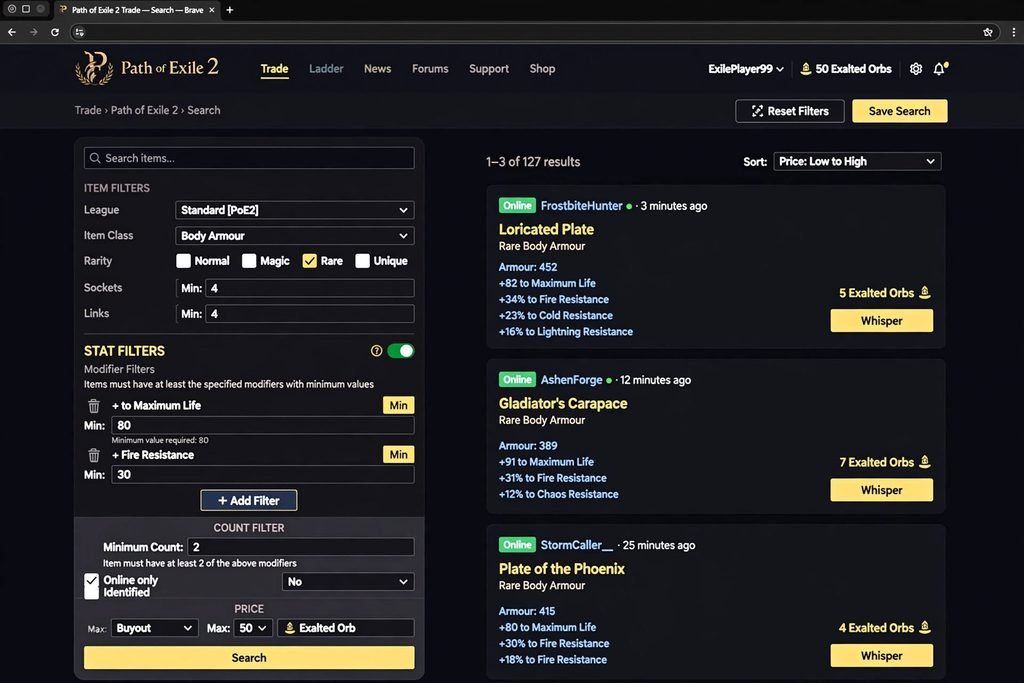
Filters change over time, so treat this as a practical overview. Confirm the exact labels in the current interface.
- Item type and base type: narrows to a weapon class, armour piece, jewel or specific base.
- Rarity: Normal, Magic, Rare or Unique.
- Item level and requirements: helpful when a base needs a certain item level to roll top-tier affixes.
- Modifiers (affixes): the core of a serious search. You can select explicit stats and set minimum and maximum values.
- Price: set a currency and a budget ceiling.
- Pseudo modifiers: combined stats, such as total resistance. The in-game market has supported these.
A few habits make searches better:
- Add only the modifiers you truly need. Every extra filter removes listings.
- Use minimum values rather than exact numbers.
- Aim for a result list you can read, roughly a few dozen entries at most.
- Sort by price, then check the cheapest few genuine listings.
If your results run into the hundreds, the search is too broad to price from.
The 0.5 Price-Check Shortcut
Patch 0.5.0 (Return of the Ancients) added a quick-search feature. Hold Shift and Alt, then left-click an item in your inventory. The game applies matching filters and shows comparable listings.
You can then switch individual modifiers off to see how each one affects value. Reports say it works while you are in a town or your hideout.
It is not perfect on heavily rolled rares. It is a fast first pass, not a final appraisal.
How to Buy Items in PoE2: Step by Step
Follow this process for gear and other non-stackable items.
- Open the site. Go to
pathofexile.com/trade2, or open the in-game Market Panel. Log in with the account linked to your character. - Select your league. Choose the league you are playing, such as Runes of Aldur or the Forbidden Rites event.
- Search. Enter the item type or name, then add the modifiers you need.
- Compare listings. Look at several similar items. Do not buy the first result.
- Check the item’s stats. Read every modifier. Note any that do not fit your build.
- Check the seller and price. Confirm the price currency and whether the seller is online.
- Buy. If the listing shows Secure Item, click it. You are taken to the seller’s hideout and purchase from Ange. If it shows the whisper option, copy the message and send it in game.
- Bring the payment. Have the listed currency and enough gold for the fee ready before you start.
- Verify. Confirm the item and price match what you saw on the site.
- Complete. Finish the purchase or accept the trade window.
A gold fee applies to the buyer on asynchronous purchases. If you run out of gold, the purchase can stall, so keep a reserve.
How to Contact a Seller
For direct trades, the whisper button on the listing copies a pre-written message. Paste it into chat and send it.
Then wait. If the seller is available, they will invite you to their party. Travel to their hideout rather than asking them to come to yours.
Some etiquette guidelines from community guides:
- Do not invite the seller to your party.
- Make offers in a separate message instead of editing the original.
- Wait for the seller to open the trade window.
- Do not spam skills in someone’s hideout, since lag can disrupt the trade.
How to Sell Items in PoE2
Selling has two practical routes: asynchronous listing and direct trade.
Selling Through a Merchant’s Tab
This is the main way to sell gear, uniques and non-stackable items, and it works while you are offline. Here is the process:
- Unlock a hideout. If you have not, complete the Hostile Takeover quest.
- Invite Ange. Asynchronous trade is unlocked in Act 4 by speaking with her.
- Get a Merchant’s Tab. You can buy one from the microtransaction shop. Alternatively, you can convert a Premium Stash Tab, but only tabs purchased before The Third Edict qualify, and Quad tabs cannot be converted.
- Place the item in the tab. Then price it. Each item is priced individually in a single currency type. The interface remembers your last price, but bulk pricing for the whole tab is not available.
- Wait. Items do not appear instantly. There is a short grace period before they show on the trade site, and cooldowns apply to removing or repricing them.
- Collect earnings. Talk to Ange and open the Earnings Tab, which is remove-only.
A Merchant’s Tab can only hold items that are not sold on the Currency Exchange.
Selling Without a Merchant’s Tab
You can still sell through direct trade. Earlier guides describe pricing an item in a public stash tab so it appears on the trade site, then waiting for buyer whispers. Because the interface has changed since then, confirm the exact steps in game.
The catch is that you must be online to complete the trade.
Preparing an Item for Sale
Before listing, check the item on the trade site. Use the Shift+Alt+Click shortcut first, then verify anything that looks valuable.
Price near the cheapest genuine listings for a near-identical item. Items priced far above the market usually sit unsold.
PoE2 Currency Trading and the Currency Exchange
The Currency Exchange handles stackable items. That includes basic orbs, runes and soul cores, crafting materials, boss fragments and other stackables. Gear and non-stackable items such as uniques, waystones and jewels are not allowed.
How to Use It
- Open the exchange through the currency NPC. Guides differ on the details of where it unlocks in the campaign, so check in game.
- Select the currency you want.
- Select the currency you are offering.
- Set a ratio. Common market ratios are shown for reference.
- Review the gold cost, then place the order.
If your ratio matches an existing order, it fills right away. Otherwise it stays open until a counterpart appears. The gold cost scales with the quantity and rarity of the items.
Exchange vs Normal Item Trading
| Currency Exchange | Item trade | |
|---|---|---|
| Item types | Stackables | Gear, uniques, others |
| Seller needed online | No | Depends on method |
| Price discovery | Order book ratios | Compare listings |
Understanding Currency Values
Exalted Orbs are common for small trades, and Divine Orbs for larger ones. One June 2026 guide reported a Divine Orb trading for roughly 100 to 130 Exalted Orbs early in Runes of Aldur.
Treat that as a dated snapshot only. The Forbidden Rites league has a fresh economy, and rates shift daily. Check live values on a community tracker like poe.ninja before any large trade.
How to Price Items in PoE2
There is no universal pricing formula. Prices depend on the current league and what players want.
Here are the main factors:
- Rarity: uniques and rares are priced differently. Some uniques are in demand only for specific builds.
- Base type and item level: a strong base can carry a rare.
- Modifiers and tiers: how many desirable affixes, and how high they roll.
- Build demand: popular builds pull prices up.
- League timing: early in a league, common items can be expensive. Later, supply grows.
- Similar listings: the most reliable guide.
A practical approach:
- Search for near-identical items.
- Ignore extreme outliers.
- Read the cheapest few real listings.
- Price at or just under them for a faster sale.
- Recheck after a day or two.
One guide suggests undercutting by 10 to 15 percent for a quick sale. That is an opinion, not a rule. Use your own judgment.
PoE 2 Trade Safety Tips
Most trades go fine, but a few habits protect you.
- Hover every item before you accept. Last-second item swaps are an old trick. Confirm the item and price in the trade window.
- Do not rush. A legitimate trade can wait a few seconds.
- Prefer Secure Item where available. It locks in the item and price before you arrive.
- Never share your account credentials. Nobody legitimate needs your password.
- Be careful with links. Only use the official site address and avoid unknown links sent in chat.
- Watch for unusual requests. Gold cannot be traded, so anyone asking you to hand it over is not following the game’s rules.
- Be cautious with third-party software. More on that below.
Common PoE 2 Trade Problems and Fixes
The seller does not respond. They may be busy, offline, or the item may be sold. Whisper once more, wait briefly, then move on.
The site shows only PoE1 characters. You are probably on the wrong page. Use pathofexile.com/trade2.
You cannot buy through Secure Item. Check that you have enough gold and the required currency in your inventory.
Your item will not list. Check that your hideout, Ange and Merchant’s Tab are set up. Remember the cooldown after listing.
Your search returns hundreds of results. Add stricter modifier minimums or a price cap.
You cannot trade at all. You may be in Solo Self-Found. Leaving SSF is a one-way change to the Standard league, so think carefully first.
PoE vs PoE2 Trade: What Is Different?
Path of Exile and Path of Exile 2 are separate games with separate trade pages. Do not apply one game’s rules to the other.
| Feature | Path of Exile | Path of Exile 2 |
|---|---|---|
| Official trade site | Original trade page on pathofexile.com | pathofexile.com/trade2 |
| Async trade (Merchant’s Tab, Ange) | GGG said it would come later; check current status | Available since patch 0.3 |
| In-game market panel | Not part of the classic setup | Yes, opened with / or the menu |
| Gold fees on trades | Not a feature | Buyer pays gold on async purchases and exchange orders |
| Bulk currency | Separate bulk exchange on the website | In-game Currency Exchange |
| Quick price check | Community tools | Built-in Shift+Alt+Click (0.5.0) |
I verified the PoE2 column against the sources listed below. PoE1 changes on its own schedule, so verify that column before publishing if you extend it.
Third-Party PoE2 Trade Tools
Community tools can speed up trade, but they are not official.
- poe.ninja publishes economy data and, since Return of the Ancients, a Character Trade Search. It jumps from an item on a character to a pre-filled search on the official trade site.
- Overlay price-check apps exist. One popular app triggered a false-positive antivirus warning for some players in a Steam thread. Only download tools from their official pages, and never enter your account details into them.
Keep the distinction clear. The official trade site and Market Panel come from GGG. Everything else is community-made.
PoE 2 Trade FAQ
What is PoE2 trade?
It is the collection of systems for player-to-player buying and selling in Path of Exile 2: the official trade site, in-game Market Panel, asynchronous Merchant’s Tabs and the Currency Exchange.
What is the official PoE2 trade website?
pathofexile.com/trade2 It is operated by Grinding Gear Games as part of the main Path of Exile website.
How do I buy items in PoE2?
Search on the trade site or Market Panel, compare listings, then click Secure Item or whisper the seller. Verify the item before completing.
How do I sell items in PoE2?
List gear in a Merchant’s Tab through Ange, or trade directly while online. Price against similar listings.
Do I need a premium stash tab to trade?
Buying does not need one. Selling asynchronously needs a Merchant’s Tab. Premium Stash Tabs bought before The Third Edict can be converted. Direct trades do not require it.
How does PoE2 currency trading work?
Use the Currency Exchange. Pick what you want, pick what you offer, set a ratio and pay the gold fee. The order fills when matched.
Is PoE2 trade safe?
Trading through official tools is safe when you verify items, avoid suspicious links and never share credentials.
Why is a PoE2 seller not responding?
They may be offline or busy, or the item may have sold. Try another listing.
How is it different from PoE1 trade?
It uses a separate trade2 page and adds the in-game market, Merchant’s Tabs and Currency Exchange.
Conclusion: Make PoE 2 Trade Work for You
PoE 2 trade looks complicated at first, but the logic is simple. Use the official site to search, Secure Item or a whisper to buy, a Merchant’s Tab to sell offline, and the Currency Exchange for bulk orbs.
Check the league, compare several listings, and never skip the final item check. Prices change quickly, especially in a fresh Forbidden Rites economy, so treat every number as temporary.
Bookmark pathofexile.com/trade2 Learn the Shift+Alt+Click shortcut, and your next PoE 2 trade will be faster and safer.
Sources Used
Official or primary:
- GGG’s official trade page,
pathofexile.com/trade2(URL confirmed via search results; direct fetch was blocked) - GGG’s PoE2 forum trade thread (via
pathofexile.com/forum/view-thread/3592056) - Grinding Gear Games’ asynchronous trade FAQ, as reported by RPG Site (rpgsite.net)
Established publications:
- PCGamesN, “Valuing Path of Exile 2 drops…” (May 28, 2026)
- Maxroll, “Trade in Path of Exile 2” (maxroll.gg)
- Game8 trade and Merchant Tab guides
- poe. ninja, “Character Trade Search” post
Third-party guides (lower authority, used for corroboration only):
- NextTier (a commercial boosting site, so verify its claims), TimeSaver, Conquest Capped, MMOJugg, Epiccarry, Boostmatch, Fextralife patch notes, MMOEXP

Written by Daniel Carter
Daniel Carter is a dedicated gaming writer who enjoys turning complex gaming topics into clear, useful, and engaging content. He covers game guides, tips, reviews, features, and the latest developments across the gaming world. His approach focuses on research, accuracy, and practical value, helping readers discover new games, improve their gameplay, and stay informed about the industry. For Daniel, great gaming content is not just about information—it is about making every article genuinely worth reading.