PoE trade is the system Path of Exile players use to buy and sell items, and it starts on Grinding Gear Games’ official trade website. For Path of Exile 1, the address is pathofexile.com/trade. For Path of Exile 2, it is pathofexile.com/trade2.
This guide explains how PoE trade works in September 2026, from your first search to a finished sale. It covers filters, buying, selling, currency, Merchant’s Tabs and scams. It also keeps Path of Exile 1 and Path of Exile 2 apart, so you never follow the wrong steps.
The main focus is Path of Exile 1 in the current Curse of the Allflame league (patch 3.29). Path of Exile 2 gets its own section further down.
Quick Answers: PoE Trade at a Glance
- What it is: a search tool for items that other players have listed for sale.
- Official PoE1 site: pathofexile.com/trade
- Official PoE2 site: pathofexile.com/trade2
- Cost to search: free.
- Cost to sell: you need a Premium Stash Tab or a Merchant’s Tab.
- Cost to instant-buy: the listed price plus a Gold fee.
- Bulk currency: use the Currency Exchange or the bulk exchange on the site.
- Solo Self-Found: characters in SSF cannot trade at all.
Table of Contents
What Is PoE Trade?
PoE trade is Path of Exile’s player-driven marketplace. It is not a classic auction house. Instead, a search website lists items from players’ public stash tabs and Merchant’s Tabs.
You search, compare listings and pick an item. Then you either contact the seller or, for eligible listings, buy instantly.
The game has no universal gold coin for player trading. Players pay in currency items such as Chaos Orbs and Divine Orbs. Gold does exist, but it cannot be traded between players. It only pays fees and NPC costs.
That design is deliberate. Trading is meant to feel like part of the game’s economy rather than a menu you click through.
Why “PoE Trade” Can Mean Several Things
Search results for “poe trade” are mixed. Players use the phrase for at least four different things.
| What people mean | What it actually is |
|---|---|
| The official trade site | Grinding Gear Games’ website at pathofexile.com/trade |
| The old poe.trade | A former third-party indexer that has been shut down |
| PoE2 trading | The separate site at pathofexile.com/trade2 |
| Trade tools | Community overlays and browser extensions built around the official site |
The old poe.trade site closed in late 2022, according to community reports at the time. The official site replaced it as the standard way to search. Any page claiming to be the “real” poe.trade today deserves suspicion.
Browser extensions and overlays, such as Awakened PoE Trade, are community projects. They are not made by Grinding Gear Games. They can be useful, but they are add-ons, not the marketplace itself.
The Official PoE Trade Website
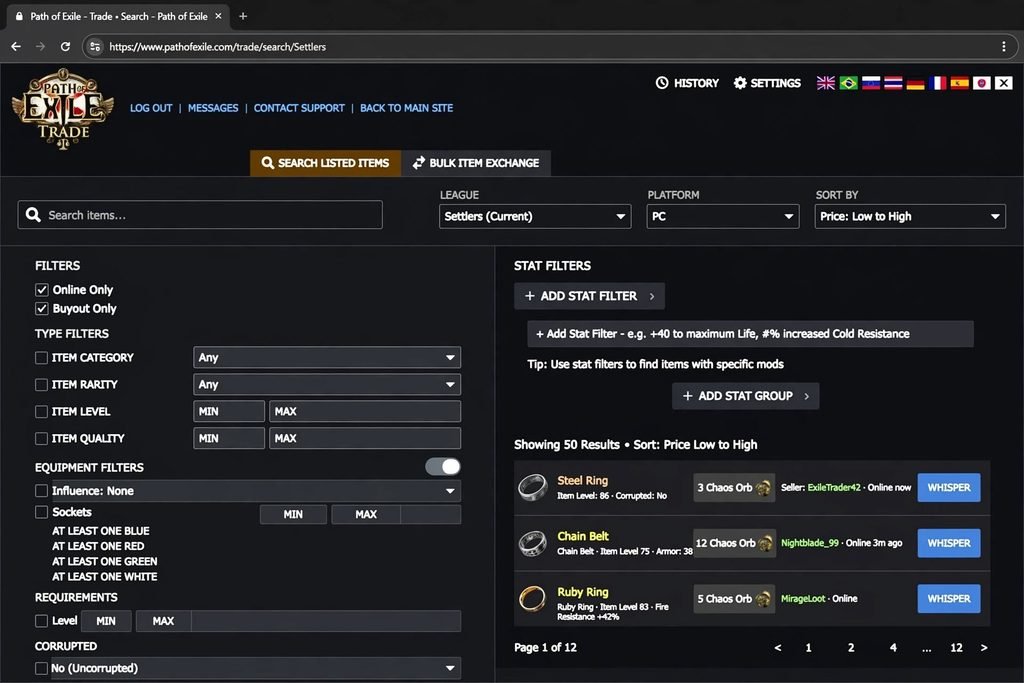
If you want the official PoE trade website, there are two verified destinations. Both are run by Grinding Gear Games.
| Game | Official trade address |
|---|---|
| Path of Exile (PoE1) | pathofexile.com/trade |
| Path of Exile 2 (PoE2) | pathofexile.com/trade2 |
Grinding Gear Games has referred to “the trade websites for both Path of Exile 1 & 2” in its own announcements. They are separate sites for separate games.
This matters more than it sounds. If you open the wrong one, your characters may not appear, and the search will show the wrong game’s items. Look for “trade2” in the address when you play PoE2.
Read More: https://gamespuma.com/poe2-trade-site/
What the Official Site Does
The site lets you search listed items by name, type, modifiers, price and more. It also has a bulk exchange section for currency and other stackable goods.
Each result shows the item, its listed price and its seller. From there you can contact the seller or, when the listing supports it, buy instantly.
How It Connects to the Game
The website reads listings from stash tabs that players have made public. It also reads items placed in Merchant’s Tabs. In-game, Path of Exile 1 has a Trade Market window that works from the same backend. You open it with the comma key or the pause menu.
How Does PoE Trading Work in 2026?
There are three main ways to trade in Path of Exile 1 today. Which one you use depends on what you are buying or selling.
| Method | Best for | How it completes |
|---|---|---|
| Manual trade | Rare gear, Uniques, gems, jewels | Whisper the seller, join their hideout, use the trade window |
| Asynchronous trade | Items in a Merchant’s Tab | Instant buyout, even when the seller is offline |
| Currency Exchange | Currency and other stackables | Place an order through Faustus, filled by the system |
Asynchronous trading arrived in Path of Exile 1 with patch 3.27, Keepers of the Flame, in October 2025. It came after the same idea launched in Path of Exile 2. Manual trading still exists and is still common.
Currency Exchange trading is handled by the NPC Faustus. Community guides trace it to the Settlers of Kalguur era. It has since become a standard feature for stackable items.
How to Search for Items on PoE Trade
Searching is the heart of PoE trade. Follow these steps.
- Open pathofexile.com/trade.
- Choose the game version if the site asks.
- Select the correct league in the league field.
- Enter an item name, or use the filters for unnamed items.
- Press Search.
- Sort and compare the results.
Step 3 matters most. Each league has its own economy. Standard and Curse of the Allflame do not share listings or prices. The current challenge league is usually selected by default, but check it anyway.
Searching for Unique Items
Uniques have fixed names, so they are the easiest to find. Type the name and search.
Then look at the rolls. Two copies of the same Unique can differ a lot in price. Focus on the modifier that matters for your build, not just the cheapest result.
Searching for Gems
Gems need extra fields. Use the Quality and Level fields in the miscellaneous section of the filters.
Corrupted gems are often much cheaper, because they may have failed a corruption attempt. If you do not want one, set the Corrupted filter to No.
Searching for Rare Items
Rares have random names, so you search by modifiers. Decide which two or three stats the slot must fix, such as Life or resistances. Search for those instead of chasing a perfect item.
PoE Trade Filters Explained
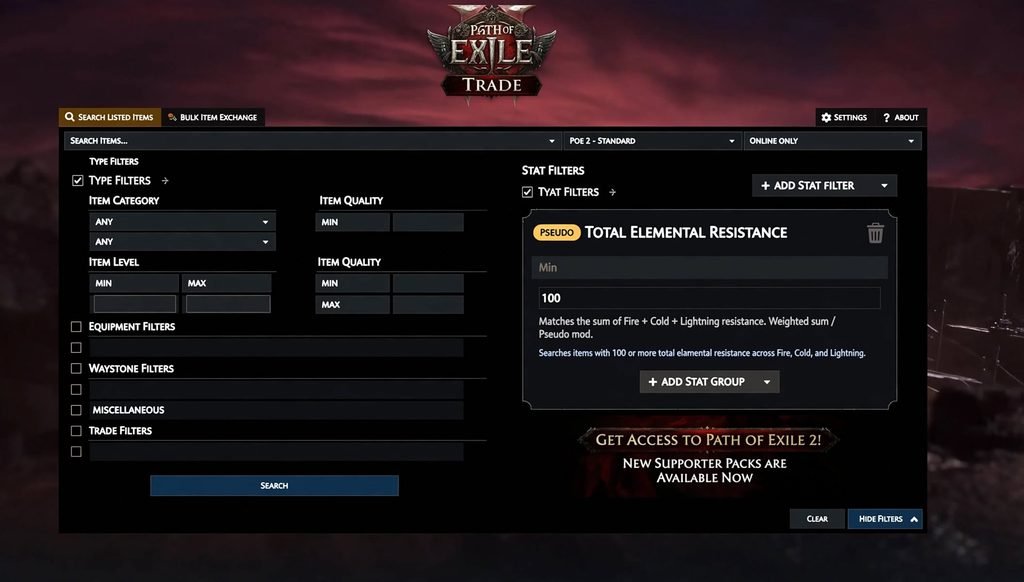
The filter panel is where PoE trade becomes powerful. Open it with the Show Filters button.
Core Filters
- Item name and type: narrow to a Unique, a base type or a category.
- Stat filters: click Add Stat Filter, type a modifier and set minimum or maximum values.
- Price: set a maximum listing price to hide anything outside your budget.
- Corrupted: choose Yes, No or either.
- Quality and level: important for gems.
- Online status: keep Online Only on, unless you want rare, long-shot listings.
- Instant buyout: show only listings that do not need a seller reply.
AND, COUNT and Pseudo Modifiers
Stat filters default to AND. That means every stat you add must be present.
The COUNT option is looser. It matches items that have a set number of your chosen stats. This helps when you cast a wide net.
Pseudo modifiers are not real in-game stats. They are helper filters that combine values. The most useful is Total Elemental Resistance.
Here is a common mistake. A new player searches for 35% Fire, 35% Cold and 35% Lightning. That removes a boot with 44%, 34% and 40%, even though the total is higher. A single pseudo filter for total elemental resistance finds both.
Sorting and Live Search
Results sort by price, lowest first, by default. Click a stat on a listing to sort by that stat instead.
Live Search keeps a search running and alerts you when a matching item appears. The browser tab must stay open. It suits rare combinations and early-league hunting.
Crafted Modifiers and Sockets
Crafted modifiers from the Crafting Bench can be removed and replaced cheaply. Judge an item by the modifiers that cannot be changed.
Sockets and colours also matter less than they used to, unless you want a specific link count. In patch 3.29, any skill gem can be placed in any socket colour, so colour is even less of a concern for uncorrupted gear.
How to Buy Items on PoE Trade
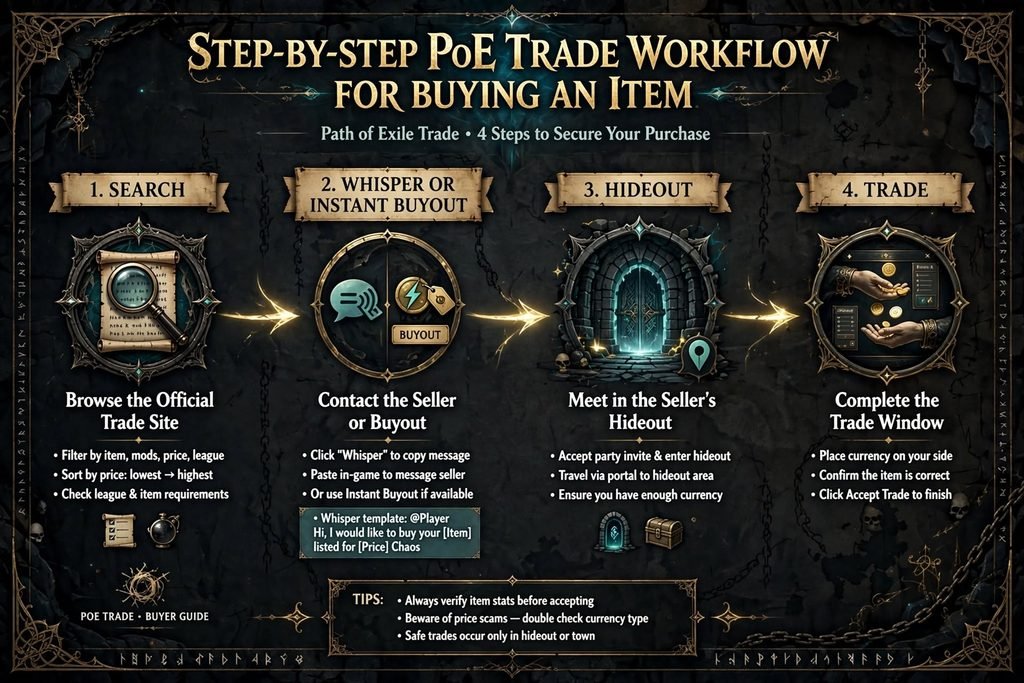
You can buy in two ways. Use the instant route when you can, and the manual route when you must.
Option 1: Instant Buyout
- Search for your item.
- Turn on the instant buyout filter.
- Pick a listing and press the button that takes you to the seller’s hideout.
- Talk to Faustus in that hideout.
- Buy the item from the Merchant window.
The buyer pays the listed price plus a Gold fee. The seller does not need to be online. If several buyers try for the same item, the first to complete the purchase gets it.
Bring the currency with you and make sure you have enough Gold. Check the price before you confirm.
Option 2: Manual Whisper Trade
- Search and choose a listing.
- Click the whisper button. The message copies to your clipboard.
- Paste it into the in-game chat and send it.
- Wait for the party invite.
- Accept, then travel to the seller’s hideout.
- Wait for the seller to open the trade window.
- Hover the item and the currency. Confirm both.
- Accept the trade.
Do not change the pre-written message price. If you want to negotiate, send a separate message.
How to Contact a Seller and What Happens Next
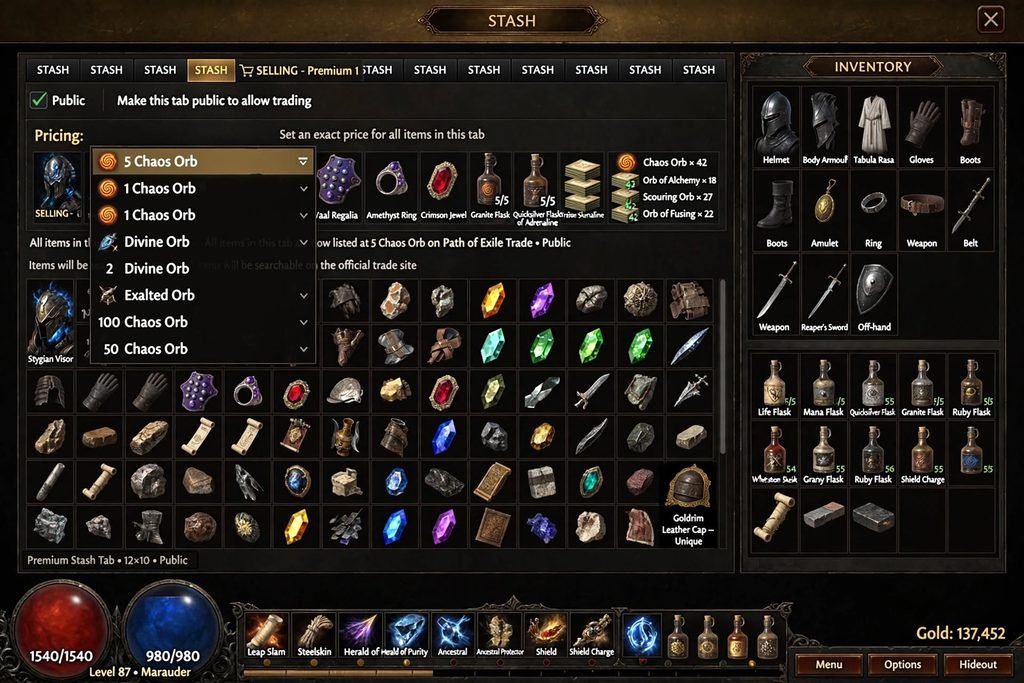
The whisper button copies a ready-made message. It names the item, the price, the league and the stash position.
After you send it, one of four things usually happens.
- The seller invites you to a party.
- The seller replies that the item is sold.
- The seller does not reply.
- Another buyer gets there first.
Sellers are often busy in a map. Because of that, it is normal to message more than one seller at once. If two accept, decline the second invite politely.
The accepted etiquette is simple. If you message someone, you go to their hideout and wait. If someone messages you, they come to yours.
Split your currency before you travel. You cannot split a stack once the trade window is open.
How to Sell Items on PoE Trade
Selling works differently from buying. You need a listing before anyone can find you.
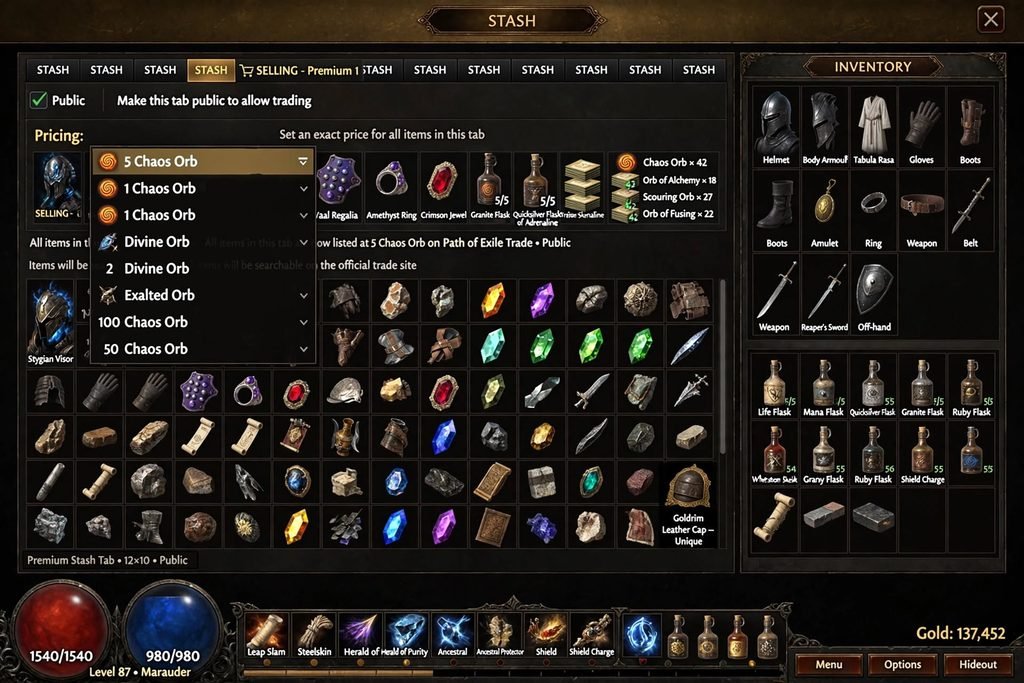
Method 1: Public Premium Stash Tab
This is the traditional route.
- Get a Premium Stash Tab. You can buy one or upgrade an existing tab.
- Open the tab settings and set it to Public.
- Choose whether items are priced individually or the tab has one price.
- Place an item in the tab and right-click it to set a price.
- Wait for a whisper.
- Invite the buyer, let them come to your hideout and trade.
The pricing menu lets you set an exact price. It also lets you mark a price as negotiable if you are happy to haggle.
Method 2: Merchant’s Tab and Faustus
This is the asynchronous route.
- Reach Act 6 and meet Faustus in Lioneye’s Watch.
- Make him steward of your Merchant’s Tabs.
- Use Manage Shop to move an item into a Merchant’s Tab and set its price.
- Leave. Buyers can purchase while you are offline.
- Return to Faustus and collect your currency from the Earnings tab.
There is no Gold cost for the seller. The buyer pays the fee. New listings have a short grace period. After that, changing the price or removing the item is subject to a cooldown.
You cannot set one price for a whole Merchant’s Tab. Price each item separately.
Merchant’s Tabs cannot list items that the Currency Exchange handles. Those go through the exchange instead.
Tab Costs and Conversion
Grinding Gear Games’ asynchronous trade FAQ listed a single Merchant’s Tab at 40 points and a bundle of six at 200 points. Check the current in-game store before buying, because prices and sales change.
Older Premium Stash Tabs bought before Path of Exile 2’s Third Edict update can be converted. Later purchases and Premium Quad tabs cannot. Merchant’s Tabs bought for Path of Exile 2 also work in Path of Exile 1.
Do I Need a Premium Stash Tab for PoE Trade?
To list a normal item for sale, yes. You need either a public Premium Stash Tab or a Merchant’s Tab.
You can still buy without either. And you can sell some things without one by using the bulk exchange on the trade site. Currency, fragments, maps and similar goods can be sold that way.
Old forum shops also technically exist. In practice, almost nobody uses them today.
How to Price Items in Path of Exile
Pricing is the hardest part of PoE trade. Follow this process.
- Identify the two or three modifiers that make your item valuable.
- Search for those modifiers with minimum values close to yours.
- Read several comparable listings, not just the cheapest.
- Loosen one requirement if there are too few results.
- Price within the range you see.
Listings are asking prices. They are not proof that an item sells for that amount.
If several buyers whisper within seconds, your price was probably too low. Pause and check the market again. Underpriced items are also the easiest thing for instant-buyout buyers to snap up, so check before you list.
Do not lock in a currency value from a guide. Prices swing during a league. For live rates, check the trade site itself or a community tracking tool.
PoE Currency Trading and Bulk Exchange
Currency trading works differently from item trading. You are swapping standard goods, not hunting for one unique roll.
The Currency Exchange
The Currency Exchange is handled through Faustus. It supports currency and many other stackable items, such as fragments, scarabs, essences and divination cards.
You choose what you have, what you want, the amount and the ratio. The Gold cost shows before you confirm. If your order matches an existing one, it completes at once. Otherwise it waits in the market until someone fills it.
Check the ratio direction carefully. A good-looking number means nothing if the two sides are reversed.
The Bulk Item Exchange on the Website
The trade site also has a bulk exchange section. You pick the item you want and the currency you will pay with. You can set a minimum stock to avoid sellers who only have a few units.
Unlike the Currency Exchange, this shows listings from players and often ends in a whisper trade.
Chaos Orbs, Divine Orbs and Bulk Prices
Chaos Orbs suit smaller purchases. Divine Orbs are the common unit for expensive gear.
Buying in large bulk often costs a small premium, because the seller is paying for convenience. Compare the per-unit price with the effort of contacting many sellers.
Is PoE Trade Safe?
The official trade site is run by Grinding Gear Games and is safe to use. The risks come from other players and from fake websites, not from the site itself.
Grinding Gear Games generally does not reverse bad trades, so care matters. Use these habits.
- Hover everything. Check the item and the currency in the trade window before you accept.
- Verify the stats. Compare the item with the listing, especially modifiers and corruption.
- Watch for swaps. A common trick is to change the item or the currency at the last second.
- Do not change the agreed price. Negotiate in a separate message beforehand.
- Never share your password. No legitimate trade needs it.
- Avoid unknown links. Type pathofexile.com/trade yourself.
- Be careful with odd requests. Anyone asking for something outside the normal process is a red flag.
Common Scams
The bait and switch is the classic. The seller lists a good item and swaps it before you accept.
Price fixing is another. A seller lists many items at a very low price to mislead the market, with no plan to sell.
Fake sites are the third. If a page asks you to log in with your account to “trade”, leave.
The bright side is that the vast majority of trades are smooth. Check twice and the rest of the risk is small.
Common PoE Trade Problems
The seller does not respond. They may be busy, offline or already sold the item. Try another listing.
The listing shows the wrong game. Check whether you are on /trade or /trade2.
No results. Your filters may be too strict. Loosen one stat or use a pseudo filter.
I cannot see my Merchant’s Tab. Merchant’s Tabs are managed through Faustus, not shown as ordinary stash tabs.
The item was already sold. Live listings can go stale. Use Online Only and instant buyout to reduce this.
Prices look too good. They may be price-fixing. Compare with other listings first.
I am in SSF. Solo Self-Found characters cannot use trade.
PoE Trade vs PoE2 Trade
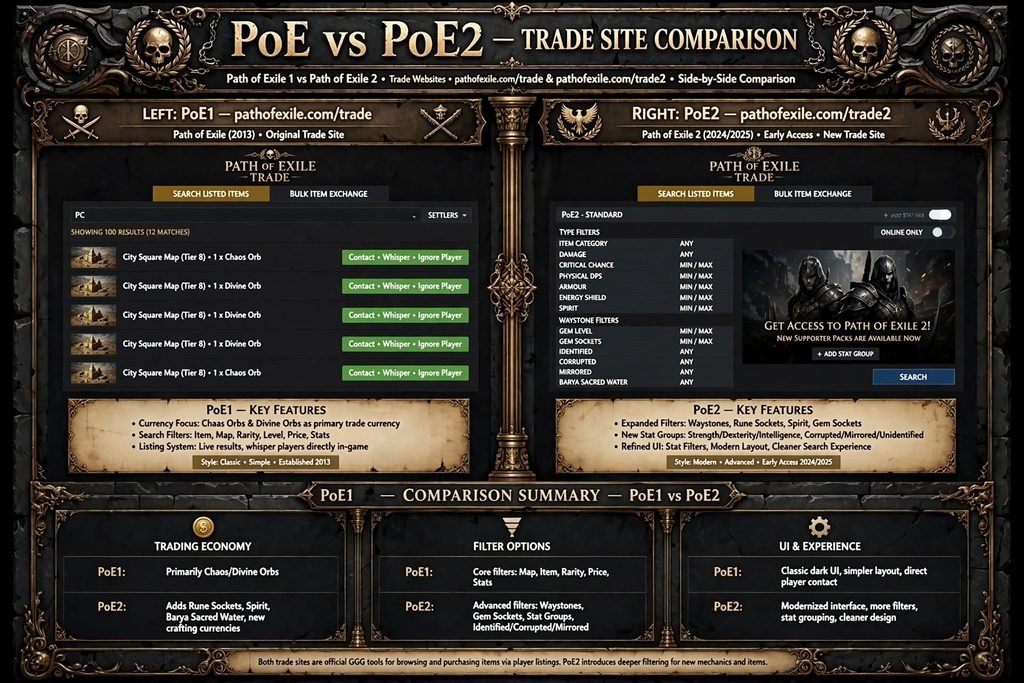
Path of Exile 2 has its own trade site and its own rules. Do not mix them.
| Feature | Path of Exile (PoE1) | Path of Exile 2 (PoE2) |
|---|---|---|
| Trade website | pathofexile.com/trade | pathofexile.com/trade2 |
| In-game market key | Comma | Slash |
| Async NPC | Faustus | Ange |
| Async system arrived | Patch 3.27 (October 2025) | Patch 0.3, The Third Edict |
| Instant buy label | Travel to Hideout, then buy from the Merchant window | Secure Item, then buy from the Merchant window |
| Currency Exchange | Via Faustus | Via Ange |
| Gold fee for buyer | Yes | Yes |
| SSF can trade | No | No |
| Current league (Sept 2026) | Curse of the Allflame (3.29) | Runes of Aldur, plus the Forbidden Rites event |
PoE2’s current picture is more fluid. Runes of Aldur launched with patch 0.5.0 in May 2026. Patch 0.5.5 added the Forbidden Rites event with a separate economy on September 4, 2026, without wiping Runes of Aldur. PoE2 is still in early access, so its trade features may change.
The lesson is the same in both games. Pick the right site, pick the right league and check the price.
Community Tools for PoE Trade
Community tools do not replace the official site, but they save time.
- Price-check overlays let you hover an item in-game and query the trade site.
- Browser extensions add bookmarks, search history and quality-of-life buttons.
- Economy trackers such as poe.ninja show market trends for currency and items.
Use well-known projects and read permissions carefully. Never install a tool that asks for your account password.
Frequently Asked Questions About PoE Trade
What is PoE Trade?
PoE trade is the player-driven system for buying and selling items in Path of Exile. It centres on the official trade website, where players search for items listed by others.
What is the official PoE Trade website?
For Path of Exile 1 it is pathofexile.com/trade. For Path of Exile 2 it is pathofexile.com/trade2. Both are run by Grinding Gear Games.
How do I buy items in PoE?
Search on the trade site, pick a listing and either buy instantly or whisper the seller. For a manual trade, join their hideout and accept in the trade window.
How do I sell items in PoE?
Put items in a public Premium Stash Tab and set prices, or list them through a Merchant’s Tab managed by Faustus. Bulk goods can also go through the exchange.
Do I need a premium stash tab to sell items?
You need a Premium Stash Tab or a Merchant’s Tab to list normal items. You can sell some stackable goods through the bulk exchange without one.
How do I search for items on PoE Trade?
Select your league, type an item name or apply filters, then search. Use stat filters, pseudo modifiers and price limits to narrow the results.
How does PoE currency trading work?
The Currency Exchange lets you set what you have and what you want. The system fills the order and charges a Gold fee. The website also has a bulk exchange.
How do I contact a seller?
Click the whisper button on a listing. The message copies to your clipboard. Paste it into chat and wait for a party invite.
Is PoE Trade safe?
The official site is safe. Trades between players carry risks such as item swaps, so always check the trade window before you accept.
Is PoE Trade the same as PoE2 Trade?
No. They are separate sites with different addresses, leagues and NPCs, even though they share similar ideas.
How do I price items in Path of Exile?
Search for your item’s key modifiers, compare several listings and price within that range. Avoid pricing from a single cheap result.
Why is a PoE seller not responding?
They may be busy in a map, offline or already sold the item. Try another listing or use instant buyout.
Conclusion: Make PoE Trade Work for You
PoE trade looks intimidating at first, but it follows a clear pattern. Pick the right official site, choose your league, search with smart filters and check the price.
Use instant buyout when convenience matters. Use manual whispers when the item you want is not available that way. Use the Currency Exchange for stackable goods.
Sell through a public Premium Stash Tab or a Merchant’s Tab, and price against real comparable listings.
Above all, stay careful. Verify every item before you accept, keep your account details private and remember that Path of Exile 2 uses a different trade site. With those habits, PoE trade becomes one of the best tools for improving your character.
Sources Used
Official, or GGG text reproduced elsewhere:
- Google result for the PoE2 trade page (
pathofexile.com/trade2). - GGG’s post on X about the trade sites for both games (March 31, 2025).
- GGG’s asynchronous trade FAQ, via the devtrackers.gg dev tracker.
- The 3.27 Keepers of the Flame patch notes, as reproduced by Maxroll and All Out Gaming.
Community and press:
- PoE Vault, “How to Trade in Path of Exile” (March 2026).
- Maxroll: Trading Guide for Beginners (etiquette) and Currency Exchange Market.
- Mobalytics: Merchant’s Tabs.
- Sportskeeda: PoE2 asynchronous trade and Merchant’s Tab conversion.
- NextTier’s PoE2 trade guide (July 2026).
- ggseason.com and arpg-timeline.com for league dates.
- Sportskeeda and ExpCarry for the PoE2 0.5.5 Forbidden Rites event.
- Steam community threads for
poe.trade‘s shutdown and scam patterns.

Written by Daniel Carter
Daniel Carter is a dedicated gaming writer who enjoys turning complex gaming topics into clear, useful, and engaging content. He covers game guides, tips, reviews, features, and the latest developments across the gaming world. His approach focuses on research, accuracy, and practical value, helping readers discover new games, improve their gameplay, and stay informed about the industry. For Daniel, great gaming content is not just about information—it is about making every article genuinely worth reading.
1 thought on “PoE Trade: The Ultimate Guide to the Official Trade Site (Easy & Safe in 2026)”