
PoE Regex: Path of Exile is currently on patch 3.29, Curse of the Allflame, and Path of Exile 2 is in Early Access on patch 0.5.5. Regex search itself has been part of Path of Exile’s stash tabs since patch 3.14 and remains supported today, along with regex-style search in vendor windows, the Passive Tree, the Atlas Tree, and the map device.
Table of Contents
Quick Answer
“PoE regex” refers to the lightweight, regex-style text matching built into several of Path of Exile’s search boxes — most commonly the stash tab search bar, the vendor window, and the map device/Atlas search field. Typing a short pattern like life|mana highlights every item or line of text containing either word. It is not a separate app or command line; it is a text field you already have in the game client, and it understands a useful subset of standard regular expression syntax rather than the full syntax found in programming languages.
What Is PoE Regex?
poe Regex is short for “regular expression” — a way of describing a pattern of text rather than one exact word. A normal search only matches an exact phrase. Regex lets you match one of several phrases, part of a word, or text that follows a specific shape (like “a number with two digits”), all from a single search box.
You don’t need any programming background to use it. Three ideas cover almost everything a Path of Exile player needs:
- The pipe
|means “or.” Typingfire|cold|lightninghighlights anything containing any one of those three words. - Parentheses group alternatives.
(fire|cold|lightning) resistancebehaves the same as typing all three full phrases separately, but shorter. - A leading exclamation mark excludes a match. In several PoE search boxes,
!quiverhides anything containing the word “quiver” instead of highlighting it.
Everything else in this guide builds on those three ideas.
Normal search vs. regex search
- Normal search: typing
Vaalonly highlights items whose text contains exactly “Vaal.” - Regex search with alternatives: typing
Vaal|Empower|Enlightenhighlights items matching any of the three gem names in one pass. - Regex search with partial words: typing
reshighlights “Fire Resistance,” “Cold Resistance,” and “Resolve” alike, sinceresappears inside all of them — useful for short patterns, but only if you’re sure nothing unwanted also contains those letters. - Combining terms:
"quality: \+([1-9][0-9])"(explained further down) matches a specific numeric pattern rather than fixed text.
Where You Can Use Regex in Path of Exile
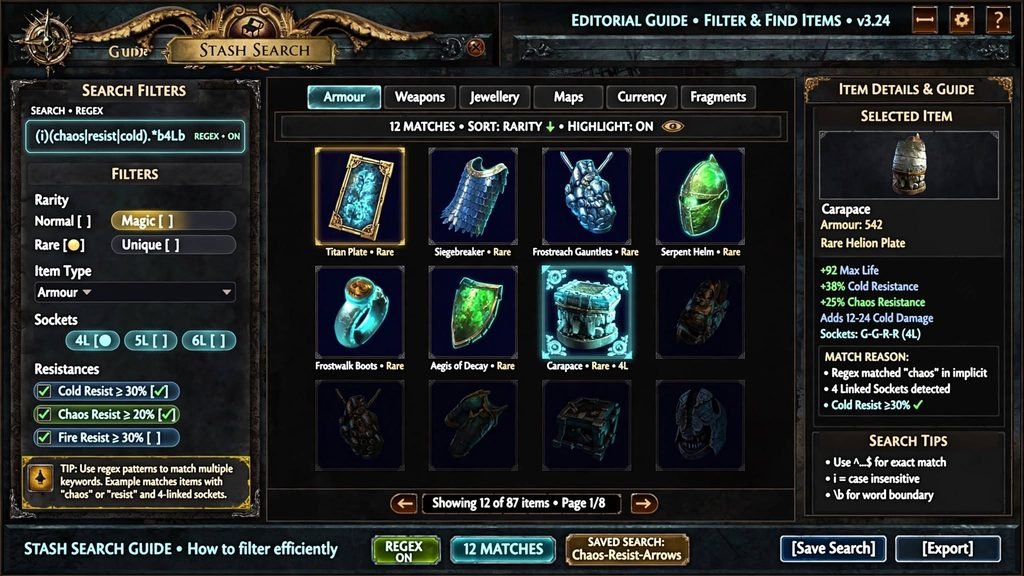
The same style of search box appears in more places than most players realize:
- Stash tabs — the search field above your stash, added in patch 3.14.
- Vendor windows — the search box works the same way when browsing a vendor’s sell/buy inventory, which is why it’s useful for isolating recipe ingredients.
- The Passive Skill Tree and Atlas Passive Tree — searching highlights matching passive nodes so you can find a keystone or notable quickly.
- The map device / Atlas interface — used heavily for highlighting wanted or unwanted map modifiers before you commit to running a map.
The underlying syntax is the same across all of these; only what you’re matching against changes.
PoE Regex vs. Path of Exile 2 Regex
Path of Exile 2 uses the same core idea, with the same search boxes appearing in vendors, stash tabs, the Passive Tree, and the Atlas Tree. The practical differences worth knowing:
- PoE 2’s search boxes have historically carried a shorter character limit than PoE 1’s — community guides put it at roughly 50 characters as of mid-2026, with an expectation (not a confirmed promise from Grinding Gear Games) that it will eventually be raised, mirroring an earlier length increase in PoE 1. Because exact limits shift between patches in both games, test your string length directly in the client rather than relying on a fixed number from any guide, including this one.
- PoE 2 supports the same exclusion with a leading
!and the same pipe|for alternatives that PoE 1 does. - PoE 2 players commonly reach for the community tool poe2.re to generate longer Waystone (map) modifier exclusion strings, similar to how PoE 1 players use map-regex generator tools.
- Because Path of Exile 2’s item mod wording, map modifier names, and UI are still being iterated on during Early Access, treat any specific PoE 2 pattern as more likely to need updating than an equivalent PoE 1 pattern.
If you play both games, don’t assume a pattern written for one will behave identically in the other — always confirm the exact modifier or item text first.
Read More: https://gamespuma.com/path-of-exile-2-release-date/
PoE Regex Syntax Reference
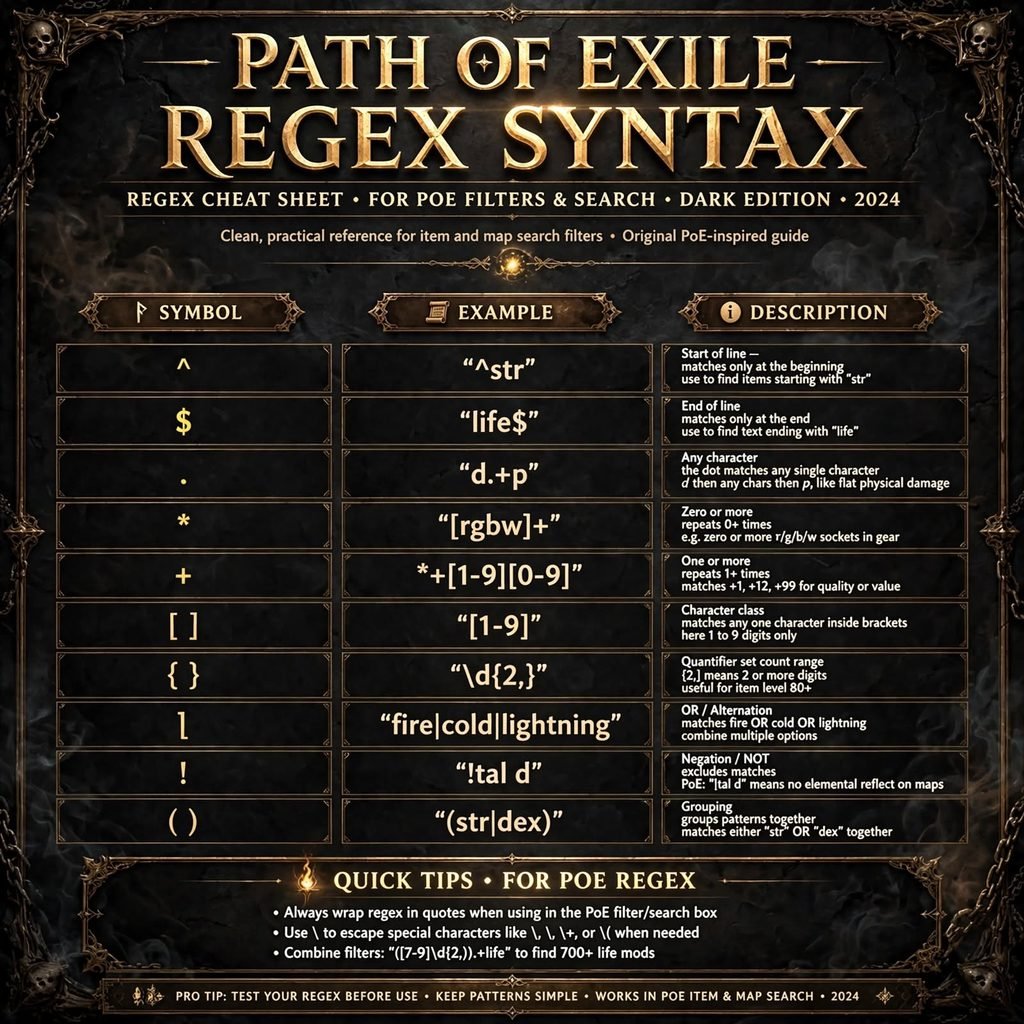
Path of Exile’s search boxes support a practical subset of regular expression syntax, not a complete implementation of any single regex standard (like PCRE, JavaScript, or Python’s re). The table below covers what’s actually useful and confirmed to work in the stash/vendor search box.
| Regex Element | Meaning | Example | What It Does |
|---|---|---|---|
| | Alternation (“or”) | life|mana | Matches either “life” or “mana” |
() | Grouping | (fire|cold|lightning) | Groups alternatives so they can be combined with other text |
[ ] | Character class | [rgbw] | Matches any single character inside the brackets (useful for socket colors) |
{n} | Exact repetition count | ([rgbw]-?){6} | Matches exactly six socket-color characters in a row (a 6-link check) |
^ | Start-of-line anchor | ^str | Matches only when the text begins a line — used to avoid matching a word buried mid-sentence |
\d / digit ranges | Digits | [1-9][0-9] | Matches a two-digit number starting at 10 or higher |
! (leading) | Exclusion | !quiver | Hides/excludes anything containing “quiver” instead of highlighting it |
| Quotation marks | String grouping | "quality: \+([1-9][0-9])" | Groups a full pattern, especially useful when it includes spaces or symbols |
Two important caveats: PoE’s search is effectively case-insensitive and multiline — it checks each line of an item’s tooltip text separately — and it does not guarantee support for every advanced construct found in general-purpose regex engines (lookaheads, lookbehinds, and some quantifier combinations are not reliably documented as working). Treat anything beyond the table above as unverified until you’ve tested it in your own client.
Common PoE Regex Patterns
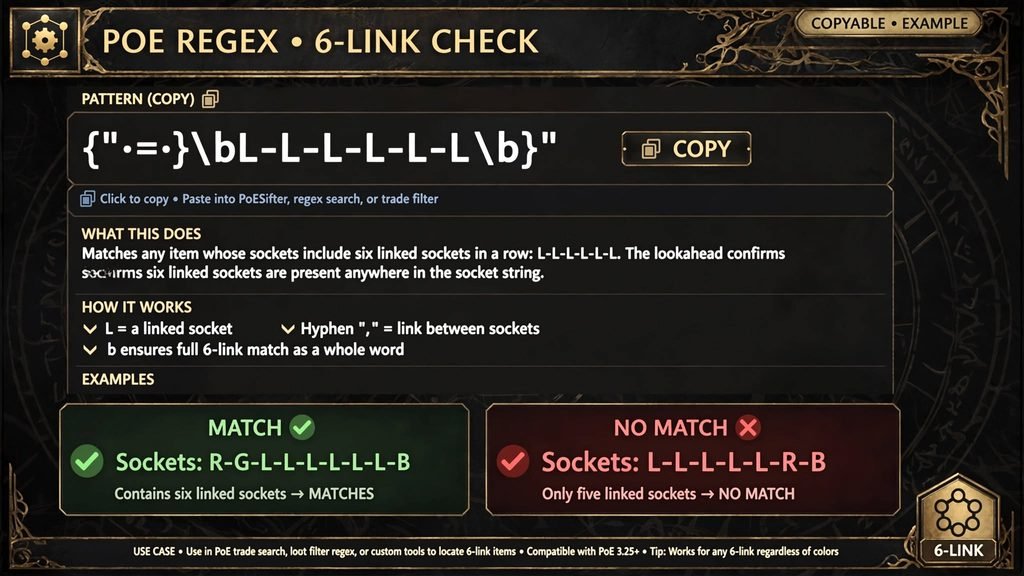
These are aimed at stash and vendor searching. Each pattern below matches against the raw tooltip text of an item, so match against the wording actually shown on the item rather than a shorthand name.
Six-linked items
sockets: ([rgbw]-?){6}Matches an item whose socket line lists six socket colors in a row, regardless of link connections shown by the dashes.
Six-socket items (not necessarily linked)
sockets: ([rgbw].?){6}A looser version of the above that also matches unlinked six-socket items.
10%+ item quality
quality: \+([1-9][0-9])Matches a two-digit quality value of 10% or higher (this only matches double-digit numbers, so it won’t catch anything below 10%).
Roughly 70+ flat life on an item
([1-9]\d{2,}|[7-9]\d).+lifeAn illustrative pattern that looks for a number in the right range followed later on the same tooltip by the word “life.” Because it’s number-pattern matching rather than a true stat parser, double-check results manually, especially on items with multiple numeric lines.
80+ item level
item level: ([1-9]\d{2,}|[8-9]\d)Matches an item level of 80 or higher.
All items of a given class, split by attribute
"class: x" "^str" "!(^(dex|int))"Replace x with the item class (for example, “body armours”). This example highlights strength-based requirements within that class while excluding dexterity and intelligence requirements — useful for quickly sorting gear by attribute during a fresh league start.
Multiple keywords in one pass
Vaal|Empower|EnlightenA simple alternation search — the most commonly used pattern type by far, and the one worth learning first.
Every pattern above should be treated as a starting point: item-mod wording and stat ranges change between leagues and balance passes, so re-check anything that looks off before trusting it on valuable gear.
PoE Regex for Map Rolling

Searching map modifiers with regex is one of the most popular real-world uses of this feature, because it lets you glance at a map’s modifier list and instantly see whether it contains something dangerous for your build.
Why it’s useful: manually reading every modifier on every map is slow, especially at high tiers where maps can carry many modifiers at once. A saved regex string highlights only the modifiers you’ve flagged as relevant, so a dangerous “reflect” or “monsters gain X% of damage as extra Y” modifier stands out instantly.
How players build these strings: rather than typing a modifier’s full text, players find the shortest unique fragment that still matches only the intended modifier and no others. For example, a fragment like f ph might uniquely match a physical-reflect modifier without also matching unrelated text elsewhere on the map’s tooltip. Several community tools (see the Tools section below) automate this fragment-shortening process so you don’t have to do it by hand.
Build-dependent, not universal: there is no single “safe” regex that works for every character. A modifier that’s lethal for a low-life character might be irrelevant for a tanky, high-armour build. Treat any shared “map regex” you find online as a starting template to edit for your own defenses, not a drop-in universal filter.
Keep it current: modifier wording occasionally changes between leagues or balance patches. A string that worked perfectly last league can silently stop matching if Grinding Gear Games rewords a modifier, so re-test saved map-regex strings after major patches.
Desirable vs. dangerous modifiers: the same technique works for both. Some players build one string to hide/exclude modifiers they don’t want to run, and a second string to highlight modifiers that make a map worth prioritizing (extra quantity or specific league-mechanic modifiers, for example).
PoE Regex for Vendor Recipes
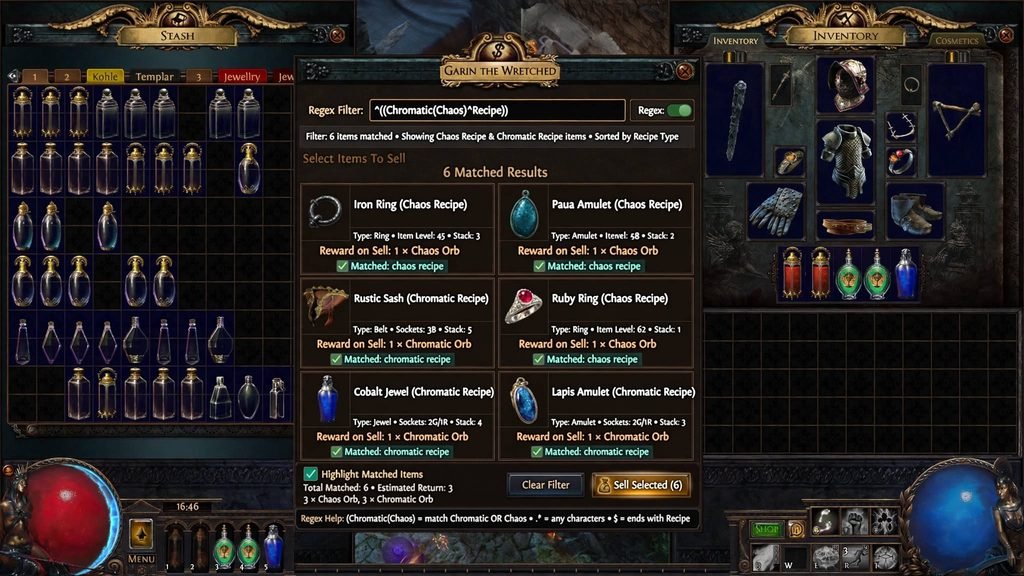
Because the vendor search box uses the same syntax as the stash search box, it’s commonly used to isolate items for recipes such as the classic chaos-orb recipe (a full rare set within a specific item level range). A pattern like:
"rare"|"item level: ([6][0-9]|[7][0-4])"highlights rare items and items within a targeted item-level band at the same time, making it faster to spot which items in your sell window qualify. As with the stash examples above, verify the exact item-level range you need for the recipe you’re running, since recipe requirements haven’t changed recently but it’s worth a quick check if you’re unsure.
PoE Regex Tools and Generators
A handful of community-built tools exist to generate regex strings without hand-writing them:
- Map-modifier exclusion generators (independent, fan-made web tools): you pick the map modifiers you don’t want to run, and the tool outputs a short regex string that matches all of your selected modifiers while avoiding accidental matches against unrelated map or item text. These are unofficial, free, browser-based, and not affiliated with Grinding Gear Games.
- poe2.re: a community-run web tool aimed specifically at Path of Exile 2 players building longer Waystone (map) modifier regex strings within PoE 2’s shorter search-box character limit. It is unofficial and not affiliated with Grinding Gear Games.
- Community pattern collections hosted on GitHub and similar platforms: curated lists of tested stash-search patterns (sockets, quality, item level, class-and-attribute filters) that players can copy directly. These are maintained by individual community members, not by Grinding Gear Games, and update at the maintainer’s discretion rather than on a fixed schedule.
- Price-checking and trade tools with regex storage: some popular third-party overlay tools let you save and quickly paste your favorite regex strings rather than retyping them, which is handy since PoE doesn’t persist search text between sessions or windows.
None of these tools are official Grinding Gear Games products. Always confirm a tool is still actively maintained before relying on it, since fan-made web tools occasionally go stale or disappear entirely.
Current vs. Outdated Regex Patterns
Regex syntax support itself (pipes, groups, anchors, character classes) has been stable since stash regex search was introduced in patch 3.14 and hasn’t been a common source of breakage. What does break older patterns:
- Modifier wording changes. If a mod’s tooltip text is reworded in a balance patch, any pattern matching the old wording silently stops working — it won’t error, it will just stop highlighting anything.
- New numeric ranges. Patterns built around specific value ranges (like a “70+ life” pattern) can become outdated if the underlying mod tier values are rebalanced.
- League-specific terminology. Patterns built around one league’s temporary mechanic text obviously won’t carry over once that league ends, unless the mechanic becomes a permanent feature.
- Copy-pasted PoE 1 patterns used in PoE 2, or vice versa. The two games’ mod text doesn’t always match word-for-word even when the concept is the same.
If you find a pattern in an older guide (including one written more than a league or two ago), treat it as a starting template rather than a guaranteed-working string, and re-verify the exact wording in your current client before relying on it for anything valuable.
Troubleshooting

Regex returns no results. Double-check the exact wording against the item’s actual tooltip text — mods are frequently reworded between leagues, and a pattern built on old wording will match nothing without any error message.
Regex matches too many items. Your fragment is probably too short or too generic. Lengthen it, or add more surrounding context (for example, use res for a fast rough search, but switch to resistance or a fuller phrase once you need precision).
A mod isn’t being detected. Confirm you’re searching the right window — the exact same mod can be worded slightly differently in different UI contexts.
A pattern worked in an older league but no longer works. This almost always means the underlying tooltip text changed. Re-read the item or modifier in-game and rebuild the pattern from the current wording.
Special characters cause unexpected behavior. Characters like +, (, ), and . have special meaning in regex. If you need to match a literal + sign (as in a quality value), escape it with a backslash: \+.
The regex is too restrictive. If a pattern with several chained conditions matches nothing, remove conditions one at a time until you find which one is failing, then adjust it.
Search behavior differs between interfaces. The stash, vendor, Passive Tree, and Atlas search boxes share the same core syntax, but what they’re searching against (item tooltips vs. passive node names vs. map modifiers) is different, so a pattern built for one won’t necessarily make sense in another.
You copied a pattern designed for a different game. A PoE 1 pattern pasted into Path of Exile 2 (or vice versa) may fail simply because the item or modifier text differs between the two games, not because the syntax itself is unsupported.
You’re actually playing Path of Exile 2. If you searched “poe regex” expecting Path of Exile 1 results, remember PoE 2’s search boxes currently enforce a shorter character limit and are still evolving during Early Access — a long, complex PoE 1-style pattern may simply not fit.
FAQ
What is PoE regex? It’s the regex-style text matching built into several of Path of Exile’s search boxes (stash, vendor, Passive Tree, Atlas Tree, map device), used to highlight or exclude items and modifiers that match a pattern rather than one exact phrase.
How do you use regex in Path of Exile? Click any supported search box and type a pattern using the pipe | for alternatives, parentheses for grouping, and a leading ! to exclude matches. The game highlights anything on-screen whose text matches your pattern.
What is the best PoE regex tool? There’s no single official tool. Community-built map-modifier generators are popular for Path of Exile 1, and poe2.re is commonly used for Path of Exile 2’s Waystone modifiers — all are unofficial, fan-made tools.
How do you make a regex in PoE? Start with the exact wording shown on the item, mod, or modifier you want to match, then shorten it to the smallest unique fragment, combining multiple targets with |.
Can you use regex in PoE stash search? Yes — regex-style search was added to stash tabs in patch 3.14 and remains supported.
What does | mean in PoE regex? It means “or.” A pattern like life|mana matches anything containing either word.
How do you search for multiple mods in PoE? Separate each mod fragment with a pipe: fire resistance|cold resistance|lightning resistance, or shorten each fragment as long as it stays unique.
What is a PoE map regex? A regex string used in the Atlas/map device search box to automatically highlight map modifiers you want to notice — either ones to avoid or ones worth prioritizing.
How do you filter dangerous map mods with regex? Find a short, unique text fragment for each dangerous modifier and combine them with |, or use a community map-modifier generator tool to build the string for you.
Why is my PoE regex not working? The most common cause is outdated or mismatched wording — mod and modifier text can change between leagues, so a pattern built on old wording will silently match nothing.
Does PoE regex work in Path of Exile 2? Yes, the same core mechanic exists in PoE 2’s vendor windows, stash tabs, Passive Tree, and Atlas Tree, though the search box has historically enforced a shorter character limit than Path of Exile 1’s.
Sources and Research Notes
| Source | Page/Title | URL | What Was Verified | Date/Context |
|---|---|---|---|---|
| GitHub (michaelschufi) | “Regex Patterns for PoE Stash Tab Searches” | https://github.com/michaelschufi/poe-stash-regex-search | Regex added to stash tabs in patch 3.14; case-insensitive/multiline behavior; specific tested patterns (6-link, quality, item level, class filters) | Community-maintained collection |
| GitHub (kweimann) | “poe-stash-filter” | https://github.com/kweimann/poe-stash-filter | Confirms stash regex matches against item tooltip text; case-insensitive matching | Community tool |
| GitHub (hbd7) | “poe-regex” map modifier generator | https://github.com/hbd7/poe-regex | Confirms existence and behavior of a community map-modifier regex generator tool | Community tool |
| Mobalytics | “PoE 2 Basic Regex Guide and the Search Bar” | https://mobalytics.gg/poe-2/profile/lolcohol/guides/poe-2-basic-regex-guide-and-the-search-bar | PoE 2 search boxes (vendor, stash, Passive Tree, Atlas Tree); exclusion with !; multi-string search with quotes; ~50-character limit noted; poe2.re and community pattern-guide references | Updated June 10, 2026 |
| aRPG Timeline | Path of Exile league tracker | https://www.arpg-timeline.com/game/path-of-exile | Confirms current PoE 1 league: 3.29, Curse of the Allflame, live since July 24, 2026 | Checked September 2026 |
| aRPG Timeline | Path of Exile 2 league tracker | https://www.arpg-timeline.com/game/path-of-exile2 | Confirms current PoE 2 patch: 0.5.5, The Forbidden Rites Event (Sept. 4, 2026); 1.0 full release scheduled December 11, 2026 | Checked September 2026 |
| GGSeason | “All Path of Exile Leagues: Complete List & Dates” | https://ggseason.com/blog/path-of-exile-all-leagues-dates/ | Cross-reference on PoE 1 league cadence and current league dates | Checked September 2026 |
| Path of Exile official site | News page | https://www.pathofexile.com/ | General confirmation of active development and current live-service status | Checked September 2026 |

Written by Daniel Carter
Daniel Carter is a dedicated gaming writer who enjoys turning complex gaming topics into clear, useful, and engaging content. He covers game guides, tips, reviews, features, and the latest developments across the gaming world. His approach focuses on research, accuracy, and practical value, helping readers discover new games, improve their gameplay, and stay informed about the industry. For Daniel, great gaming content is not just about information—it is about making every article genuinely worth reading.
2 thoughts on “PoE Regex Guide: Search Syntax, Patterns & Map Regex”