In this article
Yes, you can play Fortnite through Xbox Cloud Gaming, and neither an Xbox console nor a paid Game Pass plan is required. Xbox and Epic both say you need a free Microsoft account with an Xbox profile, a supported device with a modern browser, a fast connection and a home country on Xbox’s cloud list. This guide to xbox cloud gaming fortnite was checked against official pages on 15 November 2026, and it flags the parts that are still moving: a reported one-hour session cap for free players, new monthly cloud hours for Game Pass members, and a country list that, as published, does not include Pakistan.
Table of Contents
Can You Play Fortnite on Xbox Cloud Gaming?
You can, and xbox cloud gaming fortnite is one of the few free-to-play cloud routes Xbox officially supports. Xbox’s own support page says Fortnite can be played for free in a web browser, on a mobile device, on a smart TV or on other supported devices without an Xbox Game Pass subscription. Epic’s page for xbox cloud gaming fortnite says the same thing in plainer terms: a free Microsoft account, a high-speed connection and a compatible device are the whole shopping list.
Three conditions sit underneath that simple yes:
- Your country must be supported. Xbox Cloud Gaming runs in a limited list of markets, not worldwide.
- You need an Xbox profile on your Microsoft account. It costs nothing and takes a couple of minutes to create.
- Free access has limits. Free sessions are widely reported to end after 60 minutes, and Xbox’s cloud page states that session limits apply to its free, ad-supported option.
What “cloud gaming” means for Xbox Cloud Gaming Fortnite
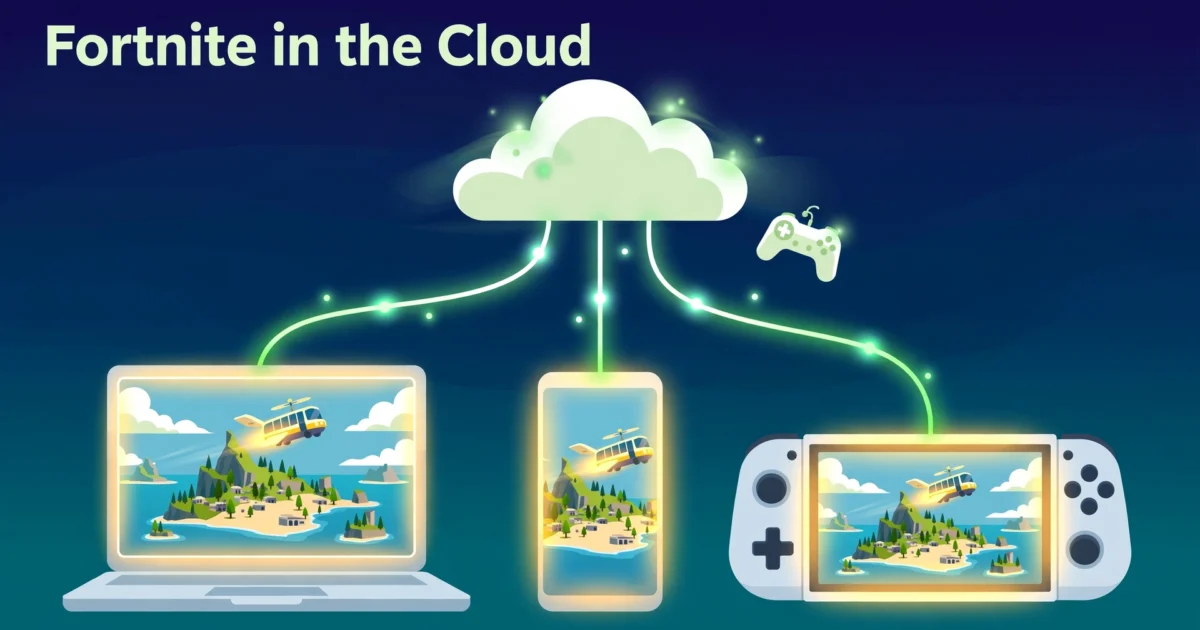
When you stream Fortnite, the match is not running on your phone, laptop or handheld. It runs on a remote Microsoft machine, which sends you a live video feed and receives your button presses, taps or mouse movements in return. Nothing large is installed, and the device in your hands only has to decode video and relay input.
That is the real difference between xbox cloud gaming fortnite and a normal install. A local copy uses your own processor, graphics hardware and storage, and it keeps working on a weak connection. The streamed version asks very little of your hardware but a great deal of your network.
What Changed in November 2026 for Xbox Cloud Gaming?
Anyone reading older articles needs this section, because the economics of the service shifted this autumn. In a post on Xbox Wire dated 3 September 2026, Microsoft announced that from November each Game Pass plan includes a fixed amount of cloud time every month: 15 hours on Ultimate, 10 on Premium and 5 on Essential. Members who use their hours can buy more through the Xbox Store, and people without Game Pass can purchase cloud hours to stream eligible games they already own.
Xbox’s current cloud gaming page lists the pricing for its US storefront: 10 hours for $3.99, 25 hours for $7.99 and 50 hours for $11.99. It also lists a “Free with ads” option and states that session limits apply to it. Prices and availability can differ by market, so treat those figures as US examples.
So does any of this touch xbox cloud gaming fortnite access? In the Xbox pages I read, Fortnite is treated as a separate free-to-play path rather than as a game that spends purchased hours. Xbox’s FAQ distinguishes games you own, games included with Game Pass and “supported free-to-play games,” and Epic’s page still says no paid subscription is needed. Xbox has also said it will publish more detail in November, so if anything on xbox.com/play contradicts this article, follow the live page.
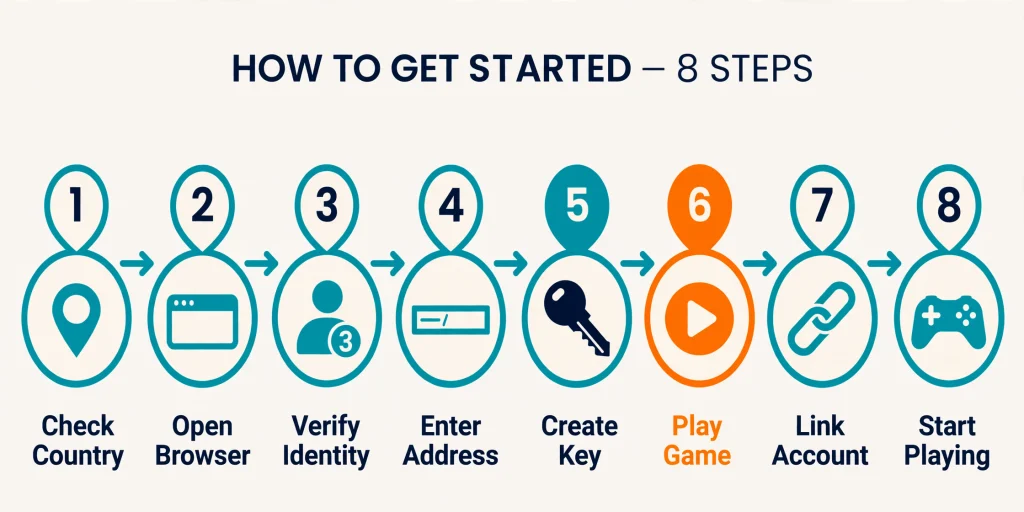
How to Play Xbox Cloud Gaming Fortnite: 8 Steps
These steps for xbox cloud gaming fortnite follow Xbox’s and Epic’s published instructions. Button labels shift from time to time, so match the meaning rather than the exact wording.
- Check your country. Open Xbox’s supported countries and regions page and confirm your country is listed for cloud gaming.
- Choose a supported browser. Xbox’s guidance points to Microsoft Edge, Google Chrome and Safari, depending on the device. Update the browser first.
- Get a Microsoft account with an Xbox profile. If you have no profile, the account setup page offers a free “Create your Xbox profile” button.
- Open xbox.com/play. This is the address Xbox and Epic both give for starting Fortnite in a browser.
- Sign in. Use the Microsoft account you set up in step 3.
- Find Fortnite and select Play. On an iPhone or iPad, Epic’s walkthrough adds one extra stop: after signing in you select “Get ready to play” and save a shortcut to your Home Screen, then launch Fortnite from that shortcut.
- Sign in to Epic, or link your accounts. Fortnite asks for your Epic Games account so your locker and progress load. More on this in the account section below.
- Pick your controls and play. Use touch on a phone or tablet, a Bluetooth controller, or mouse and keyboard in Edge or Chrome on a computer.
When a free session ends, you can usually queue for another one. Expect to wait in line at busy times.
Do You Need an Xbox Console for Xbox Cloud Gaming Fortnite?
No. People mix up four different things here, and separating them clears up most of the confusion:
- An Xbox console is hardware you buy. Streaming does not require one.
- A Microsoft account is your login. It is free.
- An Xbox profile is a free gamer identity attached to that account. Xbox’s page says you need one to sign in to Xbox apps and multiplayer games.
- Xbox Cloud Gaming is the streaming service that borrows a Microsoft server for you.
If you own no Xbox, you still qualify for xbox cloud gaming fortnite. You need the account and the profile, a browser, and a country on the list. If you do own an Xbox console, you can simply install Fortnite on it, which gives you the local experience without streaming.
Is Xbox Cloud Gaming Fortnite Free?
Free to start, yes. Free without strings, not quite. Splitting the question into parts keeps the answer honest:
- Fortnite itself is a free-to-play game. Epic does not charge to download or play it.
- Cloud access for Fortnite does not require a paid Game Pass plan, according to Xbox’s support page and Epic’s cloud page.
- Ads: Xbox’s “Free with ads” option shows commercials before a session. Xbox’s page does not say whether Fortnite sessions run through that option, so do not assume they do.
- Session length: Several outlets reported in March 2025 that free Fortnite sessions on the service were capped at 60 minutes, and later coverage of Xbox’s ad-supported test described one-hour sessions as well. Xbox’s cloud page only says “session limits apply” without giving a number, so read 60 minutes as widely reported rather than officially guaranteed.
- Spending: Cosmetics and V-Bucks cost real money, as they do on every platform.
If you want longer uninterrupted play than the free route allows or a console-like download, a paid route or a local install is the alternative. Players who care about the cost of cosmetics may also like our guide to Fortnite gift cards, which explains how Epic’s prepaid balance works.
Xbox Cloud Gaming Fortnite Region Availability
Do not assume xbox cloud gaming fortnite works where you live. Xbox’s December 2025 getting-started post says cloud gaming runs in 29 countries, with India the most recent addition. Published lists of those markets name Argentina, Australia, Austria, Belgium, Brazil, Canada, the Czech Republic, Denmark, Finland, France, Germany, Hungary, India, Ireland, Italy, Japan, Mexico, the Netherlands, New Zealand, Norway, Poland, Portugal, Slovakia, South Korea, Spain, Sweden, Switzerland, the United Kingdom and the United States.
Pakistan does not appear in any of those lists. I also could not read Xbox’s interactive regions page directly, because it loads its country filter dynamically, so readers in Pakistan or any other country not named above should check the live page before spending time on setup. Xbox says it expands the list over time, so the answer on xbox cloud gaming fortnite availability can change.
I do not recommend working around a region limit with tricks. If your country is unsupported for xbox cloud gaming fortnite, the practical fallbacks are a local install of Fortnite where your device allows it, or another cloud service that officially covers your country.
Which Devices Work for Xbox Cloud Gaming Fortnite?
Xbox’s December 2025 guide says Android, macOS, iOS, iPadOS and ChromeOS players should use a supported browser at xbox.com/play. Here is what that means device by device.
Windows PC
Open Edge or Chrome, go to xbox.com/play and start xbox cloud gaming fortnite from the browser. There is nothing to download through Epic’s launcher or the Microsoft Store. This is also the setup where mouse and keyboard play is possible.
Mac
Epic’s help center says Fortnite is not available natively on Mac and points players to cloud streaming through Xbox Cloud Gaming, GeForce NOW or Amazon Luna. On a Mac, use Safari or Chrome at xbox.com/play.
iPhone and iPad
Fortnite is not in Apple’s App Store, so the browser is the only route for xbox cloud gaming fortnite on iOS. Use Safari, sign in, follow the “Get ready to play” prompt, and save the shortcut Xbox asks for. Touch controls appear by default, and a Bluetooth controller is optional.
Android phones and tablets
Epic’s Android page says that in supported regions you can play Fortnite through cloud streaming with nothing to download, listing Xbox Cloud Gaming as one of three partners. Use a current browser and either touch controls or a paired controller for xbox cloud gaming fortnite on Android.
Chromebook
Chromebooks cannot run a native Fortnite client, but a browser is all cloud gaming needs. Epic names Xbox Cloud Gaming among the services that work on ChromeOS, so Chrome at xbox.com/play is the starting point.
Steam Deck
Epic’s support answer is direct: you cannot play Fortnite on Steam Deck directly. It names Xbox Cloud Gaming as the workaround, and Xbox’s guide notes that the Steam Deck needs extra setup through Microsoft Edge. Stick to Epic’s and Xbox’s own instructions here and skip unofficial hacks.
Smart TVs and other screens
Xbox’s support page mentions smart TVs and other supported devices, and its cloud page links a supported-device list. Because that list changes, check it for your exact model instead of trusting an old article.
Controller, Touch and Keyboard Support
Input is where xbox cloud gaming fortnite behaves differently from one device to the next.
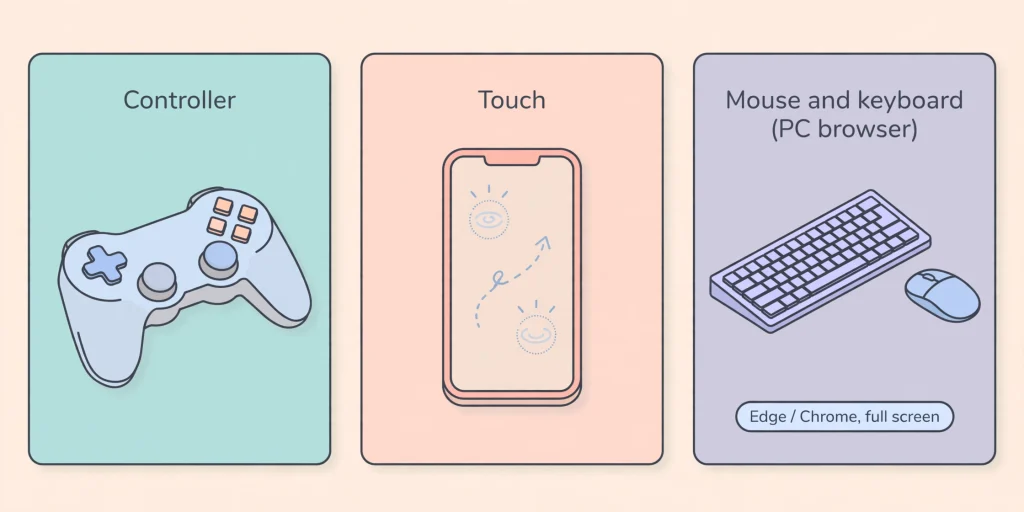
Controllers. Xbox’s support page says a supported Bluetooth-enabled controller works. On a phone, a clip-on or Bluetooth pad is usually more comfortable than touch for long sessions.
Touch controls. Xbox says touch works on certain devices for players without a supported controller, and Fortnite has its own touch layout on phones and tablets.
Mouse and keyboard. Xbox’s PC support page says Fortnite supports mouse and keyboard through cloud gaming even though it carries no badge for it. Only Edge and Chrome support this, the browser stream has to be in full screen, and you must click the game screen so the stream captures your mouse. Epic states that mouse and keyboard are not supported on mobile devices, including through cloud services.
Why the mismatch? Each browser and operating system handles pointer capture, Bluetooth and fullscreen differently, so the same game can accept an input method on a laptop and refuse it on a tablet. Test your setup before a ranked match.
Internet and Performance Requirements
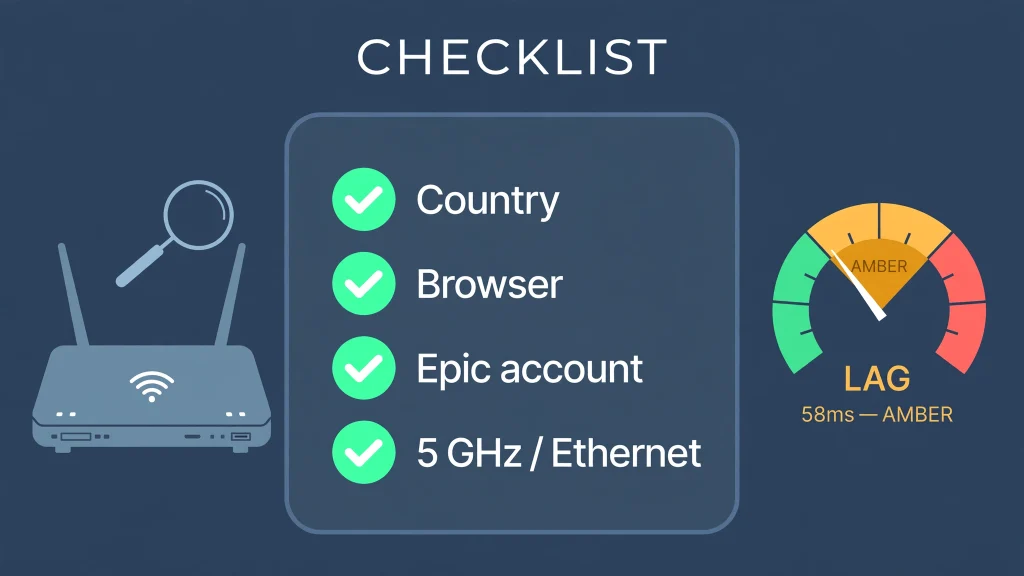
A stream is only as good as the path between you and Microsoft’s server. Xbox recommends a connection of at least 20 Mbps, prefers a wired Ethernet cable where possible, and accepts 5 GHz Wi-Fi or 5G on capable devices.
Raw speed is only part of the picture. These factors shape how xbox cloud gaming fortnite feels:
- Latency: the delay between your input and the screen reacting. Fortnite punishes late reactions during fights and builds.
- Jitter and packet loss: an unsteady connection causes stutters even when a speed test looks great.
- Wi-Fi quality: distance from the router, walls and busy channels all matter. The 5 GHz band usually suffers less interference.
- Congestion: evenings in shared buildings can hurt more than the plan’s headline speed suggests.
- Device and browser: an outdated browser or an overheating phone can add its own dropped frames.
I will not promise a frame rate, resolution or response time, because none of them are guaranteed. Xbox’s recommendations are a starting point, and results vary by home, country and hour of the day.
Is Xbox Cloud Gaming Fortnite Worth Using?
Is xbox cloud gaming fortnite good enough for regular play? It depends on what you value. The honest balance sheet looks like this.
Advantages
- No large local installation, which helps phones and laptops with little storage
- Fortnite on devices that cannot run it natively, such as Macs, Chromebooks and iPhones
- Fast to start: open a browser, sign in, play
- Low demands on the device’s own power
Limitations
- Dependence on a steady connection
- Extra input delay compared with a local install
- Limited country coverage
- Session caps for free players and possible queues
- Browser and device differences in controls
- Image quality that can dip when the network struggles
Xbox cloud gaming fortnite suits travelers, students on shared laptops, handheld owners and anyone whose hardware cannot run the game. It is a poorer fit for players chasing the lowest possible latency, because a local console or PC will almost always respond sooner.
Xbox Cloud Gaming Fortnite vs Installing Fortnite
| Feature | Xbox Cloud Gaming | Local Fortnite install |
|---|---|---|
| Game download | None; you stream from a server | Full download and patches on your device |
| Internet dependency | Constant; the connection is the game | Needed for online play, but loads from local files |
| Storage requirement | Minimal | Large; check Epic’s current figure |
| Device requirements | A supported browser or device | Must meet Fortnite’s platform requirements |
| Input latency | Adds streaming delay | Generally lower |
| Graphics | Depends on the stream and network | Depends on your hardware settings |
| Updates | Handled on the server side | You download them yourself |
| Accessibility | Works on devices that cannot install Fortnite | Limited to supported platforms |
| Best for | Casual play, travel, unsupported devices | Competitive play and the lowest delay |
Xbox Cloud Gaming Fortnite vs GeForce NOW and Amazon Luna
Epic’s help center lists three cloud services for Fortnite: Xbox Cloud Gaming, NVIDIA GeForce NOW and Amazon Luna. Choose based on your account, country and device rather than on a claim that one is better.
- Account model: Xbox signs you in with Microsoft and then loads the Epic account linked to your Xbox profile. GeForce NOW runs the Epic Games Store version of the game, so your Epic login does the work directly.
- Access: Xbox offers Fortnite without a paid Game Pass plan. GeForce NOW has a free tier with its own limits, and Luna’s Fortnite access is tied to an Amazon plan, so confirm current terms with each service.
- Availability: Each service has its own country list. Xbox’s is the 29-country list above, so a service that is blocked in your country might still work through another provider.
- Controls: Epic says mouse and keyboard are unavailable on mobile across cloud services, so touch and controller are the mobile options on all three.
The main appeal of xbox cloud gaming fortnite is how little it asks of a newcomer: one free account, a browser and no subscription.
Linking Your Epic and Xbox Accounts
Your Fortnite locker, progress and friends belong to your Epic Games account, not to the device or to Microsoft. Xbox Cloud Gaming signs you in with your Microsoft account and Xbox profile, and Fortnite then loads whichever Epic account that Xbox profile is linked to.
To keep your progress, sign in to the Epic account that holds it, open the connected-accounts area of your Epic account settings, and link the Xbox profile you plan to stream with. Check the displayed account before you play, especially if you share a family computer.
Do not create a second Epic account just to try xbox cloud gaming fortnite. A duplicate splits your cosmetics and progress. If Epic reports that a different Xbox account was linked earlier, use Epic’s own account-linking support page instead of improvising. Younger players may also be using a family Microsoft account, so our Fortnite age rating guide is worth a read for parents.
Buying V-Bucks Through Xbox Cloud Gaming Fortnite
You can buy V-Bucks during xbox cloud gaming fortnite sessions, and Epic documents how to do it for players who own no console. Before you buy, make sure the correct Xbox account is connected to your Epic account.
Epic describes two routes:
- From the Xbox Store: open the V-Bucks add-on page, choose an offer, press Buy, sign in if prompted, pick a payment method and finish.
- Inside the stream: start Fortnite through Xbox Cloud Gaming, click the V-Bucks icon, choose an offer and hold the Purchase button. You are redirected to the Xbox website, where you press Purchase and choose a payment method.
Microsoft handles the billing on this route, so a Microsoft Store balance can be used even without owning an Xbox. Epic’s separate gift card route runs through Epic’s balance instead. I am not quoting prices because they differ by region and change often.
Common Xbox Cloud Gaming Fortnite Problems
Work through the simple checks first when xbox cloud gaming fortnite misbehaves, then the specific ones.
Xbox Cloud Gaming Fortnite does not appear or says it is unavailable
Confirm your country is on Xbox’s cloud list, that you are signed in with the right Microsoft account, and that you are using a supported browser. Reload xbox.com/play and look for Fortnite directly.
“This title is not supported” error in Xbox Cloud Gaming Fortnite
Epic’s support article for this message says to contact Xbox support. Epic offers no local reinstall or account-unlinking fix for it. While you wait, try again later, because some players report the message appearing during service problems.
Login or wrong Epic account
Check which Epic account your Xbox profile is linked to. If it is the wrong one, unlink and relink through your Epic account settings, then reopen the stream.
Controller not detected
Pair the controller to the device first, then open the stream. On a computer, click inside the game screen so the browser registers input. Use a controller Xbox lists as supported.
Touch controls missing
Touch layouts appear on supported phones and tablets. On a laptop or desktop, expect the controller or mouse-and-keyboard prompts instead.
Mouse and keyboard not working
Use Edge or Chrome, switch to full screen and click the game window. On mobile, remember Epic does not support mouse and keyboard.
Disconnects, input delay or blurry video
Move closer to the router, switch to 5 GHz Wi-Fi or Ethernet, and pause other downloads on the network. Close extra tabs and restart the browser. Check Epic’s public status page to rule out an outage. Our guide to Fortnite server status shows the quickest ways to do that.
The session ended after an hour
That matches the reported free-session cap. Start a new session and expect a short queue.
Matchmaking errors
If the stream loads but matches fail, the cause is often on Epic’s side. Our walkthrough of the internal content beacon error covers one common version.
FAQs About Xbox Cloud Gaming Fortnite
Can you play Fortnite on Xbox Cloud Gaming?
Yes. Xbox and Epic both document xbox cloud gaming fortnite, and it works in a browser at xbox.com/play in supported countries.
Is xbox cloud gaming fortnite free?
Fortnite is free to play and does not require a paid Game Pass plan on the cloud. Free sessions are widely reported to last 60 minutes, and in-game purchases still cost money.
Do you need an Xbox to play Fortnite through cloud gaming?
No. A free Microsoft account with an Xbox profile, a supported device and a supported country are enough.
Do you need Game Pass for Fortnite on Xbox Cloud Gaming?
Not according to Xbox’s support page or Epic. Game Pass only matters for the rest of the cloud library.
How do you play Fortnite on Xbox Cloud Gaming?
Sign in at xbox.com/play with your Microsoft account, find Fortnite, select Play and link your Epic account when asked.
Can you play Fortnite on your phone with Xbox Cloud Gaming?
Yes, on supported iPhones, iPads and Android devices through a browser, using touch controls or a Bluetooth controller.
Can you play Fortnite on PC through Xbox Cloud Gaming?
Yes. Windows PCs can run xbox cloud gaming fortnite in Edge or Chrome, and mouse and keyboard work there when the stream is full screen.
Can you use a controller with Fortnite on Xbox Cloud Gaming?
Yes. Xbox says a supported Bluetooth-enabled controller works.
Why is xbox cloud gaming fortnite not working?
Common causes are an unsupported country, the wrong browser, an account mix-up, a network problem or a service issue. For the “not supported” message, Epic says to contact Xbox support.
Sources & References
- Xbox Support, “Play Fortnite with cloud gaming for free”: https://support.xbox.com/en-US/help/games-apps/cloud-gaming/free-to-play-games
- Xbox, “Xbox Cloud Gaming” page (cloud playtime, free with ads, FAQ): https://www.xbox.com/en-US/cloud-gaming
- Xbox Wire, “Upcoming Changes to Xbox Cloud Gaming,” 3 September 2026: https://news.xbox.com/en-us/2026/09/03/xbox-cloud-gaming-changes/
- Xbox Wire, “Getting Started with Xbox Cloud Gaming,” 19 December 2025: https://news.xbox.com/en-us/2025/12/19/getting-started-with-xbox-cloud-gaming/
- Xbox Support, “Play Xbox cloud games on PC with mouse and keyboard”: https://support.xbox.com/en-US/help/games-apps/cloud-gaming/play-xbox-cloud-games-on-pc-with-mouse-and-keyboard
- Xbox, “Supported Countries & Regions”: https://www.xbox.com/regions
- Fortnite, “Play Fortnite on Xbox Cloud Gaming”: https://www.fortnite.com/mobile/xbox-cloud-gaming?lang=en-US
- Epic Games Support, “How to play Fortnite using Xbox Cloud Gaming on iOS”: https://www.epicgames.com/help/c-202300000001636/c-202300000001719/how-to-play-fortnite-using-xbox-cloud-gaming-on-ios-a202300000010514
- Epic Games Support, “This title is not supported with Xbox Cloud Gaming” error: https://www.epicgames.com/help/en-US/c-Category_Fortnite/c-Fortnite_TechnicalSupport/this-title-is-not-supported-with-xbox-cloud-gaming-error-when-launching-fortnite-a000094550
- Epic Games Support, “Can I play Fortnite on Steam Deck?”: https://www.epicgames.com/help/c-202300000001636/c-202300000001719/fortnite-steam-deck-a202300000014552
- Epic Games Support, “Can I use my Microsoft Store Balance in Fortnite without an Xbox?”: https://www.epicgames.com/help/en-US/c-Category_Fortnite/c-Fortnite_Billingandpayment/can-i-use-my-microsoft-store-balance-in-fortnite-without-an-xbox-a000092772
- Epic Games Support, “Can I play Fortnite on Cloud-Streaming services?”: https://www.epicgames.com/help/en-US/c-Category_Fortnite/c-Fortnite_TechnicalSupport/can-i-play-fortnite-on-cloud-streaming-services-a000086925
- Fortnite, Android cloud gaming page: https://www.fortnite.com/mobile/android?lang=en-US
- Pure Xbox, “Fortnite Players Share Mixed Reactions As Xbox Cloud Gaming Adds Limit For ‘Free’ Users,” March 2025: https://www.purexbox.com/news/2025/03/fortnite-players-share-mixed-reactions-as-xbox-cloud-gaming-adds-limit-for-free-users
- Thurrott, “Microsoft Starts Testing Free Ad-Supported Game Streaming With Xbox Insiders”: https://www.thurrott.com/games/339582/microsoft-starts-testing-free-ad-supported-game-streaming-with-xbox-insiders

Written by Daniel Carter
Daniel Carter is a dedicated gaming writer who enjoys turning complex gaming topics into clear, useful, and engaging content. He covers game guides, tips, reviews, features, and the latest developments across the gaming world. His approach focuses on research, accuracy, and practical value, helping readers discover new games, improve their gameplay, and stay informed about the industry. For Daniel, great gaming content is not just about information—it is about making every article genuinely worth reading.