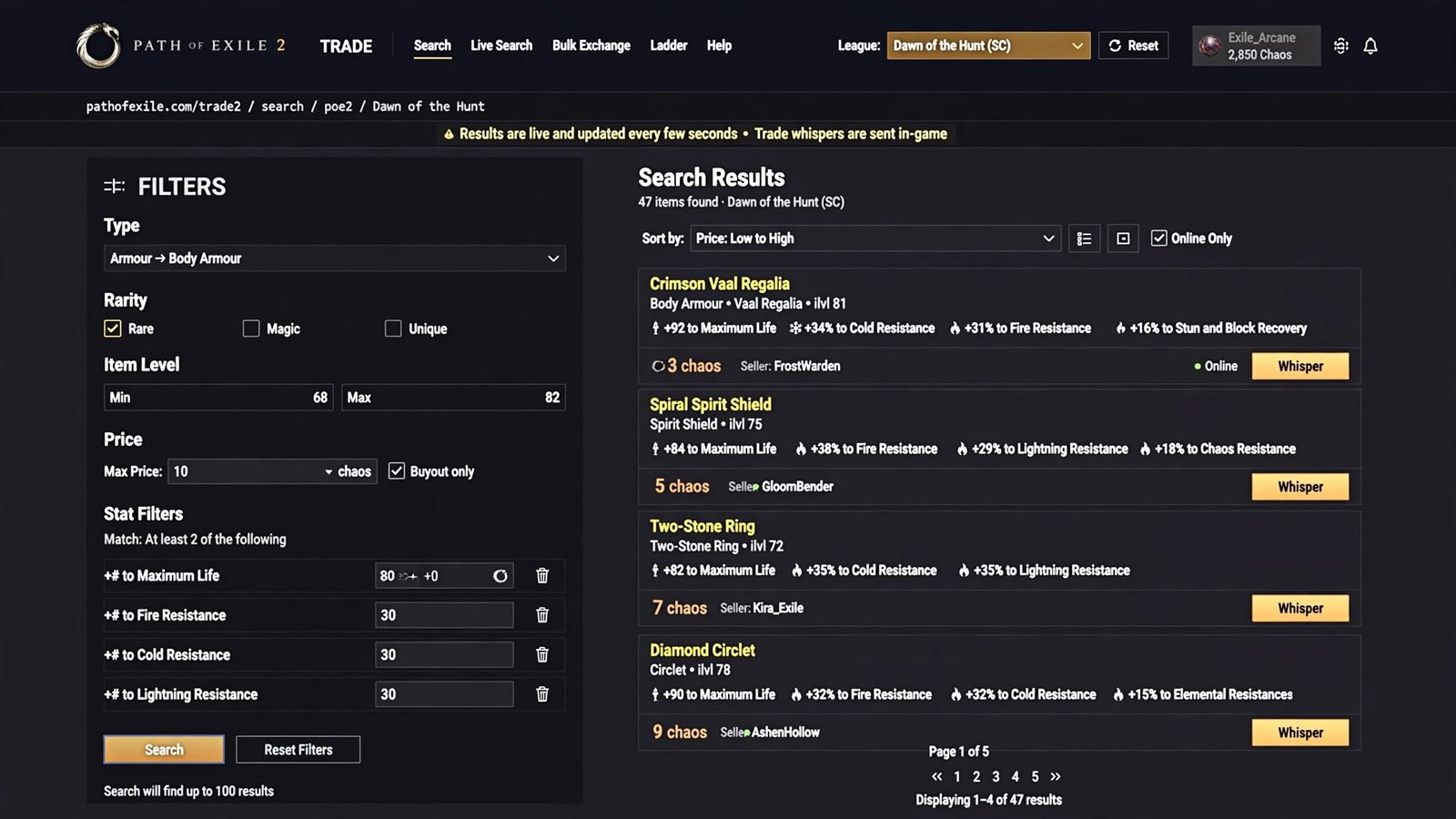
If you searched “poe2 trade,” you’re almost certainly looking for the official Path of Exile 2 trade website — here it is, along with a full explanation of how buying, selling, and currency trading actually work right now, why the system is set up the way it is, and how to avoid the scams that circulate around this exact search term.
Table of Contents
Quick answer: The official PoE2 trade site is pathofexile.com/trade2. It’s a section of Grinding Gear Games’ own website, not a separate app or third-party marketplace. Trading itself happens through a mix of the trade site, an in-game trade panel, and direct player-to-player exchanges — there’s no single “buy now” storefront the way there might be in other online games.
What Is PoE2 Trade?
“PoE2 trade” refers to the entire system Path of Exile 2 players use to exchange items and currency with one another. There’s no developer-run auction house where you spend real money on gear, and there’s no gold-for-cash marketplace sanctioned by Grinding Gear Games. Instead, the economy is entirely player-driven: someone finds an item, decides they don’t need it, and lists it for other players to buy using in-game currency — Exalted Orbs, Chaos Orbs, Divine Orbs, Gold, and so on.
This player-driven model is a defining feature of the Path of Exile series as a whole, and it carries over into PoE2 trade with some meaningful updates. Because the game is still in Early Access, the exact tools available for trading have changed more than once since launch, most notably with the introduction of asynchronous (offline) trading partway through Early Access. That’s worth understanding before you dive in, because a lot of older guides only describe the original, more manual version of the system.
What Is the Official PoE2 Trade Site?
The official PoE2 trade: Path of Exile 2 trade site is:
https://www.pathofexile.com/trade2
This is a dedicated section of pathofexile.com — the same domain that hosts Grinding Gear Games’ account management, forums, and the original Path of Exile’s trade tools. PoE2 trade gets its own /trade2 path because the two games run on completely separate economies, separate leagues, and in some cases separate currencies, so their listings can’t be mixed.
A few things worth knowing about the official site specifically:
- It requires a linked account. You’ll log in with the same credentials (GGG account, Steam, or Epic Games, depending on how you play) that you use in-game, and your in-game stash needs to be set up correctly for your items to actually appear in search results.
- It mirrors the in-game trade panel. Everything you can do on the website, you can also do from inside the game through an in-game trade browser, bound to a configurable hotkey in the options menu. This means you don’t have to alt-tab out of the game to search for items — useful if you’re mid-map and want to check prices quickly.
- It is not a separate “PoE2.com” site. This trips people up. There are unofficial domains, forum posts, and even some ad-driven content pages that reference “the PoE2 trade website” as though it’s a distinct product with its own branding. It isn’t. If a link isn’t on pathofexile.com, it isn’t the official trade site — full stop.
That last point matters more than it might seem. Because “poe2 trade” is exactly the kind of casual, half-remembered search term people type when they don’t know the real URL, it’s also exactly the kind of term that scam and content-farm sites target with lookalike names. We’ll come back to this in the safety section, but it’s worth flagging early: the only trustworthy destination for PoE2 trading is a page that lives on pathofexile.com.
Read More: https://gamespuma.com/poe2-ninja/
How PoE2 Trading Actually Works Right Now
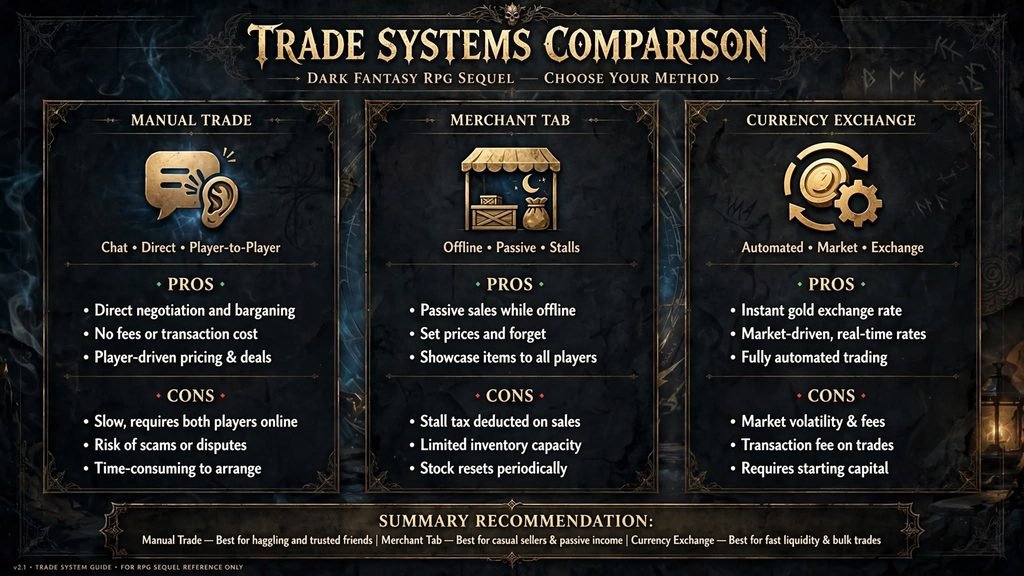
This is the part most guides oversimplify, because Path of Exile 2 currently runs three distinct trade-related systems side by side, and which one applies depends on what you’re trying to do.
1. Manual trade (the original method)
This is the classic PoE2 trade: Path of Exile trading experience, carried over largely unchanged from the original game. You keep items you want to sell in a stash tab marked public, set a price, and wait. When a buyer finds your listing on the trade site, they whisper you in-game. You then invite them to your hideout (or they invite you), open the trade window together, and manually exchange currency for the item. Nothing completes until both sides accept.
2. Asynchronous (direct-buy) trade
Introduced partway through PoE2’s Early Access, this system lets you skip the whisper-and-meet-up step entirely. You place an item into a special stash tab designed for this purpose, set a price through a hideout NPC who manages your storefront, and the item becomes instantly purchasable by anyone browsing the trade site or in-game panel — even while you’re offline. When someone buys it, the currency (plus a small Gold fee) is collected automatically, and you pick up your earnings from the same NPC next time you’re online.
This was a genuinely significant change to how the game’s economy functions, because it removes the biggest pain point of the original system: needing to be online and responsive to make a sale. It’s also why some older written guides feel out of date — anything written before this system existed will only describe the whisper-and-meet-up flow.
3. Currency Exchange
Currency — Exalted Orbs, Chaos Orbs, Divine Orbs, Gold, and other tradeable resources — has its own separate system, also run through a hideout NPC. Instead of searching for an individual seller, you pick the two currency types you want to swap, and the system matches you against currently listed exchange rates. This is generally the fastest way to convert one currency into another, and it doesn’t involve whispering a stranger at all.
In practice, most players end up using all three at different times: the Currency Exchange for quick currency swaps, the asynchronous system for buying and selling items on the trade site without coordinating schedules, and manual trade for rarer, higher-value items where a seller wants more control over who they trade with (or for anything the newer system doesn’t cover).
How to Search for Items in PoE2 Trade
- Go to pathofexile.com/trade2, or open the in-game trade panel with your configured hotkey.
- Double-check you’re viewing PoE2 trade and the correct league — it’s easy to land on PoE1’s trade section or the wrong league tab by mistake, especially if you have both games bookmarked or your browser autofills the wrong address.
- Use the Item Category dropdown to narrow to a weapon type, armor slot, or item class. Avoid typing category names into the free-text search box — that box performs a partial-name match against item names, not categories, so searching “helmet” there can return odd, unrelated results instead of every helmet in the game.
- Add Stat Filters for the specific modifiers you actually need, such as “+# to Maximum Life” or “% increased Fire Damage,” and set a realistic minimum value for each one rather than maxing them out immediately.
- Use Equipment Filters (Armour, Evasion, Energy Shield thresholds) when you’re shopping for a defensive stat rather than a specific base item.
- Use Trade Filters to set a maximum buyout price in your preferred currency, and optionally restrict results to sellers who are currently online if you specifically need a manual (whisper) trade.
- Run the search. If you get no results, the fix is almost always to remove or loosen a filter — PoE2’s stat combinations are specific enough that stacking too many filters at once frequently returns nothing, even when suitable items exist.
How to Buy Items in Path of Exile 2
- Find a listing that matches what you need on the trade site.
- Check whether it’s an instant-buy listing (through the asynchronous system) or a manual listing. Instant-buy listings are typically marked clearly and let you complete the purchase immediately, without needing the seller online.
- For manual listings, use the site’s built-in contact button, which generates a pre-filled whisper message you paste into the in-game chat.
- Wait for the seller to invite you to their hideout, or send your own invite if they’re waiting on you.
- Once the trade window is open, place your agreed-upon currency on your side of the window.
- Before accepting anything, hover over the item the seller has placed on their side and read its modifiers carefully. Confirm they match exactly what you searched for — sellers occasionally place the wrong item by mistake, and in rare cases, a listing may not accurately reflect what’s actually in someone’s stash.
- Only accept once both sides look correct. The trade window is designed so neither party can back out once both items are locked in, which is what makes in-game trades fundamentally safe as long as you verify before accepting.
How to Sell Items in Path of Exile 2
You have two realistic paths, and most active traders end up using both depending on the item:
Manual listing. Drop the item into a stash tab set to public, assign it a price, and wait for whispers. This works for anything, doesn’t require a special stash upgrade, and gives you full control over who you trade with — useful if you want to negotiate or if you’re selling something unusual enough that automated pricing doesn’t make sense.
Asynchronous listing. Place the item into the special stash tab designed for direct-buy sales, and set your price through the hideout NPC that manages listings. Once it’s live, anyone can buy it instantly, including while you’re offline, and the sale completes automatically. This costs a small amount of Gold per listing, and listings generally can’t be pulled back immediately after going live — so it pays to double- and triple-check your price the first time, since an underpriced item in this system can sell in seconds rather than sitting for someone to negotiate.
A practical tip: if you’re unsure what an item is worth, search for comparable listings on the trade site first using the manual system’s pricing as a reference point, then list at a competitive rate through the asynchronous system if you want a hands-off sale.
How to Trade Currency in PoE2
Currency trading runs through the Currency Exchange, a separate system from item trading, accessed via a dedicated hideout NPC. Rather than browsing individual sellers, you select the currency you’re offering and the currency you want in return, and the system fills your order against current listed rates — similar in spirit to a simple exchange order book. This is almost always faster than trying to manually trade currency stack-for-stack with another player, and it’s the standard way most players convert, say, a pile of common drops into the higher-tier currency they actually need for crafting.
Because exchange rates float based on what players are actively listing, the “value” of any given currency can shift meaningfully within a single day, especially early in a fresh economy like the Forbidden Rites league.
How to Check PoE2 Item Prices
There’s no official price database — PoE2’s economy is fully player-set, so “checking a price” really means estimating current market value from live listings. Reasonable approaches:
- Search the trade site for comparable items and look at the range of current asking prices, rather than fixating on the single cheapest or most expensive listing.
- Check the Currency Exchange for real-time swap rates if you’re trying to value currency rather than gear.
- Cross-reference community economy-tracking tools, which aggregate trade-site data into more digestible price charts (see the note on third-party tools below). These can be genuinely useful, but they’re a snapshot of recent sales, not a guarantee of what your specific item will fetch.
Whatever number you land on, treat it as a moving target. Prices swing hard in the days after a league launch, after major patches, and around any change to drop rates or crafting recipes — a price that was accurate last week may be noticeably off this week.
How to Find Cheap PoE2 Items
There’s no shortcut that guarantees underpriced gear, but a few habits genuinely help:
- Widen your stat filters slightly rather than searching for a “perfect” item — a build often performs almost identically with a slightly lower roll on a secondary stat, and those items are usually far cheaper.
- Search recently listed items rather than sorting only by price — the very cheapest listing on a popular item is often a price-fixer bluffing (see Common Mistakes below), not a real deal.
- Buy during off-peak hours in your region, when there’s less competition for genuinely well-priced listings.
- Consider the asynchronous system for quick pickups, since instant-buy listings don’t involve competing with other buyers for a seller’s attention.
How to Use PoE2 Trade Filters
The PoE2 trade site’s filter panel is organized into a handful of groups, and understanding what each one is for makes searches much faster:
| Filter Group | What It Does |
|---|---|
| Item Category | Narrows results to a specific weapon, armor slot, or item class |
| Rarity | Filters to Normal, Magic, Rare, or Unique items |
| Item Level | Useful for crafting, since many modifiers are gated by item level |
| Stat Filters | Search by specific explicit or implicit modifiers, each with an adjustable minimum |
| Equipment Filters | Generic Armour, Evasion, or Energy Shield thresholds for gear that doesn’t need a specific base |
| Trade Filters | Buyout price limits, online-seller-only toggles, and seller account search |
| Misc Filters | Item-specific extras, such as socketed skill-gem level on certain equipment |
A couple of practical notes: only filters that actually exist in the current UI will appear here, and GGG has adjusted this list more than once during Early Access as new item systems have been added. If you’re writing or reading a guide months from now, it’s worth confirming the current filter set directly on the site rather than assuming it hasn’t changed.
How to List Items for Sale
Requirements depend on which listing method you use. Manual listings need a stash tab set to public, with pricing either applied per-tab (all items the same price) or per-item if you’re using a tab that supports individual pricing. Asynchronous listings need the dedicated stash type built for that system, plus enough Gold to cover the listing fee. In both cases, make sure the item is actually the one you intend to sell — public tabs and listing tabs can get cluttered fast, and accidentally listing the wrong item (or at the wrong price) is one of the most common self-inflicted trading mistakes.
PoE2 Trade vs. PoE1 Trade
They’re closely related but not interchangeable, and mixing them up is a common source of confusion for players who’ve played both games:
- Separate sections, same domain. PoE1 trade lives at pathofexile.com/trade; PoE2 trade lives at pathofexile.com/trade2. Neither shares listings, search history, or saved searches with the other.
- Separate economies and currencies. Each game runs its own currency pool and its own league/season cycle. Items and currency from one game cannot be used or traded in the other.
- Different hideout NPCs and systems. PoE2 trade, asynchronous trade, and Currency Exchange are handled by PoE2-specific NPCs, distinct from the equivalent systems in the original game.
- Different itemization. PoE2 trade uses a different approach to item customization, including a Rune system, rather than PoE1’s classic socket-and-link setup — which changes what certain trade filters mean between the two games, even when the filter names look similar.
- Different pacing. PoE2 trade is still in Early Access, meaning its trade systems have changed more during this period than PoE1’s have in a comparable stretch of its life. That’s expected to stabilize once the 1.0 full release ships.
If you’re following a guide and it’s not explicitly labeled for PoE2 trade, assume it’s describing PoE1 until proven otherwise — a surprising number of trade instructions online are technically accurate but for the wrong game.
Common PoE2 Trading Mistakes
- Searching on the wrong league, or accidentally landing on PoE1’s trade section instead of
/Poe2 trade. - Typing an item category into the free-text search box instead of using the category dropdown.
- Accepting a trade without hovering over the item to verify its actual modifiers first.
- Listing an item through the asynchronous system at the wrong price and having it sell instantly before the mistake can be corrected.
- Trusting the single cheapest listing on a popular item without checking whether it’s realistic — extremely low outlier prices are sometimes placed by players who never intend to actually sell, to manipulate what others think an item is worth.
- Assuming a third-party price-checking tool is perfectly accurate without cross-referencing it against live trade-site listings.
Is PoE2 Trading Safe?
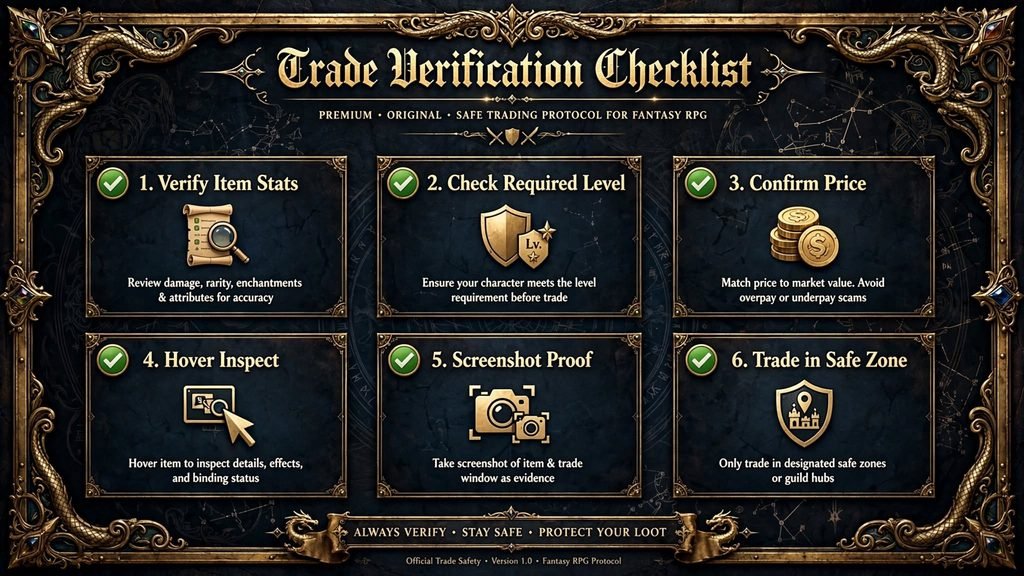
Trading through the official trade site and the in-game trade window is safe by design. The trade window itself is built so neither party can pull out once both sides have locked in their offer, which eliminates the classic “ninja” scam where someone grabs the item and cancels before handing over currency. The real risks in PoE2 trading live outside that window:
- Lookalike sites. Domains and pages styled like “poe2 trade” that aren’t hosted on pathofexile.com are a known pattern for phishing attempts in this space, and some circulating content specifically warns about this. Don’t log into anything that isn’t the real domain, and don’t trust urgency-driven language (“act now,” “limited slots”) on any trading page — that’s a manipulation tactic, not a feature of the real trade site.
- Real-money trading (RMT) offers. Buying in-game currency or items for real money through third-party sellers is against Path of Exile’s terms of service and puts your account at risk of action from Grinding Gear Games, on top of the ordinary scam risk of paying a stranger before receiving anything in return.
- Impersonation and unofficial download tools. Some third-party “trade helper” applications have been flagged by antivirus software or reported by players for suspicious behavior. If you use a community tool at all, stick to well-known, actively maintained, open-source options, and never enter your account password into anything other than the official site or game client.
- Rushed verification. Even in a fundamentally safe trade window, rushing through a high-value trade without checking the item’s exact modifiers is how players end up with something other than what they thought they were buying.
None of this means trading is inherently dangerous — the core system is solid. It just means the danger sits at the edges, in places where people are tempted to step outside the official tools for convenience or a better deal.
A Quick Glossary
- Hideout — your personal instance, where hideout NPCs (including trade and currency-exchange NPCs) are located.
- Whisper — an in-game private message, used to contact a seller for a manual trade.
- Buyout price — the price a seller has listed an item for.
- Public stash tab — a stash tab whose contents are visible to the trade site’s search.
- Exalted Orb / Chaos Orb / Divine Orb — common mid-to-high-tier currencies used for trading and crafting.
- Gold — a resource used for various in-game costs, including asynchronous listing fees.
Expanded FAQ
What is the official PoE2 trade site?
It’s pathofexile.com/trade2, a dedicated section of Grinding Gear Games’ own website for Path of Exile 2 item and currency listings.
Is poe2 trade an official website?
No — “poe2trade” isn’t itself an official domain. The real destination is pathofexile.com/trade2. Treat any other site using a similar name with caution.
How do I trade in Path of Exile 2?
Through the official trade site or in-game trade panel to find listings, then either an instant purchase (asynchronous system) or a whisper-and-hideout trade for manually listed items.
Can I buy items directly without whispering the seller?
Yes — items listed through the asynchronous trade system can be bought instantly, even while the seller is offline.
How does PoE2 currency trading work?
Through the Currency Exchange, a separate NPC-run system for swapping currency types against current listed rates, without needing to contact anyone.
Is PoE2 trading safe?
The official trade window itself is safe by design. The real risks are lookalike third-party sites, RMT sellers, and unofficial download tools — not the actual in-game trade process.
Is PoE2 trade free to use?
Yes, the trade site and basic in-game trade are free. Some conveniences, like the stash tab used for asynchronous selling, are purchasable upgrades.
What’s the difference between PoE2 trade and PoE1 trade?
They’re separate sections of the same website with separate economies, currencies, item systems, and hideout NPCs — nothing crosses over between the two games.
Does PoE2 have leagues like PoE1?
Yes — the current PoE2 league is Forbidden Rites (patch 0.5.5), which began September 4, 2026, and runs until the 1.0 full release on December 11, 2026.
Can I trade on console?
PoE2 is available on PlayStation 5 and Xbox Series X/S in addition to PC, and in-game trade functionality is accessible on those platforms as well — though your primary trading workflow will still generally route through the same underlying trade system either way. If console-specific trade steps differ meaningfully, confirm the current process against GGG’s own support documentation before publishing platform-specific instructions.
Why did trading change partway through Early Access?
Grinding Gear Games introduced the asynchronous (offline) trading system to address a long-standing complaint about the original whisper-based method — namely, that it required both buyer and seller to be online and responsive at the same time. The newer system runs alongside the original rather than replacing it.
Sources Used
- pathofexile.com/trade2 (official)
- Grinding Gear Games patch coverage via Massively Overpowered, PC Gamer, and SeasonDex (Forbidden Rites league dates, 1.0 release date)
- Mobalytics, Vulkk, and Epiccarry trade guides (trade-site UI and filter behavior)
- Mobalytics, MMOGAH, MMOSO, AOEAH, and Epiccarry coverage of the Patch 0.3 “Third Edict” asynchronous trade system
- poe.ninja developer post on Character Trade Search
- Wikipedia (Path of Exile 2 background/release facts)

Written by Daniel Carter
Daniel Carter is a dedicated gaming writer who enjoys turning complex gaming topics into clear, useful, and engaging content. He covers game guides, tips, reviews, features, and the latest developments across the gaming world. His approach focuses on research, accuracy, and practical value, helping readers discover new games, improve their gameplay, and stay informed about the industry. For Daniel, great gaming content is not just about information—it is about making every article genuinely worth reading.
1 thought on “PoE2 Trade: The Official Path of Exile 2 Trade Site, Explained”