Quick answer:
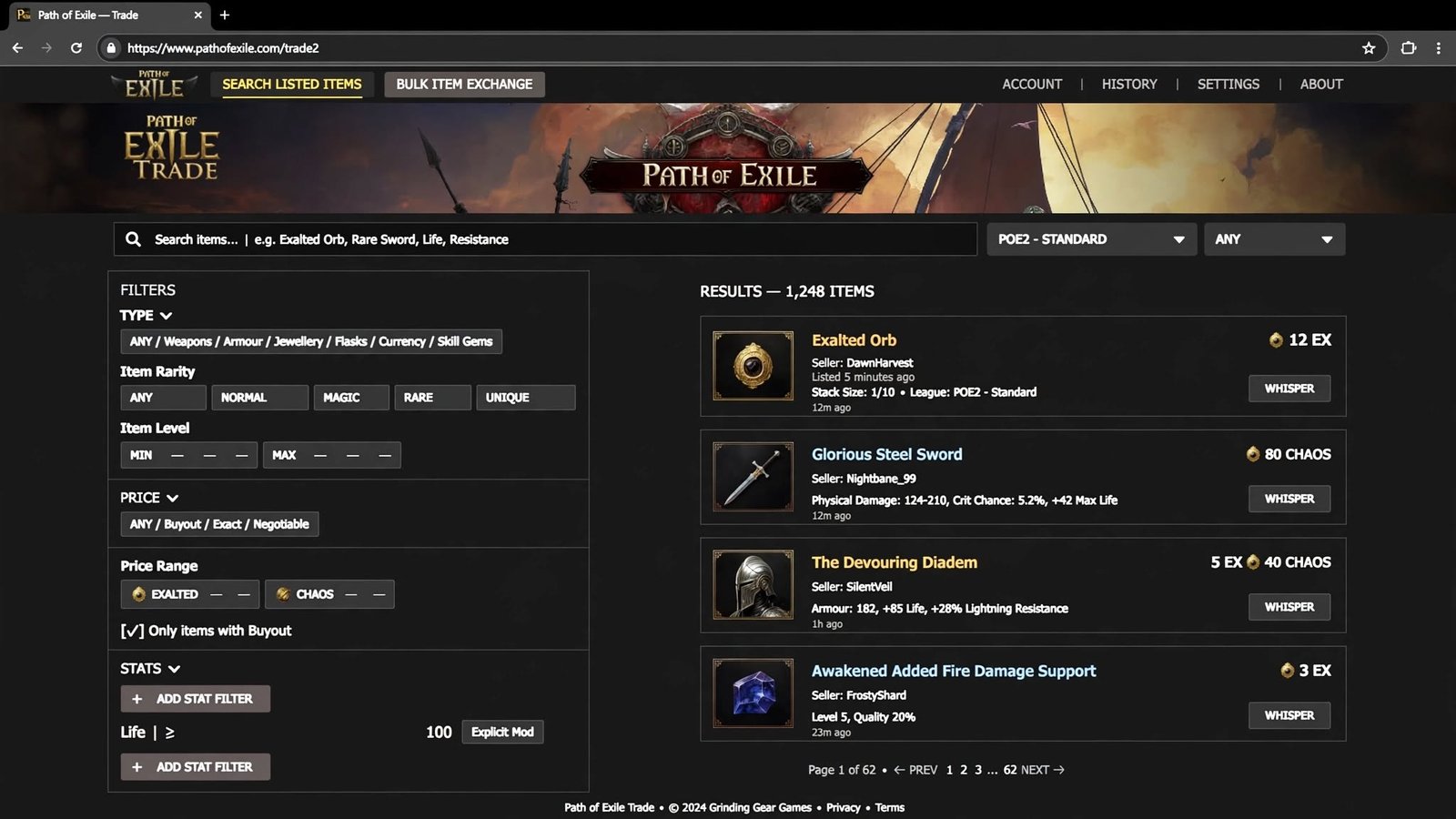
The official Path of Exile: PoE2 trade site is pathofexile.com/trade2, built and operated directly by developer Grinding Gear Games (GGG). It is not a separate “PoE2.com” domain, a fan project, or a third-party marketplace — it’s a dedicated section of the main Path of Exile website that shares your existing game account. You can also open the exact same trading window inside the game itself by pressing / (forward slash), which brings up the in-game Market panel without needing a browser at all.
This guide covers everything: what the site is, how it actually works step by step, how it differs from the separate Currency Exchange system, which third-party tools are safe to use alongside it, and which sites you should steer clear of.
Table of Contents
The Official PoE2 Trade Site at a Glance
| Detail | Information |
|---|---|
| Official URL | pathofexile.com/trade2 |
| Operator | Grinding Gear Games (the studio behind PoE2) |
| Login | Same account as the game — Steam login works if you play via Steam |
| In-game access | Press / to open the Market panel (identical data, no browser needed) |
| Cost to browse/search | Free |
| Cost to list items | Requires a Premium Stash Tab (bought via the in-game microtransaction shop) |
| Minimum requirement to sell | A level 25+ character on the account |
| Trade type | Item-for-item barter facilitated by manual whispers — never real-money purchases |
| Console support | Yes, via the in-game Market panel; browsing the web version is more practical on PC |
A Brief History: Why the Trade Site Exists
Path of Exile has never had a built-in auction house, and that was a deliberate design choice by GGG to keep trading player-driven rather than automated. In the original Path of Exile, a fan-built trade website became so popular that real-money gold-selling operations reportedly approached its creator about buying it out to fill it with advertisements. Rather than let that happen, GGG brought the site in-house, hired the original developer, and turned it into the official trading tool. That same philosophy — official, ad-free, player-to-player trading with no automated purchases — carried directly into Path of Exile 2’s trade2 site. Understanding this history helps explain some of the site’s quirks: it’s built to index real listings and facilitate contact between real players, not to process transactions itself.
Official vs. Third-Party: Which Site Should You Actually Use?
This is the most important distinction to make, because a search for “poe2 trade site” surfaces a mix of genuinely useful tools and sites you should actively avoid.
Official (this is where you actually trade):
- pathofexile.com/trade2 — the only site pulling listings directly from real player stash tabs in real time. This is where you search for items, apply stat filters, and generate whisper messages to contact sellers. Nothing else is required to trade in PoE2.
Legitimate third-party companion tools (supplement the official site, never replace it):
- Awakened PoE Trade — a free, open-source overlay app. Hover over an item in-game, press a hotkey, and it instantly price-checks that item by querying the same official trade API pathofexile.com/trade2 uses. It doesn’t host its own listings or currency.
- poe.ninja — an economy-tracking and price-history site. Good for researching how currency and item values have moved across a league; not a place to list or buy items directly.
- Community-built overlays (various price-checking and macro tools) — generally acceptable to GGG as long as they only read publicly available game data and don’t inject code into the client or automate actions a human couldn’t perform manually.
Sites to avoid entirely:
- Any storefront that lets you “buy” PoE2 currency, items, or accounts with real money — often marketed using language like “PoE2 marketplace,” “PoE2 shop,” or “cheap orbs.” GGG’s terms of service explicitly ban real-money trading (RMT) of items, currency, and accounts, and both the buyer and the seller can be banned for participating, even if the transaction itself “worked.” These sites are not part of the official ecosystem no matter how professional they look, and account bans from RMT are typically permanent.
If you take away one rule from this whole guide: legitimate item-for-item trading only happens through pathofexile.com/trade2 (or the identical in-game Market panel), and nothing beyond a game account and a Premium Stash Tab is ever required.
Read More: https://gamespuma.com/poe2-trade/
How the PoE2 Trade Site Works, Step by Step
PoE2 doesn’t have an auction house — there’s no “buy now” button that instantly transfers an item to you. Instead, the trade site is a searchable index paired with a manual handshake between two real players:
- Open the search page. Go to pathofexile.com/trade2 (or press / in-game) and land on the search interface.
- Choose your league. Use the dropdown next to the search bar to select the league you’re actually playing in (a fresh challenge league, Standard, or Hardcore). This matters — results are entirely league-specific, so searching in the wrong league shows you items you can’t actually buy.
- Search by name or build a filtered query. Type an exact item name for something specific (a named unique, a particular currency orb, a skill gem), or use the advanced filter panel to search by base type, item level, rarity, specific stat ranges, sockets, quality, corruption status, and more. The filter sections are collapsed by default — click the small expand arrows to reveal additional stat and property filters.
- Sort and review results. Listings show asking price, seller name, and whether the seller is currently online or AFK — prioritizing online sellers dramatically increases your odds of a fast trade. Hovering over a listing shows the full item exactly as it would appear in your inventory.
- Contact the seller. Click the “whisper” or contact icon next to a listing to auto-generate a pre-filled message, then paste it into your in-game chat (or use the direct whisper button if you’re doing this from inside the game’s Market panel). This sends a real, live whisper to that player.
- Get invited and meet up. If the seller is available, they’ll typically invite you to their party, bringing you to their hideout or a shared instance.
- Complete the manual trade window. Both players place their agreed-upon items/currency into a trade window. Critically, the “Accept” button only becomes clickable after you’ve hovered over the item being offered — a built-in safeguard designed to stop last-second item swaps or scams.
- Confirm and finish. Once both sides click Accept, the trade completes instantly and irreversibly, so double-check stats and quantities before confirming.
Tips for Faster, Safer Trades
- Prioritize online sellers. Offline listings can sit unanswered for hours or days; filtering for “online only” saves significant time.
- Price competitively when selling. Undercutting the lowest few listings slightly is the most reliable way to sell quickly, since buyers almost always sort by price.
- Always hover before accepting. Never accept a trade window without hovering the offered item first — this isn’t just good practice, it’s the mechanism the game itself relies on to prevent swap scams.
- Watch for currency swap scams. A common scam pattern involves a seller subtly changing the currency stack size after you’ve already hovered once. Re-check the item immediately before every Accept click, not just the first time.
- Don’t pay upfront outside the trade window. Legitimate trades complete entirely inside the game’s trade interface — never send currency “as a show of good faith” before the actual trade window opens.
Selling Items on the Trade Site
To have your own items show up in other players’ search results, you need three things in place:
- A Premium Stash Tab, purchased from the in-game microtransaction shop (this is the only real money involved anywhere in the process — you’re paying GGG for storage/UI functionality, not buying or selling in-game items).
- A level 25+ character somewhere on your account. This threshold exists specifically to slow down bot-driven, large-scale real-money trading operations, not to inconvenience normal players.
- The tab set to Public, with prices assigned either individually per item or in bulk across the whole tab.
Once those conditions are met, everything placed inside that tab is automatically indexed and appears on the trade site in real time — you don’t need to manually “post” each item.
Trade Site vs. Currency Exchange: Two Different Systems
One of the most common points of confusion for new PoE2 players is that the game actually has two separate trading systems, and conflating them leads to a lot of wasted time:
- The Trade Site (pathofexile.com/trade2): Used for gear, unique items, gems, and anything else that isn’t a stackable currency conversion. Every transaction is manual — you whisper a real person and complete a player-to-player trade window. Nothing happens automatically.
- The Currency Exchange: A separate, NPC-driven system inside the game (accessed in-game rather than through the trade site) where you place buy and sell orders for currency items — Exalted Orbs, Chaos Orbs, and similar — and the system fills them asynchronously against other players’ standing orders, closer to how an order book works than a barter system. You never whisper anyone to use it.
Simple rule of thumb: converting one currency type into another goes through the Currency Exchange; buying or selling actual equipment goes through the trade site.
Glossary: Trade Site Terms You’ll See
- Whisper — A direct, private in-game message sent to another player, used to initiate contact after finding a listing.
- Premium Stash Tab — A purchasable inventory tab that can be made “Public” so its contents auto-list on the trade site.
- Stat filter — A trade site search option that lets you require an item roll within a specific numeric range (e.g., a minimum amount of cold resistance).
- Currency Exchange — The separate, automated in-game system for converting currency types (distinct from the trade site).
- RMT (Real-Money Trading) — Buying or selling in-game items, currency, or accounts for real money or external currencies; explicitly against GGG’s terms of service.
- Direct Whisper button — The trade site’s built-in button that auto-generates and copies a pre-written contact message for a listed item.
Frequently Asked Questions
What is the official PoE2 trade site?
It’s pathofexile.com/trade2, a section of the official Path of Exile website run by Grinding Gear Games. It isn’t a separate app, standalone domain, or third-party product.
Do I need a special account to use the trade site?
No. You log in with the same Path of Exile account you already use to play the game, including via Steam.
Can I use the trade site without opening a web browser?
Yes — pressing / while in-game opens an identical Market panel with the same search and filtering functionality.
Why can’t I list any items for sale?
You need a Premium Stash Tab configured as Public, and your account needs at least one character at level 25 or above.
Is it safe to use third-party PoE2 trade websites?
Price-checking overlays like Awakened PoE Trade are safe because they simply query the same official trade data rather than hosting their own listings. Sites that sell currency, items, or accounts for real money violate GGG’s terms of service and put your account at genuine risk of a ban.
Can I trade Gold in PoE2?
No. Gold is used exclusively for NPC interactions (buying, crafting costs, etc.) and can never be traded between players. Only items that occupy physical inventory space — including currency orbs — are tradeable.
Does the trade site work the same way in every league?
Yes, but you must manually select the correct league from the dropdown each time, since listings are entirely league-specific and don’t carry over between temporary challenge leagues and the permanent Standard/Hardcore leagues.
What’s the difference between the trade site and the Currency Exchange?
The trade site handles gear and items through manual, whisper-based trades with real players. The Currency Exchange is a separate, automated in-game system purely for converting currency types via standing buy/sell orders.
Can I get scammed on the official trade site?
The site itself is safe, but the manual trade window it leads to can be exploited by bad-faith traders using swap tricks. Always re-hover the offered item immediately before clicking Accept, every single time.
Current State of PoE2 Trading (Late 2026)
Path of Exile 2 is still in its seasonal early-access phase, with the trade site and Currency Exchange both actively maintained through each new league launch. As of this writing, the game is heading toward its 1.0 full release, expected in December 2026, which will bring the complete class roster and full campaign. Core trading mechanics — the Premium Stash Tab requirement, the level 25 threshold, and manual whisper-based trades — are expected to carry forward largely unchanged into 1.0, since they’re foundational to how the game’s economy is designed to function rather than temporary early-access placeholders. Whenever a new league launches, remember to double-check that you’ve selected the correct league on the trade site, since listings reset and re-populate independently with each new economy.
source
Here are the primary sources I used to verify the facts in the article:
Official confirmation of the trade site URL:
- pathofexile.com/trade2 (Grinding Gear Games’ own site) — https://www.pathofexile.com/trade2
Trading mechanics, requirements, and how-to steps:
- Game8 — Trading Website Guide and How to Trade | Path of Exile 2 — https://game8.co/games/Path-of-Exile-2/archives/488380
- GamesRadar — Path of Exile 2 trading system and trade site explained — https://www.gamesradar.com/games/action-rpg/path-of-exile-2-trading-trade-site/
- Mobalytics — PoE 2 Trade Site Guide — https://mobalytics.gg/poe-2/guides/poe2-trade-site
- GameRant — What is the Path of Exile 2 Trade Site (and How to Use it) — https://gamerant.com/path-of-exile-2-how-to-trade-site-poe2/
- Epiccarry — Path Of Exile 2 Trading Guide — https://epiccarry.com/blogs/poe-2-trading-guide/
Currency Exchange vs. trade site distinction, level-25/Premium Stash Tab requirements:
- Odealo — PoE2 Marketplace overview (used only to confirm official-site details, not as a trading recommendation) — https://odealo.com/games/path-of-exile-2/marketplace
Third-party tools (Awakened PoE Trade, poe.ninja) legitimacy and scope:
- ExitLag — Path Of Exile 2 Mods: Best Tools & Overlays for PoE2 — https://www.exitlag.com/blog/path-of-exile-2-mods/
- poedb.tw Community Wiki — Tools list — https://poedb.tw/jp/Tools
- AlternativeTo — Awakened PoE Trade — https://alternativeto.net/software/awakened-poe-trade/about
GGG’s real-money trading (RMT) policy:
- Official Path of Exile forum — RMT/External Trading Policy and Trade Rules — https://www.pathofexile.com/forum/view-thread/106096
League timeline / 1.0 release date context:
- ARPG Timeline — Path of Exile 2 Updates — https://www.arpg-timeline.com/game/path-of-exile2
- GamingCY — PoE2 Leagues Guide: All Dates and Key Features — https://gamingcy.com/blog/poe2-leagues-all-dates

Written by Daniel Carter
Daniel Carter is a dedicated gaming writer who enjoys turning complex gaming topics into clear, useful, and engaging content. He covers game guides, tips, reviews, features, and the latest developments across the gaming world. His approach focuses on research, accuracy, and practical value, helping readers discover new games, improve their gameplay, and stay informed about the industry. For Daniel, great gaming content is not just about information—it is about making every article genuinely worth reading.
1 thought on “PoE2 Trade Site: The Complete Official Path of Exile 2 Trading Guide (2026)”