
A PoE2 pricing tool estimates what an item is worth in Path of Exile 2 by comparing it with current trade listings. It helps you list loot at a fair price, judge a trade offer and avoid overpaying for upgrades. If you want a quick answer, start with a free overlay such as Exiled Exchange 2 or ePOE (both list Windows and Linux support), try PoE Overlay II if you play on Windows, and always confirm the result on the official trade site.
Pricing matters because Path of Exile 2 has no single gold coin that values everything. Two items with the same name can differ wildly in worth, and a guess either leaves currency on the table or leaves your listing unsold. This guide explains what each tool does, where it falls short, and how to read the numbers.
For a broader look at the basics, see our PoE2 price checker guide. This article focuses on comparing the tools themselves.
Table of Contents
Quick summary
- Fastest in-game checks: a hotkey overlay such as Exiled Exchange 2, ePOE or PoE Overlay II.
- Source of truth: the official trade site at pathofexile.com/trade2.
- Market trends: poe.ninja’s Path of Exile 2 economy section and similar trackers.
- Console or phone users: a camera-based mobile app is the only option listed here that does not need a PC overlay.
- Golden rule: treat every estimate as a starting point, then compare it with real listings.
What Is a PoE2 Pricing Tool?
A PoE2 pricing tool is software or a website that reads an item’s details and returns an estimated market value. Most do this by searching comparable listings on the official trade site. Some add price history, currency rates or a suggested asking price.
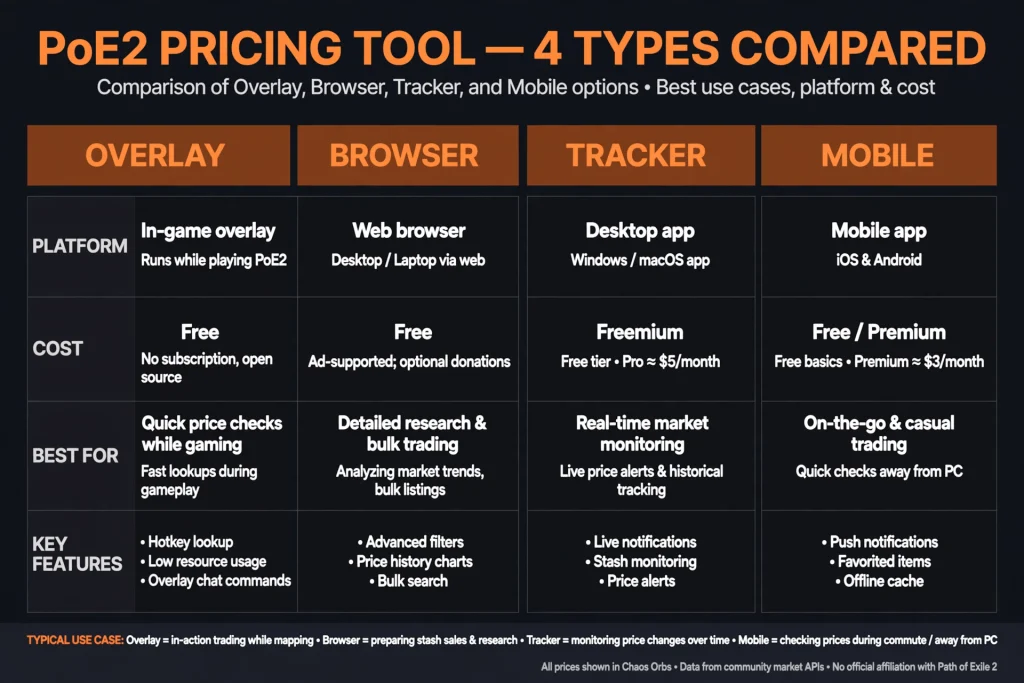
It helps to separate three types of PoE2 Pricing tool, because players often mix them up:
- In-game overlays sit on top of the game. You hover over an item, press a hotkey and see matching listings.
- Browser-based resources run in a tab or extension. The official trade site belongs here.
- Economy trackers show prices and trends for currency and unique items. They tell you about the market, not about your particular rare.
An estimate is not a guaranteed sale price. A listing shows what a seller is asking right now, not what a buyer has paid. Prices also move with each new league, patch and wave of players, so a number that was right last week may be wrong today.
If you want to know why prices shift after updates, our PoE2 patch notes page tracks the latest changes.
A note on search results: some pages that appear for this term describe a retail price-comparison product that has nothing to do with the game. A PoE2 pricing tool in the sense used here is a community tool for Path of Exile 2 items and currency.
Best PoE2 Pricing Tools to Consider
The PoE2 Pricing tools facts below come from each project’s own pages and stores, checked in October 2026. Features, prices and platform support can change, so verify them before you install anything.
| Tool | Format | Platforms listed | Cost | Key strength | Best for |
|---|---|---|---|---|---|
| Exiled Exchange 2 | Open-source overlay | Windows, Linux | Free | Hotkey price checks plus poe.ninja trends | Most PC players |
| ePOE | Desktop companion overlay | Windows, Linux | Free, account required | Adjustable filters, suggested price, currency market data | Players who want extra tools |
| PoE Overlay II | Overlay (Overwolf or standalone) | Windows only | Free, optional Premium | Machine-learning estimate, market history | Windows players who like guidance |
| Official trade site | Website | Any browser | Free | Real listings from GGG | Verifying any estimate |
| poe.ninja economy | Website | Any browser | Free | Currency and unique-item trends | Market research |
| Path of Price Check | iPhone app | iOS | Free, in-app purchases | Camera scan for console and PC players | Console players |
Exiled Exchange 2
Exiled Exchange 2 (often shortened to EE2) is a free, open-source overlay for Path of Exile 2. Its GitHub repository describes it as a Path of Exile 2 trading app for price checking, and it is a fork of the older Awakened PoE Trade project. Our own Exile Exchange 2 guide covers setup in more depth.
The developer’s site says it reads your clipboard rather than game memory. You copy an item in-game, the tool parses that text, and the overlay shows prices pulled from public sources such as poe.ninja and the trade site. Listed features include currency exchange rates, map search, an item editor and an optional OCR mode.
The GitHub release notes show steady maintenance. Version 0.16.3 appeared in early September 2026 and added an item editor that lets you preview the price effect of augments and catalyst quality before spending currency.
Who it suits: players who want a free, open-source tool with frequent updates. Limitation: it relies on the trade site’s data, so outages or API changes can break it for a few days.
ePOE
ePOE describes itself as a free Path of Exile 2 desktop companion for Windows and Linux with no ads or subscription. Its price check compares your item with real trade listings, suggests a price and gives you filters to narrow the matches. It also offers roll-range sliders, currency market cards with trends, and extras such as crafting and build tools.
Two details are worth knowing before you install. A confirmed account is required to download, and the site says product telemetry is on by default but can be switched off in settings. The developer also labels Linux and controller support as beta.
Who it suits: players who want pricing plus session tracking and other utilities in one app. Limitation: it has a large feature list, which can feel heavy if you only want a quick price check.
PoE Overlay II
PoE Overlay II is the Path of Exile 2 version of the long-running PoE Overlay. The developer’s site says it is Windows only and free to use, with an optional Premium plan. You can install it through Overwolf or as a standalone app, and the only listed difference is a Replay feature that needs Overwolf.
Its price checker gives a machine-learning estimate and lets you refine the prepared trade query. It also lists market history, a stash tracker and a service board.
Who it suits: Windows players who like an estimate first and filters second. Limitation: no Linux support, and some features sit behind the optional plan.
Browser PoE2 Pricing tools and economy trackers
The official trade site is the baseline for every other PoE2 Pricing tool. Some browser extensions add convenience on top of it. One example imports the text you copy from the game and applies those filters on the trade site automatically. Its store listing asks only for access to pathofexile.com, but check the last update date before you rely on any extension.
For market trends, poe.ninja’s Path of Exile 2 economy section tracks currency exchange data. Since May 2026 it also tracks unique items across several categories. Its own announcement says prices for uniques are estimated from the official trade API, because no dedicated API exists yet for the sequel. That is a useful reminder that even trackers are estimates.
Community lists also mention Poe2 Pricing tools Scout for unique and currency price history, plus a browser-based checker with seven-day trends and supply data. Treat these as research tools rather than final answers.
Mobile and other options
Path of Price Check is an iPhone app that scans items with the camera using OCR. Its listing says it is built for console and PC players, with a Pro subscription priced at $0.99 monthly or $9.99 yearly on the storefront we checked. Prices vary by region, and the developer states it is not affiliated with Grinding Gear Games.
Two other community tools appear on the PoE2DB tools list. Xiletrade is a customizable price checker that its developer says avoids automation and respects the trade site’s rules. Sidekick is a companion that checks prices and dangerous map modifiers. Confirm current platform support on each project’s page before installing.
Official PoE2 Trade vs. Third-Party Pricing Tools
The official trade site, run by Grinding Gear Games at pathofexile.com/trade2, is the only place that shows genuine live listings. Third-party tools mostly automate searches against it. They do not replace it.
Use the official site when you need to:
- Search for comparable items with exact filters.
- Check real listed prices rather than a model’s estimate.
- Read currency denominations and see who is online.
- Use the Bulk Item Exchange tab for stackable items.
The in-game Currency Exchange is a separate system for stackable currency, and the gold cost depends on the size and rarity of the trade. Our Path of Exile 2 trade guide explains how the trade site, the exchange and direct trading fit together.
A third-party PoE2 pricing tool earns its place through speed. Hovering over an item and pressing a hotkey is quicker than rebuilding filters in a browser. But a listed price is only an asking price. It does not prove that anyone paid it, so check any estimate against several real listings.
How to Use a PoE2 Pricing Tool Step by Step
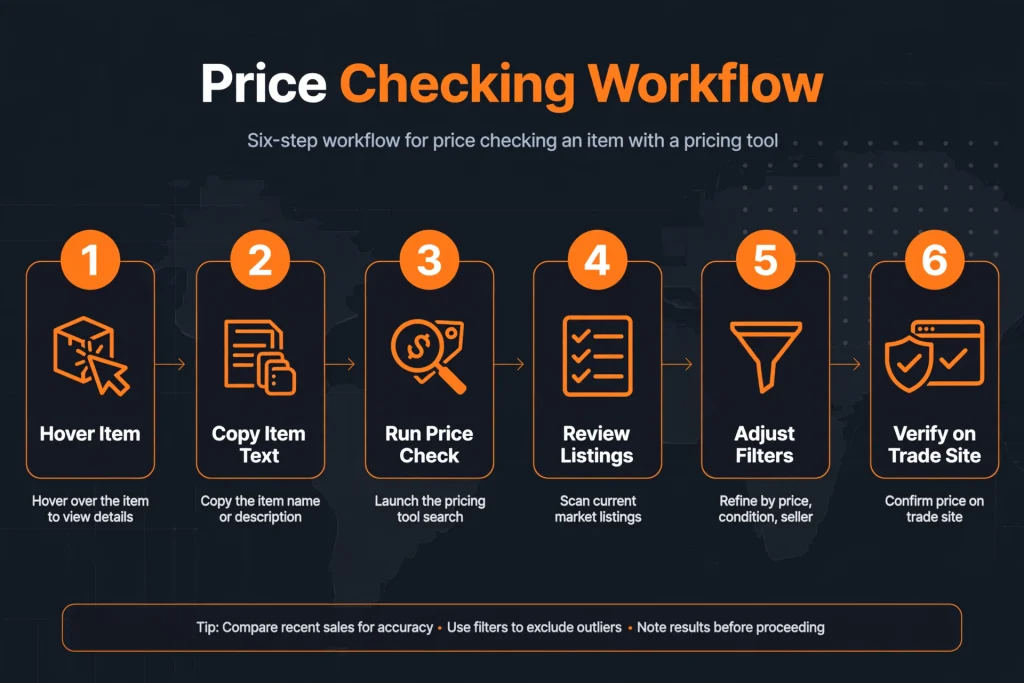
The exact steps differ by tool, so the workflow below describes the common pattern. Follow each tool’s own setup guide for hotkeys.
- Choose a reputable tool. Stick to projects with public repositories, visible release notes and clear documentation.
- Download from the official source. For open-source tools, use the project’s GitHub Releases page rather than a mirror.
- Confirm the game and league. Make sure the tool is set to Path of Exile 2 and the league you actually play, not a Path of Exile 1 league.
- Copy the item. Most overlays use the game’s item-copy command (Ctrl+C in Exiled Exchange 2’s documentation) and then open their panel with another hotkey.
- Run the price check. Wait for the tool to search comparable listings.
- Review the matches. Look at several listings, not only the first one.
- Adjust filters. Tighten or loosen modifier ranges until the results resemble your item.
- Compare the important rolls. Check which modifiers drive the value.
- Interpret the estimate. Decide whether you are looking at the cheapest listing or a typical asking price.
- Confirm on the trade site. Open the same search on the official site and check whether the listings look current.
Some tools fall back to a looser search when few items match. ePOE, for example, says it keeps your strongest modifier and tells you which filters it relaxed. Always read that note, because a relaxed search can hide an overpriced or underpriced result.
How to Price Different PoE2 pricing tools Items
An item’s name rarely decides its price. The details do. Here is what to look for in each category, subject to what your chosen tool supports.
Rare equipment. Value comes from the combination of modifiers, the roll quality of each one, the item base and the item level. Resistances, life and movement speed on boots often matter, but demand shifts by league. Even a small difference in a key stat can change the price noticeably.
Unique items. Many uniques have a stable market price, which is why trackers handle them well. Rolls still matter, especially on items with wide ranges, so check whether your tool searches by roll or only by name.
Weapons. Look at damage per second, attack speed and critical stats rather than the base alone. Exiled Exchange 2 and ePOE both list damage-based filters for weapons.
Armour and defensive gear. Compare defence values, resistances and any rare modifier tiers. A higher base is not automatically better if the useful modifiers are missing.
Skill gems and currency. These are easier to price because they are stackable or standardized. Currency usually has a market rate, and tools such as ePOE and poe.ninja show trends for it. Our PoE currency guide explains the main orbs and what they do.
Maps and other tradable categories. Waystones are priced by their properties, and some tools route them differently from gear. Check the tool’s documentation for supported categories.
Because every PoE2 pricing tool supports a different set of categories, never assume that a feature available for one category exists for another.
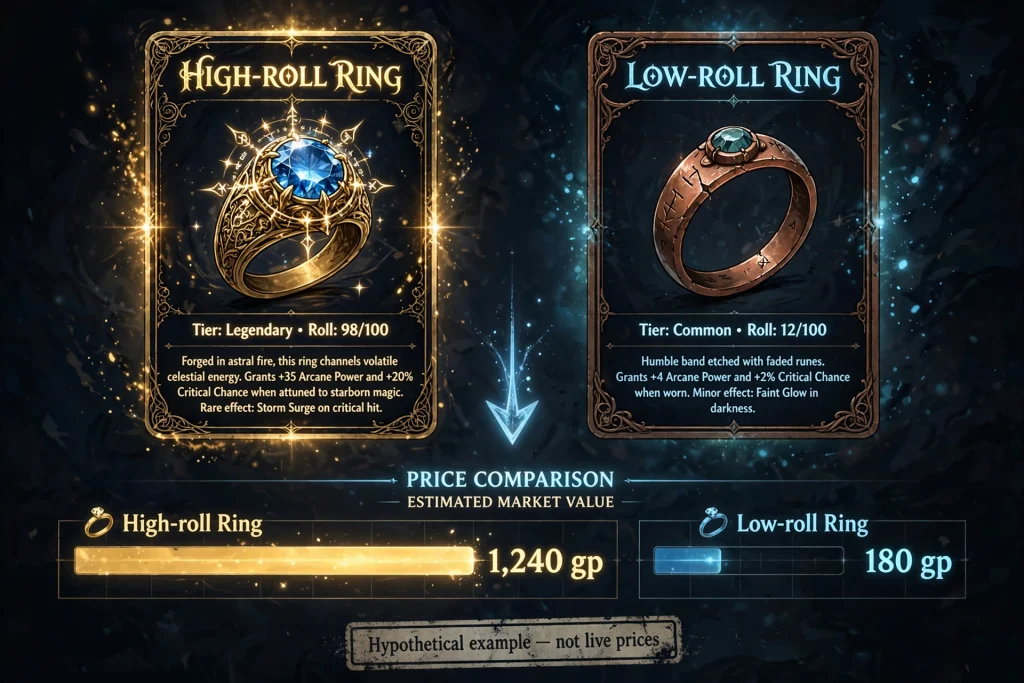
A hypothetical example shows the logic. Imagine two identical-looking rings. One has a high roll on a key modifier and one has a low roll. The first may sell for far more, even though both share a name and a base. This is an illustration, not a market quote.
How to Read PoE2 Price Estimates Correctly
A raw number is only useful if you know what it represents. Keep these points in mind.
Lowest listing versus typical price. The cheapest result is often a mispriced item, a stale listing or bait. A typical asking price across several comparable items is usually safer. ePOE says its exchange view leads with the typical offer rather than the cheapest one, but not every tool does this.
Outliers. One extremely high or low listing can skew a quick glance. Ignore the extremes and look at the cluster in the middle.
Poorly matched modifiers. If the tool loosened a filter, the listings may not resemble your item. Narrow the search again.
Rolls and bases. A slight difference in a roll or base type can move the price. Match both as closely as you can.
Availability and stale listings. Some listings remain up long after the seller has logged off. Check whether sellers are online.
Supply and demand. Many sellers of a similar item push prices down. A thin market makes any estimate less reliable.
Currency conversion. Prices appear in different currencies. Check the exchange rate that your tool uses, and remember that the main reference currency can change as a league ages.
League differences. Softcore and hardcore economies differ, and prices change between leagues. Make sure your tool points to the right one.
Only rely on features such as median, trend or live-rate indicators when your chosen PoE2 pricing tool documents them. For market direction, our PoE2 trading guide covers how to think about supply and demand before you sell.
Common Pricing Mistakes to Avoid
Most pricing errors come from rushing. These are the ones that cost players the most.
- Trusting the cheapest listing. Compare several results before you decide.
- Comparing items with different modifiers. Match the stats that actually drive the value.
- Ignoring roll ranges. A top roll and a bottom roll can sit in very different price bands.
- Using outdated prices. A screenshot or old forum post can mislead you after a patch.
- Confusing Path of Exile with Path of Exile 2. Use tools and data built for the right game.
- Assuming every listing will sell. Asking prices are not completed sales.
- Paying for features you do not need. Several PoE2 pricing tool options are free, so test them first.
- Downloading suspicious executables. Use official project pages only.
- Sharing credentials. Never give your password or session token to an untrusted service.
Are PoE2 Pricing Tools Safe to Use?
No PoE2 pricing tool is risk-free, and none is guaranteed to be approved. Grinding Gear Games’ developer documentation says its general policy is to allow applications that run completely separate from the game. It also says the studio does not encourage players to run tools, because they are never guaranteed to be free of malware. Read that policy for yourself, because it can change.
Some tools describe how they work. Exiled Exchange 2 and ePOE both say they use the item text you copy rather than reading game memory. Exiled Exchange 2’s site adds that it knows of no bans specific to the tool but that you use any overlay at your own risk. Treat those statements as developer claims, not as official approval.
Sensible precautions include:
- Download only from the official site or the project’s verified repository.
- Check the publisher, release notes and recent activity.
- Review permissions, especially for browser extensions.
- Read the privacy page, since some tools collect telemetry that you can turn off.
- Keep your account details private. Authenticated features should use the developer’s documented sign-in flow, never a password shared in chat.
If a tool asks for something that seems unnecessary, skip it.
Which PoE2 Pricing Tool Should You Choose?
The right choice depends on how you play.
- Beginner who wants a simple check: try Exiled Exchange 2, which is free and focused on price checking. The setup notes in the Exiled Exchange 2 section above will help.
- Browser-first player: use the official trade site, perhaps with an extension that imports copied item text.
- In-game overlay fan: compare Exiled Exchange 2, ePOE and PoE Overlay II. All three list overlay-style price checks.
- Active trader: use an overlay for speed, then confirm on the official site. ePOE and PoE Overlay II list market features such as price history.
- Currency and economy watcher: open poe.ninja’s economy section, or use a tool that shows currency trends.
- Console player: a camera-based app such as Path of Price Check is the option here that does not need a PC overlay.
- Linux player: Exiled Exchange 2 and ePOE both list Linux support; PoE Overlay II is Windows only.
If you are unsure, install one overlay, price a few items you already understand, and compare the result with the trade site. A tool that matches your own judgment is a good sign.
Frequently Asked Questions About PoE2 Pricing Tools
What is the best PoE2 pricing tool?
There is no single best option. Exiled Exchange 2 suits players who want a free, open-source overlay. ePOE and PoE Overlay II add extra features. The official trade site remains the best way to verify any estimate.
Is there a free PoE2 price checker?
Yes. Exiled Exchange 2 and ePOE are listed as free. PoE Overlay II is free with an optional Premium plan. The official trade site and poe.ninja’s economy pages are also free to use in a browser.
How do I check an item’s price in Path of Exile 2?
Copy the item text in-game, run it through a price checker, and review the comparable listings. Then open the same search on the official trade site. Compare several listings instead of relying on the cheapest one.
Is a PoE2 pricing tool more accurate than manual searching?
Not necessarily. A tool is faster and often applies sensible default filters, but manual searching gives you full control. The most reliable approach is to use a tool for speed and verify with real listings.
Can I check rare-item prices with a PoE2 price checker?
Usually, yes, but rares are the hardest items to price. Results depend on how well the tool matches modifiers and rolls. Adjust the filters until the listings resemble your item.
Do PoE2 pricing tools show live market prices?
Most pull data from the trade site, so they reflect current listings. Trackers may show averaged or estimated values instead. Check each tool’s documentation to see which kind of data it presents.
Why do two tools show different values?
They may use different filters, data sources, currency conversions or refresh times. Some also estimate with models rather than listing searches. A difference is a reason to check the trade site, not to pick the higher number.
Are third-party PoE2 overlays safe?
No tool can be guaranteed safe. Download from official sources, review permissions and read the studio’s third-party policy. Developers of several overlays say they avoid reading game memory, but those are their own claims.
Final Verdict
A PoE2 pricing tool saves time, but it does not replace judgment. For most players the best setup is simple: one free overlay for quick checks, the official trade site for verification, and poe.ninja for market trends.
Match the tool to your platform and habits. Windows and Linux players can choose between Exiled Exchange 2 and ePOE, Windows players can add PoE Overlay II, and console players can look at a camera-based app.
Whatever you pick, compare the estimate with several current listings before you list or buy. To keep learning, read our Path of Exile trade guide and our PoE 2 DB guide for item and modifier research.
Source list PoE2 Pricing Tool
Official or developer-documented
- Path of Exile developer docs, third-party policy: https://www.pathofexile.com/developer/docs
- Official PoE2 trade site (URL as given in your brief; it requires login, so I did not read its contents): https://www.pathofexile.com/trade2
- Exiled Exchange 2 project site (platforms, features, FAQ, “not aware of bans” statement): https://exiledexchange2.net/
- Exiled Exchange 2 GitHub releases (v0.16.2/v0.16.3, Sept 2026, item editor): https://github.com/kvan7/Exiled-Exchange-2/releases
- ePOE home page (Windows and Linux, free, account required, telemetry default, price-check behaviour): https://epoe.io/
- PoE Overlay home page (PoE Overlay II, Windows only, free with optional Premium, Overwolf/Standalone): https://www.poeoverlay.com/
- poe.ninja announcement on PoE2 unique items (prices estimated from trade API): https://poe.ninja/posts/poe2-unique-items
- poe.ninja API docs (economy endpoints, PoE2 exchange): https://poe.ninja/docs/api
- Xiletrade repository (price check, bulk exchange, “without automation”): https://www.github.com/maxensas/xiletrade
- Path of Price Check, App Store listing (OCR, Pro pricing, non-affiliation): https://apps.apple.com/qa/app/path-of-price-check-poe2-tool/id6741771726?l=ar
Independent / community
- PoE2DB tools list (Sidekick, Xiletrade, Poe2 Scout, browser checker descriptions): https://poe2db.tw/de/Tools
- Mobalytics, PoE2 Currency Exchange (gold cost depends on trade size and rarity): https://mobalytics.gg/poe-2/guides/currency-exchange
- Prima Games, price-checker how-to: https://primagames.com/tips/how-to-get-the-price-checker-tool-in-poe-2
- Chrome Web Store, PoE2 Trade import extension (permissions, version, ratings): https://chromewebstore.google.com/detail/egolclbodmghhneciiodfoehkcgccehk
- GamesPuma.com homepage and page 2 (internal URLs): https://gamespuma.com/ and https://gamespuma.com/page/2/

Written by Daniel Carter
Daniel Carter is a dedicated gaming writer who enjoys turning complex gaming topics into clear, useful, and engaging content. He covers game guides, tips, reviews, features, and the latest developments across the gaming world. His approach focuses on research, accuracy, and practical value, helping readers discover new games, improve their gameplay, and stay informed about the industry. For Daniel, great gaming content is not just about information—it is about making every article genuinely worth reading.