PoE Ninja builds are the character-build overviews on poe.ninja, a free community-run website that turns ladder data from Path of Exile and Path of Exile 2 into searchable tables, character profiles and passive-tree heatmaps. Instead of reading one author’s opinion, poe ninja builds let you filter real top-ranked characters by class, skill, items and passive choices, then open a profile to see how that player is set up. Used carefully, poe ninja builds are one of the fastest ways to test a build idea against what strong characters are actually running.
This guide shows how to find the right section, use the filters, read a character profile, compare poe ninja builds fairly and move a character into Path of Building. It also covers where the data stops being useful, because a snapshot of a finished endgame character is not a leveling guide. poe.ninja keeps Path of Exile 1 (PoE1) and Path of Exile 2 (PoE2) in separate sections, and this guide does the same. Mixing their classes, passive trees and items leads to bad decisions.
Still deciding what to play in PoE2? Read our PoE 2 builds guide first, then come back here to see what real characters are doing with those ideas.
Table of Contents
What Are PoE Ninja Builds?
On its homepage, poe.ninja describes its Builds sections as a way to explore the current build meta and the builds used by top players on the ladder. Each entry in poe ninja builds is a real character. It is not a submitted guide and not a tier-list placement.
The site’s documentation explains where those characters come from. poe.ninja uses Grinding Gear Games’ ladder API, which lists the top characters by experience. In PoE1 it also lists top characters by solo Delve depth. So poe ninja builds show characters that climbed high enough to appear, not every character in the game.
That distinction shapes how you should read the data. Observed characters tell you what strong players ran. They do not tell you why a player chose a setup, how they leveled, what the gear cost or whether the build is pleasant to play. A written build guide does those jobs, which poe ninja builds cannot do alone. poe.ninja is closer to a research library: excellent for “what do top characters tend to use?” and weaker for “what should I do with my current gear?”
| What the builds data can show | What it cannot tell you on its own |
|---|---|
| Class, ascendancy and level | Why the player chose this setup |
| Main skill and gem or support choices | A leveling route from level 1 |
| Equipped items | What those items cost to obtain |
| Passive tree allocation | Step-by-step progression advice |
| Simulated offensive stats from Path of Building | How the build feels in a real boss fight |
A highly ranked character is not automatically the right template for you. Ladder position reflects experience gained, which in turn reflects play time, gear and often a large investment. Treat it as evidence, not instructions.
PoE1 or PoE2: Which Section Do You Need?
The poe.ninja homepage lists a separate Builds entry for each game, and the documentation keeps separate Path of Building rules for PoE1 and PoE2. Think of the poe ninja builds for each game as two different datasets that happen to share a website.
- PoE1: ascendancy classes on the original passive tree, plus extra systems that appear in its data. A cached view of poe.ninja’s PoE1 streamers page, for example, included a breakdown by second ascendancy.
- PoE2: a different class and ascendancy set and a different passive tree. GamesPuma’s coverage reports eight playable base classes and 22 ascendancies in patch 0.5.5; see our Path of Exile 2 classes list for the current picture.
- Ladders: each game has its own ladder, and poe.ninja’s “character not listed” pages point to each game’s ladder separately.
- Change speed: PoE2 is still receiving large content patches, so older characters can age quickly.
The rule of thumb is simple. Never apply a PoE1 skill, item or passive node to PoE2, or the other way round, unless you have confirmed it exists in that game.
How to Find Builds on poe.ninja
Menu names and layouts change over time. If what you see differs from the steps below, follow the labels on screen.
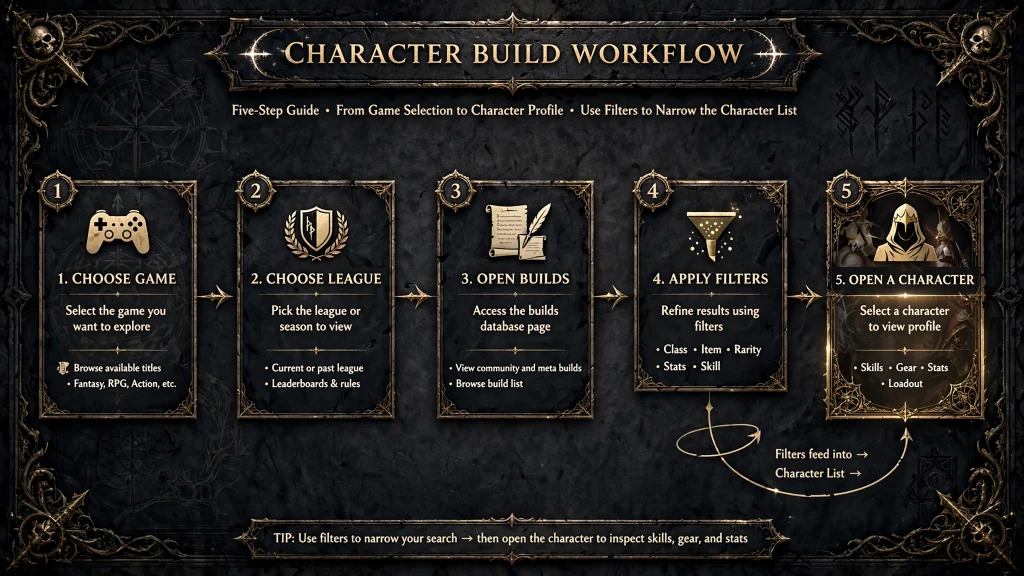
- Go to the official site. Type poe.ninja into your browser. The site states that it is not affiliated with or endorsed by Grinding Gear Games, so treat it as a community tool.
- Choose your game. On the homepage, open the Builds entry for Path of Exile 1 or Path of Exile 2.
- Pick the league or data section. Softcore trade, solo self-found (SSF), hardcore and Standard are different pools of characters, and league names change each season. Match the section to the one you plan to play.
- Open the builds overview. The poe ninja builds overview summarizes how classes, skills and items are distributed across the characters in the selected pool.
- Apply filters. Start with one filter, such as class or main skill.
- Narrow the results. Add items, keystones or other supported options one at a time.
- Open a character profile. Click a character that matches your idea.
- Inspect the details. Look at equipment, skills, the passive tree and the displayed stats.
- Check context and recency. Note the league, the character’s level and whether the setup still fits the current patch.
- Save or analyze the build. Use the “Copy PoB code” button to move the character into Path of Building. For PoE2, poe.ninja’s own description also mentions a passive tree tool with sharing and a page for sharing Path of Building codes.
Understanding PoE Ninja Build Filters
According to poe.ninja’s own description, you can filter by class, items, skill gems, linked gems, passive skills, keystones, anointed passives and weapon configuration. You can also exclude items or skills and enable extra columns to filter and sort by niche stats. Availability can vary by game and section, so check the panel for the game you selected.
What each filter is for
- Class and ascendancy: shows what a given starting class and subclass actually look like in play.
- Skill gems and linked gems: reveal the main skill and the supports players pair with it. In PoE2 the equivalent idea is support gems attached to a skill.
- Items: show which uniques and gear types cluster around a build.
- Passive skills and keystones: show which nodes define a playstyle.
- Anointed passives: relevant only where the game supports them, so verify before assuming they apply.
- Weapon configuration: separates builds by the weapon setup they rely on.
- Extra columns: let you sort by niche statistics once you know what you are looking for.
If you are unsure which PoE2 ascendancy a result belongs to, our PoE 2 ascendancies guide lists them and explains how they unlock.
How to combine filters without losing useful builds
Every added filter shrinks the pool of poe ninja builds you can see. Add one at a time and watch how many characters remain. Percentages describe the share within the filtered group, so a figure from a handful of characters says little.
Here are three sensible approaches:
- Start from playstyle. Filter by class only, then look at which skills appear. Pick a skill type you enjoy before narrowing further.
- Test a specific idea. Filter by a keystone or unique item, then check which classes and skills use it. If the group is tiny, the idea may be rare or fragile.
- Escape the dominant setup. If one expensive unique appears in every result, use the exclusion option to remove it and see what else strong characters use.
One caveat from the documentation: the character API sometimes returns the secondary weapon set as the primary, so a character can be filed under an unexpected skill. If a build you expect is missing under a skill filter, try the class filter instead.
How to Read a PoE Ninja Character Profile
The exact fields depend on the game and the profile, so use this as a checklist for any of the poe ninja builds you open, rather than a fixed layout.
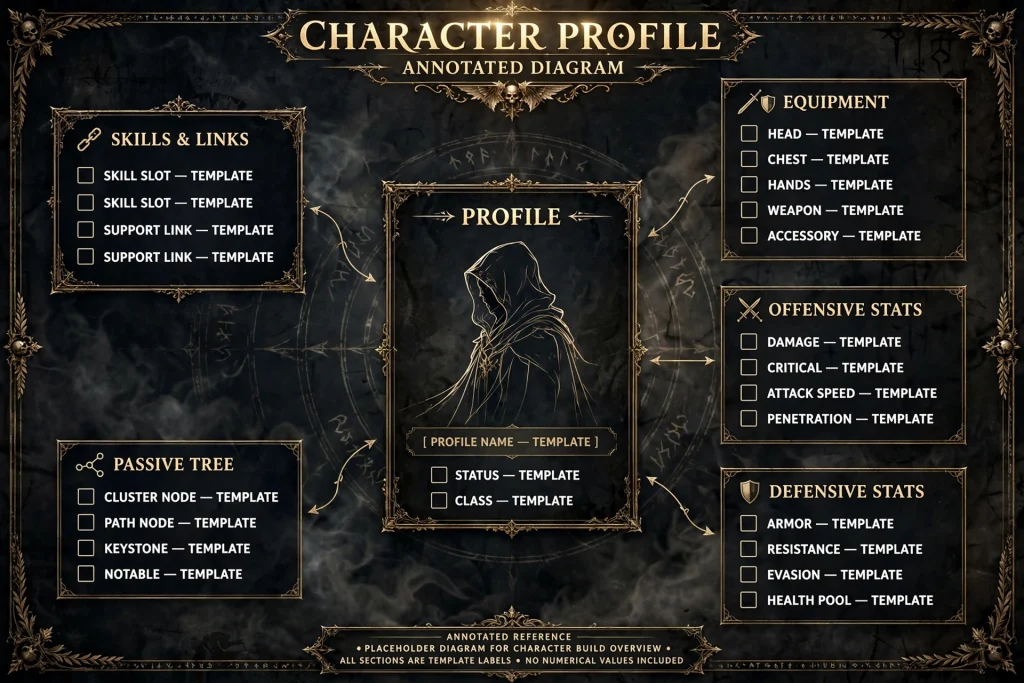
- Class, ascendancy, level and league. These tell you whether the character is comparable to what you plan to play.
- Main skills and links. Note the primary skill, its supports and any secondary skills for defense, movement or utility.
- Equipment. Check which slots depend on uniques and which use rare items with specific modifiers. When a name or modifier is unfamiliar, our PoEDB guide explains how to look it up.
- Passive tree. See which keystones and clusters the player invested in, and compare them with the heatmap view if available.
- Offensive statistics. Usually a damage-per-second (DPS) figure. More on how it is produced below.
- Defensive statistics. Where shown, look at life or energy shield, resistances, armor, evasion and recovery. Effective health pool (EHP) is a way of expressing how much damage a character can absorb across its defensive layers. poe.ninja’s documentation does not confirm an EHP figure, so use whatever defensive fields your profile provides.
- Import options. The “Copy PoB code” button exports the character for Path of Building.
How poe.ninja calculates DPS
The documentation says DPS is calculated with Path of Building Community Fork. It also explains that the calculation tries to approximate Shaper DPS, the benchmark many players use for builds, by including effects builds consistently have active on a boss. “On Hit” modifiers are included, while “On Kill” modifiers are not.
This has practical consequences when you read poe ninja builds. Two builds with different skills, damage types or reliance on conditional effects are not strictly comparable by one number. A build that depends on kill-triggered effects can look weaker than it plays. The site’s own docs add that there is still a lot of work to do on the configuration, so treat DPS as a guide to scale rather than a verdict. The docs also include a Tooltip Guide, which helps when you are decoding what a hover tooltip shows.
How to Choose the Right Build
When you read poe ninja builds for ideas, measure each one against your own situation, not against the ladder.
- Progression stage. A build designed for level 100 gear may not function at level 60. Check whether the character’s setup could be approximated earlier.
- Budget. Identify the items that carry the build. Price the unique ones before committing. Our PoE currency guide explains how currency works in both games, and our PoE trade guide covers searching the official trade site.
- Playstyle. A build you dislike playing will not survive the grind, however strong it looks.
- Speed versus bossing. Clear speed and single-target damage are different goals. Decide which you need most.
- Survivability. A build that kills quickly but dies to one mistake may not suit you.
- Required uniques and expensive modifiers. The more a build depends on one rare item, the more fragile your plan becomes.
- Mechanical difficulty. Some builds demand constant buff upkeep, positioning or flask management.
- Upgrade path. Prefer setups that let you improve gear gradually.
- Patch and league relevance. Confirm the setup matches the game version and league you are playing.
Why does this matter? Top-ladder characters often rely on extensive investment, advanced mechanics and carefully optimized gear. The character is a result, not a recipe. Your job is to work out which parts of that result you can reproduce now and which wait until later.
How to Compare PoE Ninja Builds
A fair comparison needs a method. Otherwise the flashiest number on the first row wins by default. When you compare poe ninja builds, work through these steps in order:
- Stay inside one game. Never compare a PoE1 character with a PoE2 character.
- Use the same league pool. Trade, SSF, hardcore and Standard characters play under different conditions.
- Compare like with like. Match similar skills and roles, such as two single-target bossing builds or two mapping builds.
- Inspect gear and passive tree together. The tree shows what the player invested in. The gear shows what that investment depends on.
- Weigh defense against damage. A lower-damage character with solid defenses may suit you better.
- List dependencies and upgrade costs. Note the uniques and key modifiers each build needs.
- Check recency. Look at the league, level and patch context.
- Open the build in a planner. Use Path of Building, where supported, to examine details and test your own gear.
| What to examine | Why it matters | Where to look |
|---|---|---|
| Main skill and role | Prevents comparing a mapper with a boss killer | Character profile, skill section |
| Key equipment | Reveals expensive dependencies | Equipment section |
| Passive tree | Shows playstyle and what is optional | Tree view or heatmap |
| Defensive layers | Shows how the build avoids dying | Defensive stats, tree and gear |
| Displayed DPS | Indicates scale, not a ranking | Offensive stats, read with the DPS rules above |
| Cost to assemble | Decides whether the build is realistic now | Item list, then a price check |
| Data context | Stops outdated setups misleading you | League, level and patch |
| Sample size | Avoids drawing conclusions from a few characters | Filter results count |
This table lists what to inspect in poe ninja builds. It does not rank builds, and any numbers you see on poe.ninja are specific to the pool you selected.
Are PoE Ninja Builds Good for Beginners?
Partly. Beginners can learn a lot from poe ninja builds, but the data was not designed as a starting guide.
What helps:
- You see how real players combine skills, supports, gear and passive nodes.
- You can spot which items a build truly depends on.
- You can find inspiration for a class or skill you already like.
What gets in the way:
- Characters near the top are usually finished endgame setups, not level 40 versions.
- A profile shows the end result without documenting the steps needed to reach it.
- Terms such as EHP, links and keystones are assumed knowledge.
- Expensive or mandatory equipment is easy to overlook.
A sensible beginner approach is to pick a build designed for your experience and budget from a written guide first, then use poe.ninja to sanity-check it against real characters. If you are stuck on the basics, our Path of Exile help guide covers common beginner problems.
PoE Ninja Builds vs. Build Guides and Path of Building
These three resources do different jobs, and the best results come from using them together.
| Resource | Best for | Weak at |
|---|---|---|
| poe.ninja builds | Exploring and comparing real top-ladder characters | Leveling advice, cost context, explaining decisions |
| Written build guides | Progression steps, leveling, explanations, budget versions | Showing how widely a setup is actually used |
| Path of Building | Inspecting a build in depth and testing gear changes | Telling you what is popular |
A workable flow for poe ninja builds looks like this. Find a character on poe.ninja, use “Copy PoB code”, and import it into Path of Building. The documentation says that button is how you see the configuration used for a single character. Then compare it with a written guide for the same skill.
Two cautions apply. poe.ninja’s DPS comes from Path of Building Community Fork with poe.ninja’s own configuration rules, and those differ for PoE1 and PoE2. Results in your own Path of Building setup may therefore differ from what poe.ninja shows, especially if you change configuration options. And not every build will import or calculate identically, so treat the planner as an examination tool, not proof.
Common Mistakes When Using PoE Ninja Builds
| Mistake | Why it hurts | Practical fix |
|---|---|---|
| Mixing PoE1 and PoE2 builds | Classes, passive trees, skills and items differ | Confirm the game section before reading anything |
| Selecting the wrong league | SSF, hardcore and trade pools behave differently | Match the league pool to the one you will play |
| Copying an endgame build too early | You lack the gear it needs | List its key items and price them before you start |
| Comparing different skills or roles | Numbers are not comparable | Compare similar skills and purposes |
| Judging by one damage figure | DPS is an approximation with specific rules | Review defense, tree and gear as well |
| Ignoring survivability | High damage does not help if you die first | Check defensive stats and recovery |
| Assuming the most popular build is best | Popularity reflects many factors, including hype and cost | Treat it as one input among several |
| Trusting old data | An older character may not fit the current patch | Check league, level and patch notes |
| Confusing a snapshot with a guide | A profile shows the result, not the route | Pair it with a progression guide |
| Assuming every profile reflects the latest patch | Ladder-derived data can lag behind changes | Look for recent characters and cross-check with current sources |
Is poe.ninja Useful for Finding Current Builds?
Yes, with a few checks. The data behind poe ninja builds comes from the ladder, so it reflects what ranked characters are doing in the selected pool. It does not guarantee that every character shown suits the latest balance changes.
Use this routine:
- Confirm you are in the right game section.
- Confirm the league or data category.
- Look for any recency or timestamp information on the page, if it is shown.
- Compare the build with current patch notes. For PoE2, our PoE2 patch notes page tracks the latest updates and hotfixes.
- Cross-check with a current written guide.
Two cautions apply. The documentation I reviewed does not publish an update schedule, so avoid assuming real-time completeness. And because coverage is limited to ladder characters, some valid builds may never appear. A character page that remains accessible is not proof that its build is still current.
Frequently Asked Questions About PoE Ninja Builds
What are poe.ninja builds?
PoE Ninja builds are the build overviews on poe.ninja. They list top ladder characters from Path of Exile and Path of Exile 2, with filters, passive-tree heatmaps, character profiles and Path of Building integration. They show what real players run, but they are not step-by-step guides or tier lists.
How do I find builds on poe.ninja?
To use poe ninja builds, open poe.ninja, choose the Path of Exile 1 or Path of Exile 2 Builds section, select the league or data pool, then filter by class, skill, items or passive choices. Click a character to view its equipment, skills, passive tree and stats. Follow the labels on screen if the layout has changed.
Is poe.ninja free to use?
poe.ninja does not appear to charge for browsing builds. The site carries advertising and has a “Support the site” page for voluntary contributions. Check the site’s current terms if you need certainty, because features and policies can change.
Can beginners use poe ninja builds?
Yes, for research and inspiration. Beginners should pair them with a written guide that covers leveling and budget, because a ladder character often shows a finished setup without the steps needed to reach it.
How do I copy a build from poe.ninja?
Open the character profile and use the “Copy PoB code” button, then import the code into Path of Building through its import option. That lets you inspect the passive tree, gear and calculations. You still need to obtain or substitute the equipment yourself.
Why is my character not appearing on poe.ninja?
poe.ninja lists only the top characters from Grinding Gear Games’ ladder API. Check your league’s ladder (the PoE1 forum leagues page or pathofexile2.com/ladders for PoE2), go to the end of the list and see what level or experience is needed. Your character may also be filed under a different primary skill than you expect.
Does poe.ninja support Path of Exile 2 builds?
Yes. poe.ninja has a separate Path of Exile 2 Builds section with filters, a passive tree heatmap and Path of Building (PoE 2) integration. Keep it separate from PoE1 data, because classes, skills, items and passive trees differ.
Are the most popular poe.ninja builds always the best?
No. Popularity can reflect cost, ease of play, hype or recent patch changes. A build used by many top characters may still be expensive, difficult or poorly matched to your goals. Judge it on defense, cost, upgrade path and your playstyle as well.
Final Verdict
Used well, poe ninja builds turn guesswork into evidence. The workflow is straightforward: confirm the game and league, filter step by step, open a profile, then examine equipment, passive tree, defensive characteristics and cost before deciding. Pair poe ninja builds research with a written guide for progression and with Path of Building for deeper analysis.
Treat every character in poe ninja builds as a snapshot of someone else’s investment, not a promise about your own. If you want more Path of Exile coverage, start with our PoE 2 builds guide or browse the other PoE guides on GamesPuma.
External Source List
Official poe.ninja pages
- https://poe.ninja/ (homepage; build and filter descriptions; footer disclaimer)
- https://poe.ninja/poe2 (PoE2 builds description; Path of Building (PoE 2) integration; passive tree and code sharing)
- https://poe.ninja/poe1/builds/streamers (title and description only; tables not rendered)
Official poe.ninja documentation
- https://poe.ninja/docs (index)
- https://poe.ninja/docs/character-not-listed-poe1
- https://poe.ninja/docs/character-not-listed-poe2
- https://poe.ninja/docs/character-primary-skill
- https://poe.ninja/docs/dps-calculation
- https://poe.ninja/docs/pob-configuration
- https://poe.ninja/docs/pob-rules-poe1 (page shell only; rules not rendered)
Pages cited by poe.ninja’s docs (not independently reviewed)
- https://www.pathofexile.com/forum/view-forum/leagues-and-race-events (PoE1 ladder check)
- https://pathofexile2.com/ladders (PoE2 ladder check)
- https://pathofbuilding.community/ (Path of Building Community Fork)
Community or secondary sources (treat as observations, not official)
- https://poetrades.net/poe-ninja-guide-2026/ (competitor; some claims unverified)
- https://mein-mmo.de/neue-website-fuer-path-of-exile-2-verraet-geheimnisse-der-top-spieler/ (description of poe2.ninja heatmap)
GamesPuma pages used for internal context

Written by Daniel Carter
Daniel Carter is a dedicated gaming writer who enjoys turning complex gaming topics into clear, useful, and engaging content. He covers game guides, tips, reviews, features, and the latest developments across the gaming world. His approach focuses on research, accuracy, and practical value, helping readers discover new games, improve their gameplay, and stay informed about the industry. For Daniel, great gaming content is not just about information—it is about making every article genuinely worth reading.